更改用户权限:
如果您将其更改为“转写(手动)”后无法编辑材料,且需要对其进行编辑,请执行以下操作。
I. 打开用户权限
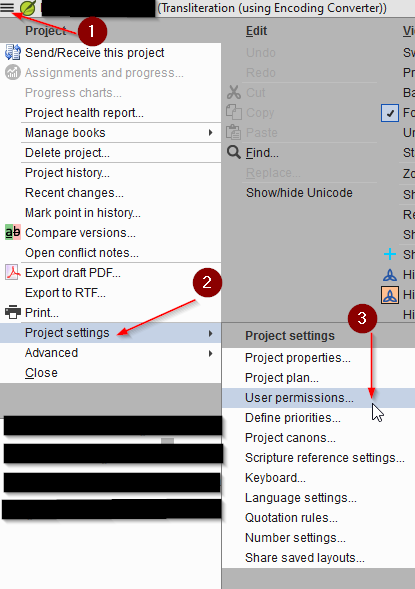
415×589 24.2 KB
II. 打开书籍权限
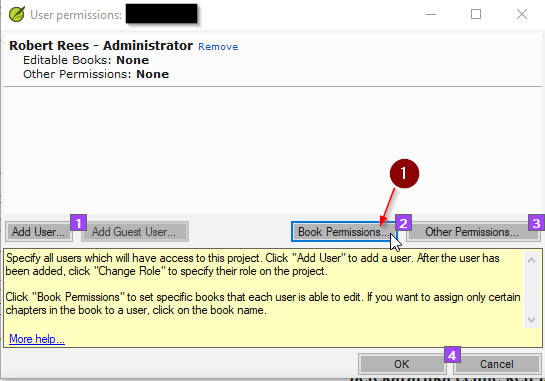
注意: 如果您的用户名下已经有  可编辑书籍:项目中的所有书籍 以及其他权限:术语、译法、拼写、经文、进度,那么您已准备就绪,可以跳过其余步骤;否则,请继续执行步骤 III。
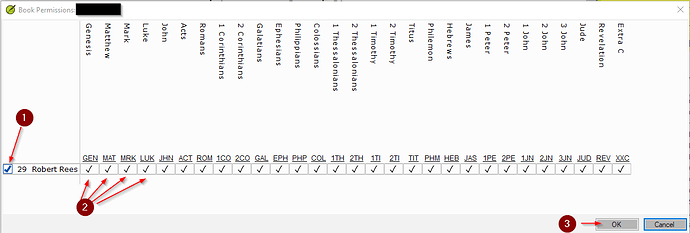
III. 选择您想要编辑的书籍。
1162×393 20.2 KB
如果您想编辑所有书籍,只需选择 1
如果您想编辑特定的书籍,请在想要编辑的书籍下方打勾。如 2 所示。
注意:如果您未选择某本书,则无法在该书中执行查找和替换操作。因此,如果您希望保护某本书,这是一种很好的方法。
完成后,按 OK。
IV. 然后转到其他权限。
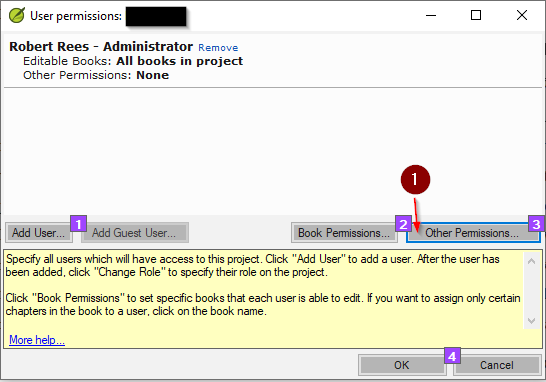
V. 选择您想要的权限。
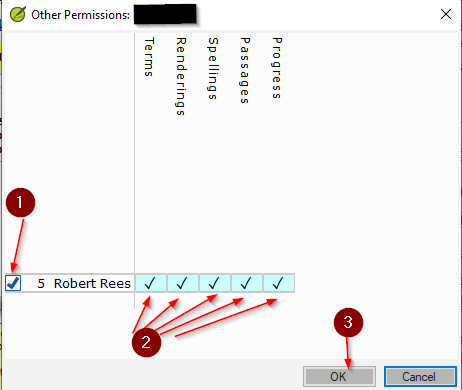
如果您想要所有权限,只需选择 1
如果您想要特定的权限,请在想要编辑的权限下方打勾。如 2 所示。但我建议您选择所有权限,以便您可以执行任何所需操作。
完成后,按 OK。
1 您会注意到,现在您拥有编辑所有书籍的权限。- 高亮显示
2 以及其他权限。- 高亮显示
3 按 OK。
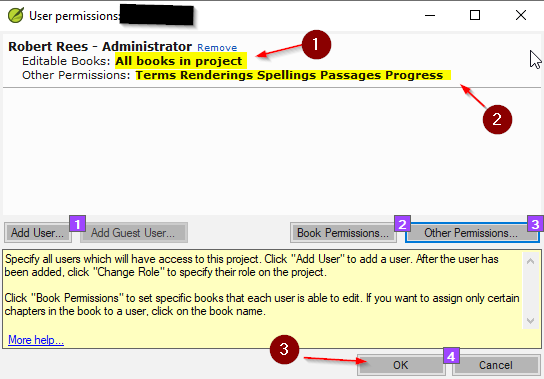
这样,您应该就能够编辑和更改任何所需的内容了。
在祂里面,
Changing User Permissions:
In case you cannot edit the material after changing it to Transliteration (Manual) and need to edit it.
I. Open User Permissions
415×589 24.2 KB
II. Open the Book Permissions
Note: If you already have Editable Books: All books in project and Other Permissions: Terms, Rendering, Spellings, Passages, Progress under you name you are all set and skip the rest of this if not continue to III.
III. Choose the Books You Would like to Edit.
1162×393 20.2 KB
If you want them all then just choose 1
If you would like individual books put a check mark under the ones you want to edit. As 2 shows.
Note: If you do not select a book you cannot do find and replace changes in that book. So this is a good way to protect a book if you would like.
Once you are done press OK.
IV. Then Go To Other Permissions.
V. Choose the Permissions You Want.
If you want them all then just choose 1
If you would like individual permissions put a check mark under the ones you want to edit. As 2 shows. But I would suggest you chose them all so you can do anything you need.
Once you are done press OK.
1 You will notice that you now have permission to edit all book. - Highlighted
2 And Other Permissions. - Highlighted
3 Press ok.
And thus you should be able to edit and change anything you need.
In Him,
机器翻译自 English








