Este tema ha estado en nuestra mente durante mucho tiempo (creo que lo digo mucho en este foro) y se relaciona con la aprobación de no solo palabras, sino también caracteres y puntuación.
Como todos han notado, la Wordlist y los Inventories actualmente solo permiten a los equipos aprobar palabras “en todas partes” o “en ninguna parte”, pero las cosas rara vez son tan simples. La solución que hemos planificado muestra el estado de las palabras (o caracteres) en ubicaciones de escritura y no escritura en columnas separadas en la Wordlist y los inventarios.
Especificar la aprobación según la ubicación estará disponible para quienes lo deseen. No será obligatorio para quienes no lo necesiten.
Los primeros indicios de estos cambios se pueden ver en Find en PT9.2. Esto permite a los usuarios buscar en “Verse text” o “All text” (‘non-verse text’ llegará "pronto"™️). Además, la Wordlist ya no tiene tres botones en cada fila para establecer la aprobación de palabras. En cambio, el estado se establece en el encabezado de la columna según la fila activa. Esto se debe a que, cuando agregamos una columna para texto no de versículo (y en proyectos de Biblia de Estudio, aparece otra columna para material de Biblia de Estudio), el “muro” de 6-9 botones por fila se vuelve un poco abrumador. Un modelo del Characters Inventory a continuación da una buena idea de cómo se vería en la Wordlist. Por defecto, aprobar una palabra en el texto de versículo también la aprobará en el texto no de versículo; aprobar una palabra en el texto no de versículo no aprueba esa palabra en el texto de versículo.
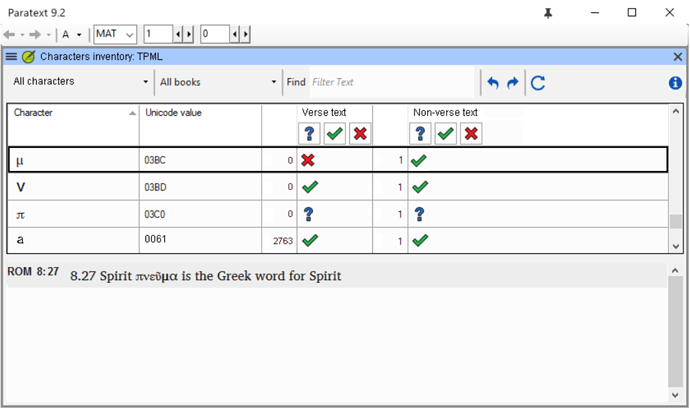
imagen1049×622 73.1 KB
No habíamos pensado que hubiera necesidad de una lista de hibernación separada. Eso es algo que debemos tener en cuenta.
Probablemente todos se pregunten cuándo se implementará. Puede estar en 9.4 (sin garantías).
This issue has been on our minds for a long time (I think I say that a lot on this forum) and it relates to approval of not just words, but also characters and punctuation.
As you all have noted, the Wordlist and Inventories currently only let teams approve words “everywhere” or “nowhere”, but things are rarely that simple. The solution we have planned shows the status of words (or characters) in scripture and non scripture locations in separate columns in the Wordlist and inventories.
Specifying approval according to location will be available to those who want it. It will not be required for those who do not need it.
The early signs of these changes can be seen in Find in PT9.2. This allows users to search in “Verse text” or “All text” (‘non-verse text’ coming "soon"™️). Also, the Wordlist no longer has three buttons in every row for setting approval of words. Instead, status is set in the column header according to the active row. This is because when we add a column for non-verse text (and in Study Bible projects, another column shows for study bible material), the “wall” of 6-9 buttons per row becomes a bit overwhelming. A mockup of the Characters Inventory below gives a good idea of how this would look in Wordlist. By default, approving a word in verse text will also approve it in non-verse text; approving a word in non-verse text does not approve that word in verse text.
image1049×622 73.1 KB
We hadn’t thought of there being a need for a separate hyphenation list. That’s something for us to bear in mind.
You’re probably all wondering when this will be implemented. It may be in 9.4 (no guarantees).
Traducción automática desde English








