Bonjour @goodgoan
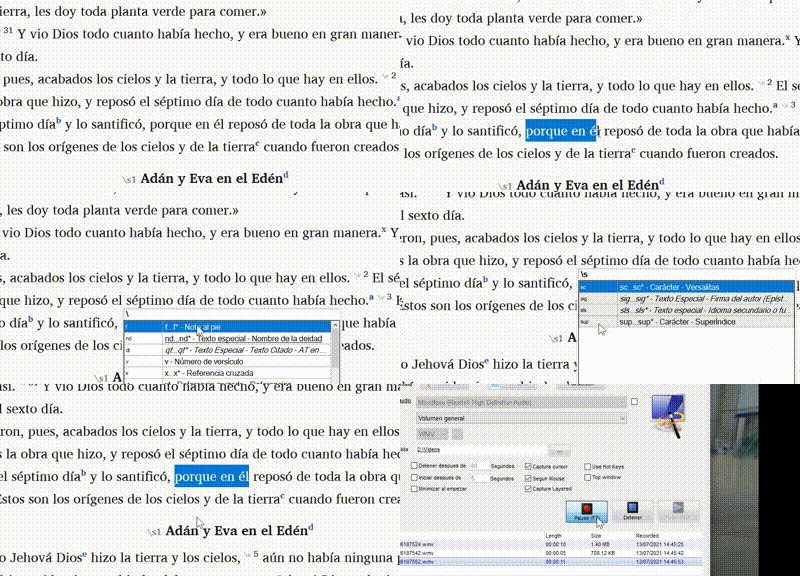
Je ne suis pas sûr d'avoir bien compris « activer », mais si vous voulez dire « comment le trouver » dans Paratext, la façon la plus simple d'utiliser un marqueur de caractère, pour moi, est de sélectionner le texte auquel vous souhaitez appliquer le formatage en exposant, puis d'appuyer sur F5 (pour insérer un antislash), et enfin de rechercher ou de taper sup. Lorsque vous voyez le marqueur, vous pouvez cliquer pour l'appliquer ou vous assurer qu'il est sélectionné (avec la ligne bleue) puis appuyer sur la barre espace.
Cordialement,
anon689242.
Hello @goodgoan
I’m not sure if I understood “unleash”, but if you mean “how to find it” in Paratext, the easiest way to use a character marker, for me, is to select the text you want to apply the superscript formatting to, then press F5 (to insert a backslash), and finally search or type sup. When you see the marker you can click to apply or make sure it is selected (with the blue line) and then press the spacebar.
Saludos,
anon689242.
Traduit automatiquement depuis English








