Hola.
Probablemente recibas una respuesta pronto al informe que enviaste, pero tal vez puedas verificar lo siguiente (ten cuidado y hazlo solo si eres la persona encargada de dar soporte al equipo):
En la carpeta de proyectos de Paratext (ya sea C:\My Paratext 9 Projects o C:\My Paratext 8 Projects) busca la carpeta del proyecto xxx y entrégala.
Encontrarás varios archivos que comienzan con “Notes” seguidos del nombre de usuario. Por ejemplo, “Notes_John Smith.xml”. Localiza el nombre del consultor y verifica si hay dos archivos con el mismo nombre. Si es así, verás que la única diferencia es el “.BAK” al final:
Notes_John Smith.xml
Notes_John Smith.xml.BAK
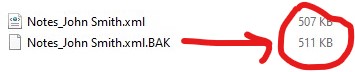
Observa el tamaño de los archivos. Si el archivo .xml.BAK es más grande que el archivo .xml, es probable que las notas puedan recuperarse.
Solo si el archivo .BAK es más grande, procede de la siguiente manera:
-
Cierra Paratext
-
Asegúrate de guardar una copia de estos dos archivos antes de continuar.
-
Una vez hecho esto, necesitas cambiar el nombre de los archivos. Lo que buscamos es que el .xml.BAK se convierta en .xml:
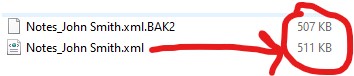
Una opción es cambiar el nombre de Notes_John Smith.xml a Notes_John Smith.xml.BAK2. Luego, cambia el nombre de Notes_John Smith.xml.BAK a Notes_John Smith.xml.
Así, el archivo con mayor peso ahora es Notes_John Smith.xml:
- Abre Paratext y verifica si tienes las notas.
La copia que tomaste anteriormente será útil para revertir este proceso en caso de error o para el personal de Paratext si te lo solicitan.
Hola.
You will probably get an answer soon to the report you made, but maybe you can check the following (be careful and only if you are the one in charge of supporting the team):
In the Paratext projects folder (either C:\My Paratext 9 Projects or C:\My Paratext 8 Projects) look for the xxx project folder and enter it.
You will find several files starting with “Notes” followed by the user name. For example, “Notes_John Smith.xml”. Locate the consultant’s name and see if there are two files with the same name. If so, you will see that the only difference is the “.BAK” at the end:
Notes_John Smith.xml
Notes_John Smith.xml.BAK
Note the size of the files. If the .xml.BAK file is larger than the .xml file, it is likely that the notes can be recovered.
Only if the .BAK file is larger proceed as follows:
-
Close Paratext
-
Be sure to save a copy of these two files before proceeding.
-
Once this is done you need to rename the files. What we are looking for is for the .xml.BAK to become .xml:
One option is to rename Notes_John Smith.xml to Notes_John Smith.xml.BAK2. Then you rename Notes_John Smith.xml.BAK to Notes_John Smith.xml.
So the file with the most weight is now Notes_John Smith.xml:
- Open Paratext and check if you have the notes.
The copy you took earlier will be useful for backtracking this process in case of error or for the Paratext staff if they ask you to do so.
Traducción automática desde English








