Saya mengalami masalah dengan tampilan teks dari sebuah sumber daya dalam Text Collection. Untuk melihatnya sendiri, unduh sumber daya ShuLatn, bahasa Arab (shu-Latn), dan tambahkan ke jendela Text Collection. Klik tautan ShuLatn berwarna biru dalam daftar teks, dan teks yang diperluas di sebelah kanan tidak lagi memiliki tanda hubung:
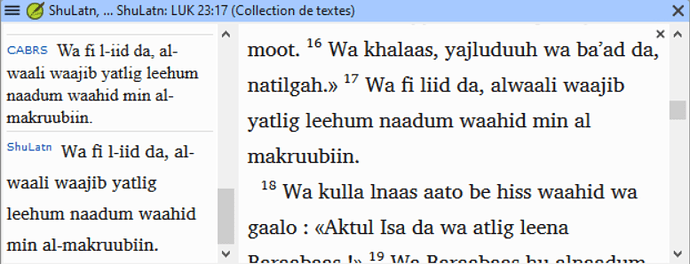
image777×298 84.5 KB
Semua ini adalah karakter tanda hubung U+002D biasa. Anda bisa melihat bahwa tanda hubung tidak sepenuhnya dihapus, karena misalnya al-makruubiin masih terpecah di antara baris. Namun, tanda hubungnya hilang.
Saya melihat di properti bahasa bahwa tanda hubung terdaftar sebagai karakter pemecah kata (bukan mungkin tanda baca di dalam kata), tetapi jika itu satu-satunya masalah, maka setidaknya ketika sebuah kata terpecah di antara baris, tanda hubung tersebut seharusnya muncul.
Saya tidak memiliki akses langsung ke proyek ini (yang ada di DBL), tetapi jika solusinya memerlukan perubahan pada proyek, saya percaya kita bisa mendapatkannya diubah.
I’m having a problem with text presentation of a resource in a Text Collection. To see this yourself, download the resource ShuLatn, language Arabic (shu-Latn), and add it to a Text Collection window. Click on the blue ShuLatn link in the list of texts, and the expanded text that appears to the right no longer has hyphens:
image777×298 84.5 KB
All of these are normal U+002D hyphen characters. You can see that it hasn’t just completely removed the hyphens, since for example al-makruubiin is still broken across a line. But the hyphen is missing.
I see in the language properties that hyphen is listed as a word-breaking character (instead of maybe punctuation inside a word), but if that were the only problem, then at least when a word is broken across a line that hyphen should appear.
I don’t have direct access to this project (which is in the DBL), but if the solution requires a change to the project, I believe we could get it changed.
Diterjemahkan secara otomatis dari English








