Salah satu hal yang berguna dalam dialog Give Feedback or Report a Problem adalah laporan tersebut menyertakan file log Paratext, yang sering kali menunjukkan detail lebih lanjut tentang apa yang terjadi.
Tetapi jika Paratext tiba-tiba berhenti, atau Windows menyatakan bahwa program telah berhenti bekerja, dan Anda memulai ulang Paratext lalu mengirimkan laporan masalah, file log Paratext kemungkinan tidak akan mencakup kejadian saat Paratext berhenti, karena kemungkinan besar program keluar sebelum sempat menyimpan file log.
Jadi, jika Anda ingin melaporkan crash atau keluar mendadak, berikut adalah cara Anda dapat memberikan informasi teknis lebih kepada kami.
Di Windows, ada program bernama Event Viewer. Anda dapat mencarinya di menu Start.
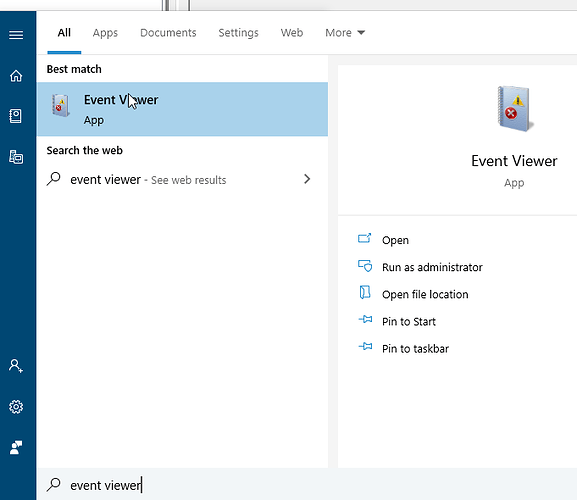
image681×590 19.6 KB
Setelah Event Viewer terbuka, buka folder “WIndows Logs” di sebelah kiri dan pilih Application.
Sekarang periksa daftar di tengah untuk sesuatu yang berlabel “Error” dan lihat apakah ada yang menyebutkan Paratext.
Contoh ini menunjukkan sebuah event dari Paratext.
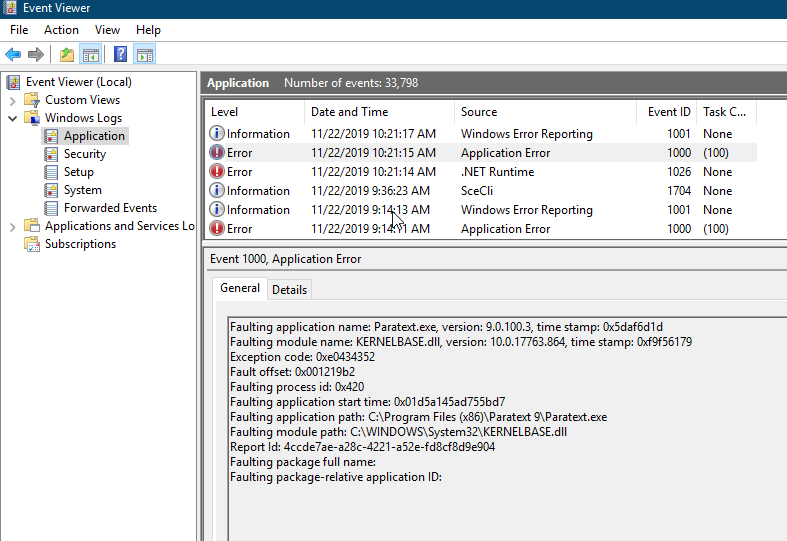
image787×541 32.9 KB
Untuk menyalin informasi yang akan dikirimkan kepada kami, klik kanan pada item tersebut, pilih “Copy > Copy details as text”, lalu tempelkan ke dalam laporan masalah Anda.
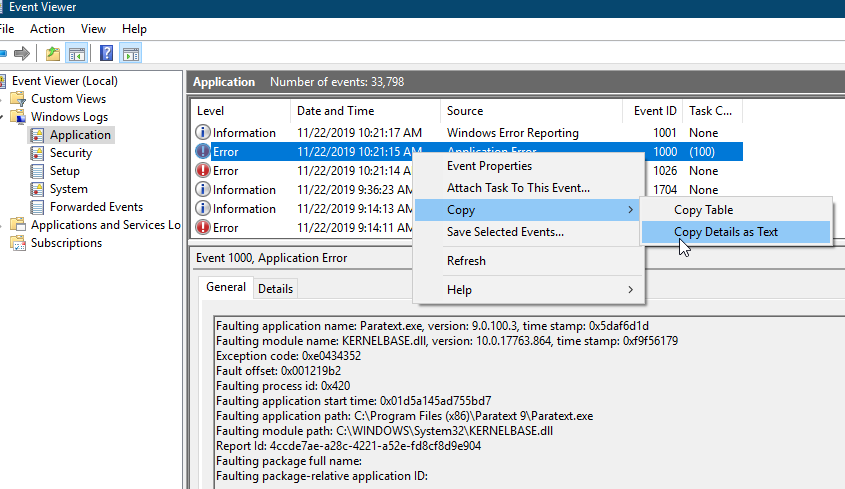
image845×489 34.4 KB
One useful thing in the Give Feedback or Report a Problem dialog is the report includes a Paratext log file which often indicates some more detail about what happened.
But if Paratext suddenly shuts down, or Windows says it has stopped working, if you restart Paratext and submit a problem report, the Paratext log probably will not include the events when Paratext stopped, because it likely exited before it had a change to save the log file.
So if you want to report a crash or sudden exit, here’s how you can give us more technical information.
In Windows, there is a program called Event Viewer. You can search for it in the Start menu.
image681×590 19.6 KB
Once Event viewer opens, open the “WIndows Logs” folder on the left and select Application.
Now look through the list in the middle for something labeled “Error” and see if it mentions Paratext.
This example shows an event from Paratext.
image787×541 32.9 KB
To copy the information to send us, right click on the item, choose “Copy > Copy details as text” then paste that into your problem report.
image845×489 34.4 KB








