+1 vote
1.4k views

Enhanced resources and the functionality to use their extra features became available with the first release of Paratext 9.

This is a conversation in which to discuss these new resources.

Paratext by (1.4k points)
reshown | 1.4k views

10 Answers

0 votes
Best answer

In the Download/Install resources… window, if you type enhanced, or just enh, in the Filter Text box, the list will display just the Enhanced Resources.
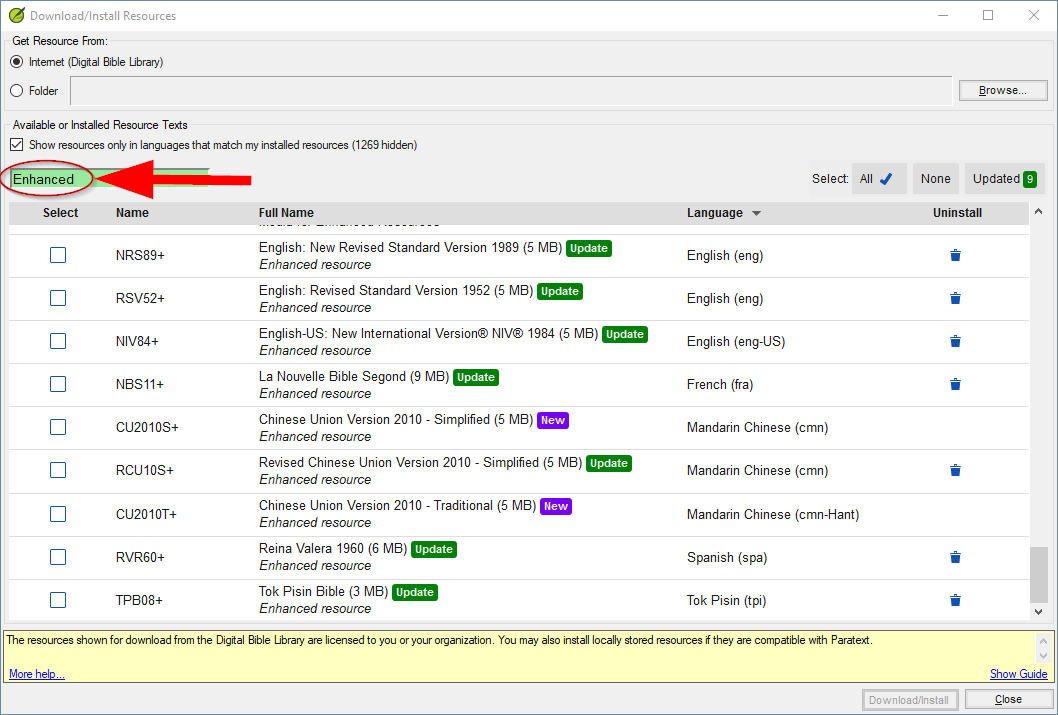
(I have made some observations about filtering the list at: Download/Install Resources… .

For the record, at the time of writing, there are twelve Enhanced Resources available, and they are in the following languages:

  • eng
  • eng-US
  • French
  • Spanish (spa)
  • Portuguese (por-BR)
  • Mandarin Chinese simplified (cmn)
  • Mandarin Chinese traditional (cmn-Hant)
  • Tok Pisin

… plus there are three images Resources: you only download one; each download has its images at a different resolution.


by (1.4k points)
reshown

I just found out about “Enhanced Resources” in an e-mail from Paratext with the subject line, “Enhanced Resource Superpowers.” [Surprised to see this has been available since Nov 2019…] I thought it would be worth exploring, but when I type “enh(anced)” in the Filter Text box, I get “No resources found.” Same result with “Show resources only in languages that match…” checked and unchecked. Any idea what might be causing this…? Permissions? Version (9.0.100.10202-Linux package [paratext-9.0, 0.58])? Other?

0 votes

BTW, it’s interesting that Download/Install resources…, even if it fails to connect to the server, will display a list of the Enhanced Resources that are available. Does anyone know why?

by (1.4k points)

We actually are using 2 different servers. The new ER data didn’t fit well into DBL, so we created a separate site to store it. We just made the dialog so it presented the two sources together - but the amount of data needed for the ER’s is small, so it will normally complete before the cancel is done.

John+Wickberg

But this list of the 15 ERs is shown even if I disconnect from the Internet and then open the Download/Install resources… window!

0 votes

The list of enhanced resources is cached, so if the internet gets disconnected after it has successfully retrieved them before, then that would cause what you are seeing.

by [Expert]
(16.6k points)
0 votes

Paul,

It works for me when I try it on 18.04/bionic.

Doing the following may allow us to see what is going on:

  1. update to the latest version, which will be paratext-9.0, 0.60. (or newer)
  2. Open the Download/Install Resources dialog.
  3. Close the Download/Install Resources dialog. (after confirming your are not seeing enhanced resources in list)
  4. Use the Give feedback… option. (to Report a problem)
by [Moderator]
(2.4k points)

I’m also using 18.04 (Wasta). I got an update from .56 to .58 just a few days ago, so I thought I was up to date. [Not sure how Linux handles informing users of PT updates; certainly not from Main Menu -> Check for Updates…] At your suggestion, I searched for another update and found .61. I installed it, and now I can find enhanced resources. Was this just rolled out for Linux? Or why haven’t I seen them from November 2019 to now…?

Paul,

Yes there has been a some updates in the last week.
.58 should have worked for getting enhanced resources though. (unlike the .56 bionic version)

0 votes

Are there plans for other “enhanced” versions? NET08, NLT, or even NASB?

by (639 points)

Honestly, more English ERs are definitely not our focus. We English speakers have enough tools. What we are hoping to put the most resources to is other language resources, to make exegesis available to other languages of wider communication.

Fair enough, dhigby! Just an interesting set of ERs available for English… More diversity would have been nice, as over half of them represent the same “stream”: RSV ~ NRSV ~ ESV. I’m not ungrateful; just hopeful. :wink:

Yes! Are there any Russian ERs in the pipeline? And a Russian Gloss2 for the SLT window would be oh-so good!

I know Russian is on our wish list too. If you have any people/resources that can help with this, contact @anon239805

+1 vote

Our two team members tried to download enhanced resources, but they can’t able to see any enhanced resources in download/install. They are using updated Paratext 9.0.103.19
image

by (241 points)
0 votes

Enhanced Resources are only available to users that are a part of any Paratext-approved organization in the Paratext Registry.

Could that be the issue (i.e. the users are not a part of an organization)?

by [Expert]
(16.6k points)
0 votes

The other issue might be in if you are Paratext 9 on Windows 7.

Windows 7 CANNOT connect to the enhanced resources server since they are on a server that uses a version of SSL/TLS not supported but Win 7. The instructions on Microsoft’s website to fix this do not seem to work (they did not work for us). As a result the enhanced resources will not appear on the list of downloadable versions.

If that is the issue, our solution was to take the needed files from a Win 10 machine and install them on the Win 7 machines.

Once in the correct location on the Win 7 machines the Enhanced Resources work with no issues.

by (238 points)
0 votes

Thank you for all your replies,
@anon291708 , I checked users paratext registry about organization, users are part of the organization.
@Generic.User, users are using windows 8 and windows 10

by (241 points)

Please use Help > Give feedback to send a problem report to us so we can look into it further.

Thank you @anon291708,
Not able to see and download enhanced resources (PTXS-22911)

0 votes

The error that is happening is the same error people are getting on Windows 7. Basically, the ERs use a newer encryption protocol so it requires a newer OS. Can you make sure the problem machines are up-to-date on Windows updates?

by [Expert]
(16.6k points)

I have the same problem as Prabhu_beelagi. on Windows 8.1, Paratext [Phone Removed].
When I open the dialog for Download/Install Resources, no ERs are listed whatsoever. Working for United Bible Societies.

If you’ve verified that you have the latest version of Windows 8.1, then please use Help > Give feedback to send a problem report to us so we can look into it further.

Related questions

0 votes
0 answers 129 views
Do you have any stories on how Enhanced Resources have benefited your users? If so, please share them here. Jonathan+Robie
Jonathan Robie 448 asked Jan 30, 2020
0 votes
1 answer 178 views
We received a question from a translator/consultant. - In the Tok Pisin Enhanced resource they have linked up all ... a revision that is currently happening. Thank you, james_post
[Moderator]
james_post
2.1k
asked Aug 22, 2022
0 votes
3 answers 279 views
It’s exciting to see new Enhanced Resources!! Does anyone know which Enhanced Resource was recently added in Chinese (Simplified or Traditional)? Thanks, james_post
[Moderator]
james_post
2.1k
asked Mar 29, 2022
0 votes
0 answers 152 views
We have got one machine in a project where we have a massive amount of ressources installed, so even on bad-internet- ... my hands on some new enhanced toys ). hth and greetings
Tim 934 asked Feb 18, 2022
0 votes
2 answers 246 views
I just had a weird problem. My NBS11+ Enhanced resource, when I clicked on a research term, was giving the definitions of ... fluke? It's working now, so no error to report
jeffh 1.4k asked Dec 1, 2021
Welcome to Support Bible, where you can ask questions and receive answers from other members of the community.
I appeal to you, brothers and sisters, in the name of our Lord Jesus Christ, that all of you agree with one another in what you say and that there be no divisions among you, but that you be perfectly united in mind and thought.
1 Corinthians 1:10
3,037 questions
5,994 answers
5,661 comments
2,022 users





