Di jendela Download/Install resources…, jika Anda mengetik enhanced, atau hanya enh, di kotak Filter Text, daftar akan menampilkan hanya Sumber Daya Ditingkatkan (Enhanced Resources).
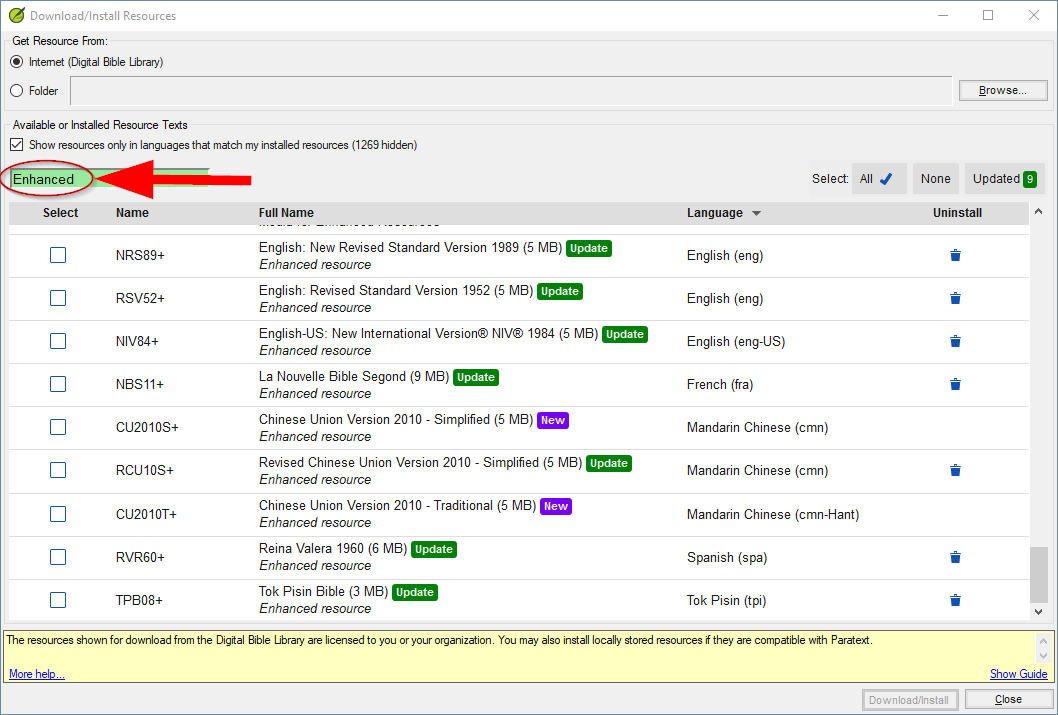
image.png1058×715 39 KB
(Saya telah membuat beberapa pengamatan tentang penyaringan daftar di: Download/Install Resources… .
Untuk catatan, pada saat penulisan ini, ada dua belas Sumber Daya Ditingkatkan yang tersedia, dan mereka dalam bahasa-bahasa berikut:
- eng
- eng-US
- French
- Spanish (spa)
- Portuguese (por-BR)
- Mandarin Chinese simplified (cmn)
- Mandarin Chinese traditional (cmn-Hant)
- Tok Pisin
… plus ada tiga Sumber Daya Gambar: Anda hanya mengunduh satu; setiap unduhan memiliki gambarnya pada resolusi yang berbeda.
In the Download/Install resources… window, if you type enhanced, or just enh, in the Filter Text box, the list will display just the Enhanced Resources.
image.png1058×715 39 KB
(I have made some observations about filtering the list at: Download/Install Resources… .
For the record, at the time of writing, there are twelve Enhanced Resources available, and they are in the following languages:
- eng
- eng-US
- French
- Spanish (spa)
- Portuguese (por-BR)
- Mandarin Chinese simplified (cmn)
- Mandarin Chinese traditional (cmn-Hant)
- Tok Pisin
… plus there are three images Resources: you only download one; each download has its images at a different resolution.
Diterjemahkan secara otomatis dari English








