संसाधन डाउनलोड/इंस्टॉल करें… (Download/Install resources…) विंडो में, यदि आप Filter Text बॉक्स में enhanced या बस enh टाइप करते हैं, तो सूची में केवल Enhanced Resources दिखाई देंगे।
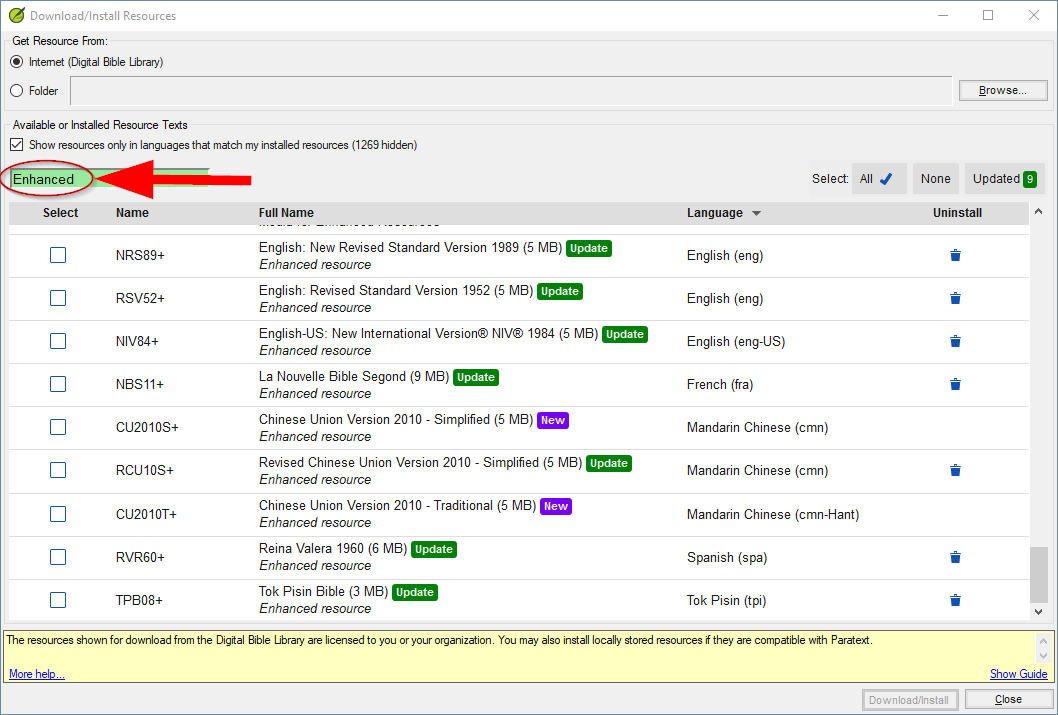
image.png1058×715 39 KB
(मैंने सूची को फ़िल्टर करने के बारे में कुछ अवलोकन किए हैं: Download/Install Resources… .
रिकॉर्ड के लिए, लेखन के समय, बारह Enhanced Resources उपलब्ध हैं, और वे निम्नलिखित भाषाओं में हैं:
- eng
- eng-US
- French
- Spanish (spa)
- Portuguese (por-BR)
- Mandarin Chinese simplified (cmn)
- Mandarin Chinese traditional (cmn-Hant)
- Tok Pisin
… इसके अलावा तीन इमेज संसाधन हैं: आप केवल एक डाउनलोड करते हैं; प्रत्येक डाउनलोड में उसके इमेज अलग-अलग रिज़ॉल्यूशन पर होते हैं।
In the Download/Install resources… window, if you type enhanced, or just enh, in the Filter Text box, the list will display just the Enhanced Resources.
image.png1058×715 39 KB
(I have made some observations about filtering the list at: Download/Install Resources… .
For the record, at the time of writing, there are twelve Enhanced Resources available, and they are in the following languages:
- eng
- eng-US
- French
- Spanish (spa)
- Portuguese (por-BR)
- Mandarin Chinese simplified (cmn)
- Mandarin Chinese traditional (cmn-Hant)
- Tok Pisin
… plus there are three images Resources: you only download one; each download has its images at a different resolution.
English से मशीन-अनुवादित








