Dado que as equipes estão começando a usar o Glyssen para pré-processar seus textos do NT e identificar cada falante no texto para uma gravação dramatizada, fiquei me perguntando se valeria a pena aproveitar esse trabalho para MARCAR AUTOMATICAMENTE as Palavras de Jesus \wj … \wj* no projeto do Paratext.
O Glyssen produz um arquivo Excel com os dados necessários, que se parece com isto:
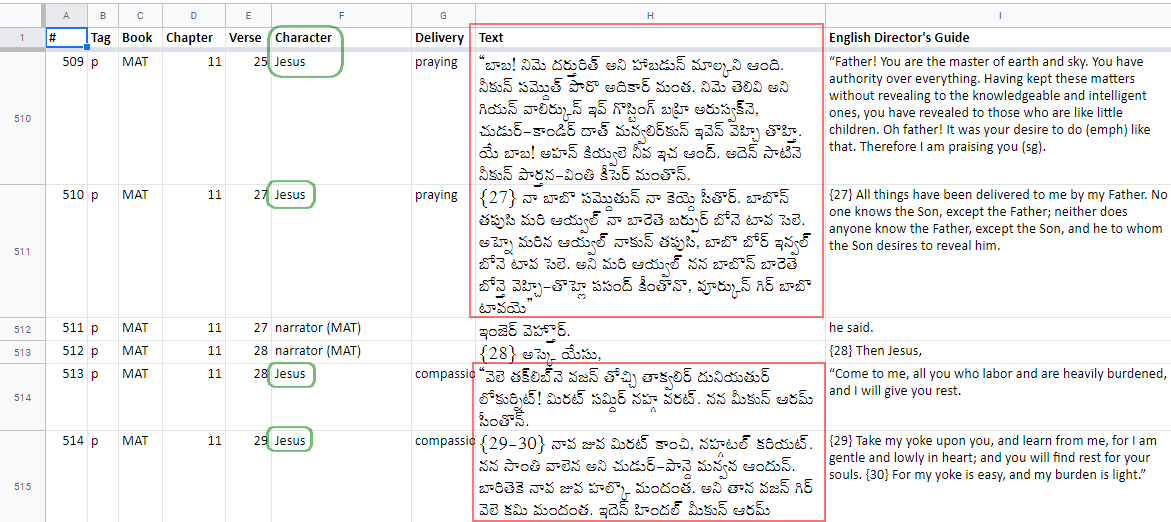
image.png1171×522 59.8 KB
Portanto, deve ser relativamente fácil gerar um script para encontrar esses lugares no texto e envolvê-los com a marcação \wj … …\wj*
Eu mesmo tentei algo simples com algumas tabelas CC geradas e consegui marcar com sucesso 88% das 1901 ocorrências das palavras de Jesus. No entanto, isso ainda deixa mais de 200 lugares onde eu precisaria entrar e corrigir manualmente. Insatisfeito com esse resultado e querendo economizar tempo para os outros no futuro, tornando o processo automatizado, completo e mais à prova de falhas, fiquei pensando em criar um Script Personalizado (em Python) que pudesse executar essa tarefa diretamente dentro do Paratext.
A maioria dos casos “falhos” com o método CC se deve a outras marcações, como \w angel|angels\w* ou \f notas de rodapé e \x referências cruzadas, que estão embutidas no texto pesquisado. Tenho algumas ideias sobre como contornar isso usando Expressões Regulares (e procurando o início e o fim das strings em vez da string inteira, etc.), mas isso vai além do CC e exigiria algum código Python para ser possível.
MAS, antes de tentar criar um Script Personalizado para fazer isso, estou me perguntando se alguém já fez algo semelhante. Não quero reinventar a roda! Olhando para os scripts de exemplo fornecidos com o Paratext, a coisa mais próxima que vejo é o TransferParallelPassageRefs.py de DRM.
Alguém mais tem algo semelhante, ou alguém mais é mais habilidoso em programação Python com ScriptureObjects e poderia montar isso melhor do que eu jamais conseguiria? Estou disposto a escrever o pseudocódigo, se isso ajudar. E estou disposto a aprender e trabalhar com outra pessoa nisso…
Given that teams are starting to use Glyssen to pre-process their NT texts to identify each speaker in the text for a dramatized recording, I wondered whether it would be worth piggy-backing on that work to AUTOMATICALLY mark up the Words of Jesus \wj … \wj* in the Paratext project.
Glyssen produces an Excel file with the needed data in it, which looks like this:
image.png1171×522 59.8 KB
So it should be relatively easy to generate a script to find these places in the text and wrap them with the \wj … markup …\wj*
I tried something simple myself with a couple of generated CC tables, and managed to get 88% of the 1901 occurrences of the words of Jesus marked up successfully. However, this still leaves 200+ places where I would need to go in and fix it manually. Being unsatisfied with this result, and wanting to save others time in the future by making it automated, complete and more foolproof, I wondered about creating a Custom Script (in Python) that could do this task directly from within Paratext.
Most of the “failed” cases with the CC method are because of other markup like \w angel|angels\w* or \f footnotes and \x cross-references being embedded within the text being searched for. I’ve got some ideas about how to get around those using Regular Expressions (and searching for the start and end of strings rather than the whole string, etc.) but that is beyond CC and would need to use some Python code to make it possible.
BUT, before I attempt to make a Custom Script to do this, I’m wondering if anyone else has done something similar already. I don’t want to re-invent the wheel! Looking at the sample scripts shipped with Paratext, the closest thing I see is TransferParallelPassageRefs.py by DRM.
Does anyone else have something similar, or is anyone else more gifted at Python programming with ScriptureObjects who could pull this together better than I ever could? I’m willing to write the pseudo code if that’s helpful. And I’m willing to learn and work with someone else on this…








