0
191 次瀏覽

This has happened several times recently. One thing I know is that an instance of Paratext could be in memory but not visible on the screen. To check for this, open Windows Task manager by right clicking on the Windows toolbar. Usually Paratext when it was open appears in the first list of Apps. (In this example Paratext is not running).
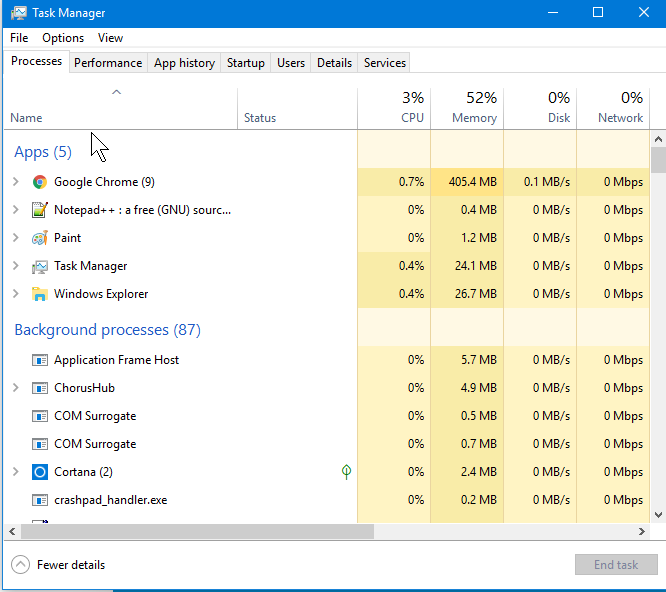
If the update is saying you need to shut it down but you don’t see it open and don’t see it in this list of Apps, look through the longer list of Background processes. If you don’t see the long “Background processes” list click the button at bottom right to show more details. Tip: you can click in that list and press “p” to go right to ones that begin with “P”. If you see Paratext here, select it and click “End task.” Now the installer should run.

I don’t know what makes Paratext start a background process, or stay on as a background process when you close it. But I do know that it happens, and others have reported it too.


舊文章 - 以原文顯示
Paratext [Expert]
(3.3k 點) 提出

已重新顯示 | 191 次瀏覽

1 個回答

0
最佳回答

We haven’t been able to determine what causes Paratext to sometimes hang.

If this happens, try running the ParatextForceShutdown command in the Paratext program folder - it should produce a .txt file with a random name in your C:\Users{userName}\AppData\Local\Temp

A couple of people who tried this got an error and no output file - so Paratext must be in a very minimal state.

Worth trying the command anyway - just in case we do get a clue.

John+Wickberg

舊文章 - 以原文顯示
[Administrator]
(3.4k 點) 提出

已重新顯示

相關問題

0
1 個回答 410 次瀏覽
I just started PT8 and it wants to update. But first it says Please close instances of Paratext before . The only ... closed when the update that wants to run is only for v8?
wdavidhj 1.4k 提出 已提問 1月 23, 2018
+1
1 個回答 405 次瀏覽
當您透過「聖經術語」工具或「聖經術語呈現」視窗輸入術語表條目時,Paratext 會將這些條目連結到聖經術語,並能決定如何排序這些術語表條目 (它使用專案設定中的排序順序來執行此操作 )如果您在使用「聖經術語」工具之前已手動建立了 ... 以在 Paratext 說明中的「如何將現有的術語表條目與聖經術語關聯」一節閱讀相關資訊 以下影片也詳細說明了此程序:
[Expert]
Jeff_Shrum
2.9k 提出
已提問 3月 23, 2021
0
1 個回答 230 次瀏覽
We have upgraded many of our projects from Paratext 7.5 to Paratext 8. What we need now is to remove those ... list of projects to be removed to that concerned person. anon242407.
anon242407 138 提出 已提問 10月 19, 2017
0
1 個回答 101 次瀏覽
有些同事在製作 PDF 檔案時遇到問題。我使用他們專案的副本重現了這個問題,並且在將他們使用的字型安裝為「所有使用者」之後也是如此。我們該如何繼續排查這個問題? 錯誤訊息: 字型檔案位於 c:\windows\fonts
[Expert]
sewhite
3.3k 提出
已提問 1月 28, 2025
Welcome to Support Bible, where you can ask questions and receive answers from other members of the community.
For where two or three gather in my name, there am I with them.
Matthew 18:20
3,049 個問題
6,007 個回答
5,673 則評論
2,029 位使用者




