0 votes
353 views

Today, from a real bit of text, I hit upon a new question:

Do I need to give each morpheme on each wordlist-entry, or can I work in a hierarchic fashion? I did not find anything on this in the help.

Example:

Already existing entry: thought (faŋa)

Also already existing entry: plural-marker+ thought (=thoughts) (a+ faŋa)

Today I need to enter: their thoughts. So can I enter

their+ thoughts (b+ afaŋa)

or do I need to enter

their+ plural-marker+ thought (b+ a+ faŋa)

I woulɖ not mind either way, but am curious of what PT8 can handle. And what advantages and disadvantages other users have found for either approach.

Can we agree that for HTML the CSS are an established working system, where the “C” is indeed helpful? It is on this background that I wonder how to handle all those regular nouns, plural-nouns, and all those possible prefixes in PT8.

Thank you.

Paratext by (934 points)
reshown | 353 views

2 Answers

0 votes
Best answer

I am using the Biblical Terms based on stems/roots. If this is what you are interested in, then the answer is that PT is not hierarchic as far as I can see. Unlike AMPLE which is a powerful analyzer that reads from a root dictionary, a prefix dictionary and a suffix dictionary plus rules, PT is simple in that it works from a root/stem indicated in the Wordlist and ignores whatever prefixes and suffixes may be given.
In your example, the root is faŋa. For afaŋa you write a+ faŋa in the morphology column of the Wordlist. For bafaŋa you can write either b+ a+ faŋa or ba+ faŋa. PT only looks for the root/stem and the complete word. How many prefixes and suffixes there are is irrelevant. If you write b+ afaŋa you are telling PT that you have both a root faŋa and a stem afaŋa, so you would need to list both as definitions for thought(s) in the Biblical Terms. If you break down as b+ afaŋa, it cannot find bafaŋa from the root faŋa, only from the stem afaŋa. In my view that is not the best option, so I would write b+ a+ faŋa.
I do mark the various prefixes and suffixes because I like to have a record of the correct morphological breakdown, so a word like musatiinakwaa (their traps) I write as musat +iin +ak +waa (root, class marker, plural marker, possessive.) But PT is only interested in the root musat (which never occurs in this form except as a root in the Wordlist) and the fuil word musatiinakwaa. When musat is given as a definition in the Biblical Terms tool and as long as the words musatiinaa, musatiinak, musatiinacaato, musatiinakaap, musatiiŋwaa, musatiit, musatiitaap are all indicated in the Wordlist with the root musat, PT will happily find all these forms in the Biblical Terms check.
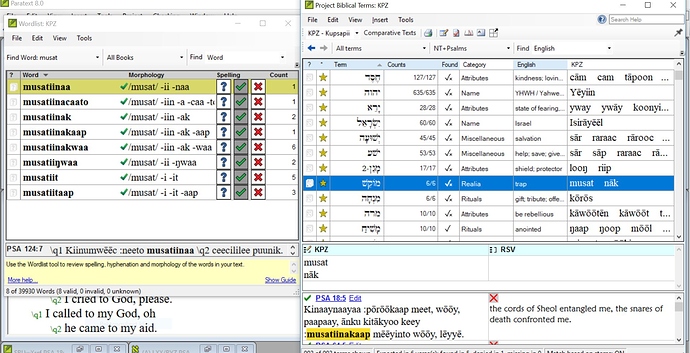

However, it will not find those places where we use the word for a different Hebrew or Greek term, because the Biblical Terms go by Hebrew words and Hebrew has various words for a trap or snare. So, in the screenshot you should see 8 words from the root musat. However, if I hold the cursor over the vernacular column in the Biblical Terms window I can see that it only found 4 of the 8 words, since the Wordlist is based on the vernacular and the Biblical Terms on the Hebrew/Greek. We also use a different word (stumbling block) for the same Hebrew word. It is complex, because we translate by context, not with word-for-word equivalents.

by (869 points)

Great, thank you. Since you show so many words in the corner of your screenshot, please allow a practical question:

In each key-terms-work-session there is a need to hop from the key-terms-window to the relevant entry in the word-list, whenever the morphology is not yet entered or not confirmed.

I know how to click on the blue verse-link, find myself in the main text, right-click on the actual rendering (a word) and select go to wordlist. Many clicks times many key terms…

I cannot right-click and jump from the text which is shown in the bottom part of the key-terms-window.

Is there a more efficient way to go from the key-terms window to a certain entry in the wordlist?

I am not aware of a more efficient way. I assume you are aware of the option to pin the window so that it is not minimized when you go to the main text window. Otherwise, you may try to complete the Wordlist before working on the Biblical Terms so that almost all words will already have an approved morphological breakdown.

+1 vote

No, Paratext does not work in that hierarchic fashion that you described. However, it should hopefully learn as you go, so it would start suggesting (b+ a+ faŋa) as its guess so you just have to press the OK button making it faster/easier the more you do.

by [Expert]
(16.6k points)

Related questions

0 votes
1 answer 335 views
Hi I am working with a team to enter renderings in their Biblical terms tool. Their language marks the future ... this would negate the value of the checking. Thanks anon703820
anon703820 215 asked Nov 26, 2018
0 votes
1 answer 278 views
I'm supporting a user who when trying to start a new paragraph cannot just enter \p . If he enters the ... with the EWTS Tibetan Keyboard, if that helps. Thanks, -anon482869
anon482869 105 asked Aug 7, 2018
0 votes
2 answers 291 views
This may be an unintended feature, but, in Paratext 7.5, I've found it's possible to enter notes in the UBS ... work through the Greek text in Paratext 7.5.) Thanks! -anon059953
anon059953 238 asked Feb 14, 2018
0 votes
2 answers 248 views
In the language we work some affixes and clitics are separated from the stem by hyphens. This hyphen is defined in the ... , I'm going to suggest such a feature. Thanks, rfkvg
Roland 245 asked Dec 1, 2021
0 votes
2 answers 462 views
I am working with a project that already has a word list with morphological breaks. Is it possible to load that ... . Just a short tutorial on the mechanics would be appreciated.
Kent Spielmann 1.8k asked Mar 30, 2021
Welcome to Support Bible, where you can ask questions and receive answers from other members of the community.
Accept the one whose faith is weak, without quarreling over disputable matters.
Romans 14:1
3,037 questions
5,995 answers
5,661 comments
2,022 users






