0 голосов
9 просмотров
I've had some strange things happen with Paratext and someone suggested doing a "reset".  How do I reset Paratext? (Answer to follow!)
Paratext назад от [Expert]
(10,0тыс. очков)
| 9 просмотров

1 ответ

+1 голос

How do I Reset Paratext? (answer from old paratext.org site)

If you are having odd problems with Paratext, you can reset it so that it returns to its default settings. Some examples where a reset could help:

  • Paratext will not start
  • Paratext  crashes (quits suddenly on its own)
  • some feature fails to work as it used to, or as the documentation  or a training video says it should.

How to reset:

  1. Save the current layout (if you haven’t already):
    1. Paratext 9: Go to the Paratext menu > Layout > Save current layout.
    2. Paratext 8: Go to the Window menu > Save Text Combination.
  2. Close Paratext.
  3. Hold down the Shift key.
    1. While holding the Shift key, start Paratext.
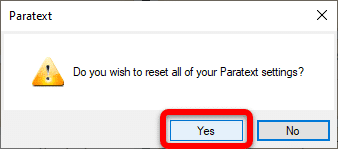
  4. Click Yes to confirm that you wish to reset your Paratext settings:image
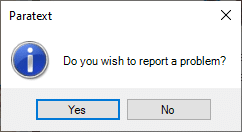
  5. When you see this window, do one of the following:image

    1. Click Yes if you wish to report a problem (to let the development team know what problems you encountered which caused you to want to reset Paratext).
      1. Follow the steps (from step 2 onwards) in How do I report a problem in Paratext? to report the problem.
    2. Click No if you do not wish to report a problem.
  6. Click OK when asked to do so.
  7. Restart Paratext.
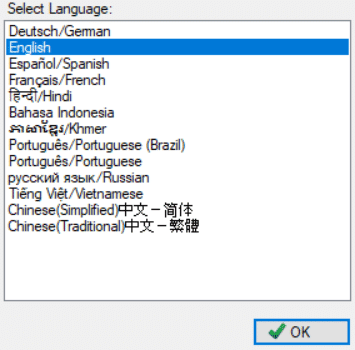
  8. Select the interface language you wish to use, and click OK:
    image
  9. Re-open any windows you need to continue your work.

NOTE: While you don't lose any data, the Send/Receive settings will be reset and Paratext will open with a blank window (thus the reason for saving your layout).


назад от [Expert]
(10,0тыс. очков)

Похожие вопросы

0 голосов
2 ответов 352 просмотров
We are having a problem with Number Settings. The team has chosen to use a space as the Thousands Separator, so ... a problem from within Paratext, or is this post sufficient?
jeffh 1,4тыс. задал вопрос окт 8, 2018
0 голосов
2 ответов 479 просмотров
A project in Paratext 8 had a mixture of á composed and decomposed. We did a search and replace ... We've already tried reinitializing Paratext and uninstalling and reinstalling.
drwww 448 задал вопрос июл 17, 2018
0 голосов
1 ответ 256 просмотров
I just submitted a report and was given PTXS-15894 as an issue number. How do I go about checking on the status of this problem report? Thank you
MSEAIT_LT 478 задал вопрос мар 7, 2018
0 голосов
1 ответ 487 просмотров
Я хотел бы, чтобы Paratext открывался так, как будто он только что установлен. Я попробовал удерживать Shift и ... включить опцию чувствительных мест). image1474 491 83.9 KB
[Moderator]
james_post
2,1тыс.
задал вопрос окт 27, 2022
0 голосов
2 ответов 199 просмотров
Мне нужно преобразовать файл USX в USFM. Я вижу, что в Paratext есть опция для обратного преобразования, но не ... преобразование их в USFM поможет Proskomma лучше с ними работать.
yeti 109 задал вопрос мар 19
Welcome to Support Bible, where you can ask questions and receive answers from other members of the community.
How good and pleasant it is when God’s people live together in unity!
Psalm 133:1
3,070 вопросов
6,031 ответов
5,702 комментариев
2,038 пользователей