0 votes
220 views
I've had some strange things happen with Paratext and someone suggested doing a "reset".  How do I reset Paratext? (Answer to follow!)
Paratext by [Expert]
(10.0k points)
| 220 views

1 Answer

+2 votes

How do I Reset Paratext? (answer from old paratext.org site)

If you are having odd problems with Paratext, you can reset it so that it returns to its default settings. Some examples where a reset could help:

  • Paratext will not start
  • Paratext  crashes (quits suddenly on its own)
  • some feature fails to work as it used to, or as the documentation  or a training video says it should.

How to reset:

  1. Save the current layout (if you haven’t already):
    1. Paratext 9: Go to the Paratext menu > Layout > Save current layout.
    2. Paratext 8: Go to the Window menu > Save Text Combination.
  2. Close Paratext.
  3. Hold down the Shift key.
    1. While holding the Shift key, start Paratext.
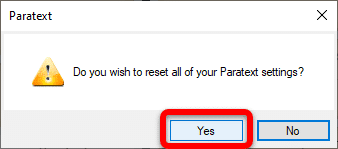
  4. Click Yes to confirm that you wish to reset your Paratext settings:image
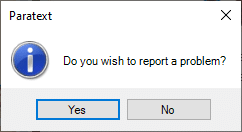
  5. When you see this window, do one of the following:image

    1. Click Yes if you wish to report a problem (to let the development team know what problems you encountered which caused you to want to reset Paratext).
      1. Follow the steps (from step 2 onwards) in How do I report a problem in Paratext? to report the problem.
    2. Click No if you do not wish to report a problem.
  6. Click OK when asked to do so.
  7. Restart Paratext.
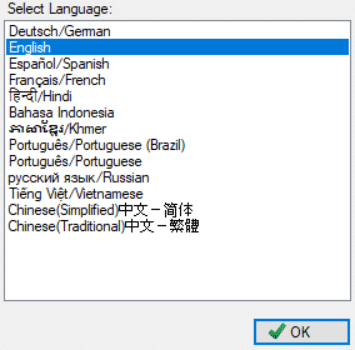
  8. Select the interface language you wish to use, and click OK:
    image
  9. Re-open any windows you need to continue your work.

NOTE: While you don't lose any data, the Send/Receive settings will be reset and Paratext will open with a blank window (thus the reason for saving your layout).


by [Expert]
(10.0k points)

Related questions

0 votes
2 answers 374 views
We are having a problem with Number Settings. The team has chosen to use a space as the Thousands Separator, so ... a problem from within Paratext, or is this post sufficient?
jeffh 1.4k asked Oct 8, 2018
0 votes
2 answers 517 views
A project in Paratext 8 had a mixture of á composed and decomposed. We did a search and replace ... We've already tried reinitializing Paratext and uninstalling and reinstalling.
drwww 448 asked Jul 17, 2018
0 votes
1 answer 284 views
I just submitted a report and was given PTXS-15894 as an issue number. How do I go about checking on the status of this problem report? Thank you
MSEAIT_LT 478 asked Mar 7, 2018
0 votes
1 answer 536 views
I'd like to have Paratext open as though it were a new installation. I tried holding Shift and resetting Paratext ... include the sensitive locations option). image1474 491 83.9 KB
[Moderator]
james_post
2.1k
asked Oct 27, 2022
0 votes
2 answers 254 views
I need to convert a USX file to USFM. I can see an option Paratext to do the reverse, but I don't see one ... them to USFM will make it easier for Proskomma to handle them.
yeti 109 asked Mar 19
Welcome to Support Bible, where you can ask questions and receive answers from other members of the community.
There is neither Jew nor Gentile, neither slave nor free, nor is there male and female, for you are all one in Christ Jesus.
Galatians 3:28
3,081 questions
6,048 answers
5,710 comments
2,048 users