It looks like you have applied blue to a couple of styles. Search for those markers in the Styles tab and change the color to the appropriate color.
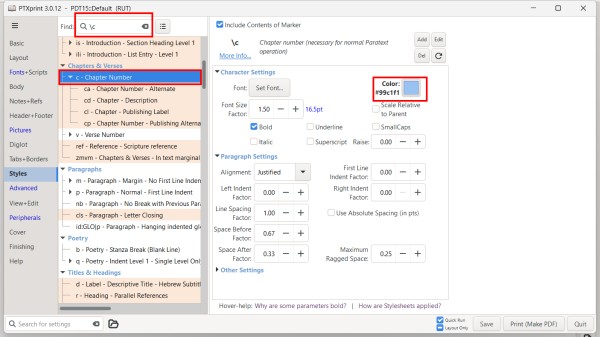
If there is a custom.sty file in the project folder with lots of color set, you might try renaming that file to something like custom.styold so that PTXprint will not use it.
You can also turn on and off the custom.sty file on the Advanced tab. You can also edit the file from there to comment out colors but placing a # at the beginning of any line you don't want to apply.
 General
45
General
45
 Paratext
2.4k
website
Paratext
2.4k
website
 PTXprint
437
website
PTXprint
437
website
 Paratext Lite
74
website
Paratext Lite
74
website
 FLExTrans
46
website
FLExTrans
46
website
 Paratext 10
24
website
Paratext 10
24
website
 Scripture Forge
20
website
Scripture Forge
20
website
 Publishing Assistant
3
website
Publishing Assistant
3
website
 Maps Diagrams
0
website
Maps Diagrams
0
website