0 suara
336 tampilan

For a couple of years now, language projects preparing the script of the Jesus Film after having translated Luke and other Scripture portions have been able to use a tool that would extract the relevant Scripture passages mentioned in the script and paste them into notes within the script file. This tool uses a specialized version of the Paratext 6 and 7 “Extract Lectionary” tool that was available in the Advanced Checks menu. (The Jesus Film tool when installed is found in Checking > Advanced > Jesus Film > Verse Extract - JLOT Recording Script).

Programming changes in how Paratext 8 processes Python scripts mean these tools will not work in Paratext 8. I have tested a workaround using a Bible module and this does seem to work.

This is the process:

  1. Download the file “VerseExtract-JLOT_Recording_Script_mod.sfm” and place it inside the “_Modules” folder inside “My Paratext 8 Projects”.
    Link to the file
  2. Create a Bible module in your Paratext project, (Tools > Open Bible Module). Choose the above file as the specification.
  3. In Paratext, go to the module book you have created, and Save to RTF the resulting module. (File, Save as RTF).
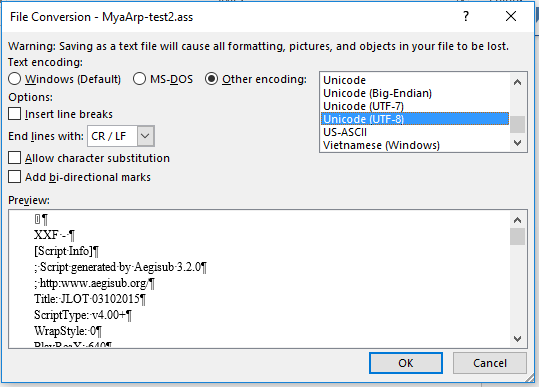
  4. In Word, open the RTF file, and save as a text file. If Word says some text will not save correctly in the current encoding, change the encoding to “Unicode (UTF-8)”
    image
  5. Copy or move the folder to the “Scripts” folder inside the Aegisub setup, and change the text file name so the last three letters end in “.ass” (the file extension expected by Aegisub)
  6. You can now start Aegisub and select this script file, and the script will have notes of all the relevant verses you have translated in Paratext.

Doug HIgby is also working on a module for the Jesus Film script, but that module has a different goal. That module is to guide teams that have not translated anything, to show them which passages they need to translate to have the relevant parts of the Scripture for the Jesus film. This module is to extract relevant passages that have already been translated into the script format.


Postingan lama - ditampilkan dalam bahasa aslinya
Paratext oleh [Expert]
(3,3k poin)

ditampilkan kembali | 336 tampilan

3 Jawaban

+1 suara
Jawaban terbaik

Technical note: the important thing needed for the text file is to preserve the existing line breaks and not add any new ones. I added \nb markers at each new line in the source text file to make the SFM file. I also changed the \ref codes from the original file to \refnp so no paragraph marks from the text get added. I also added reference codes so Paratext will put in the reference for each verse or group of verses, using the book names and abbreviations set up in the Scripture References section.

Paratext does put each \refnp at the beginning of a new line in the module, but when you save as RTF, these new lines go away, and so saving as a text file produces the desired output.

Postingan lama - ditampilkan dalam bahasa aslinya
oleh [Expert]
(3,3k poin)
0 suara

This is so cool! It also works in PT-Linux, both PT 7.x and 8, in which the "Advanced Checks" have not been available.

Thanks for working on this, sewhite (and others, perhaps).

  KimB
Postingan lama - ditampilkan dalam bahasa aslinya
oleh (673 poin)
ditampilkan kembali
0 suara

Is there something similar for the Luke film?

Postingan lama - ditampilkan dalam bahasa aslinya
oleh (448 poin)

About the Luke film, I do not know. For your information, the Jesus Film team has now created an EXE file that will find the text from Paratext and put it into the script file. Contact them for access. (If you’ve been given a link to download the latest copy of the script, this file is there as well).

Postingan lama - ditampilkan dalam bahasa aslinya

Pertanyaan terkait

0 suara
2 jawaban 374 tampilan
Mengingat tim-tim mulai menggunakan Glyssen untuk memproses awal teks PB mereka guna mengidentifikasi setiap pembicara dalam ... belajar dan bekerja dengan orang lain tentang ini
Mark P 3,2k bertanya Agu 5, 2019
0 suara
4 jawaban 545 tampilan
Saat mengekspor bagian dari Injil dari Paratext ke PDF, kata-kata Yesus berwarna merah tidak muncul di file tersebut. Ini berhasil saat diekspor ke RTF, tetapi tidak dengan PDF.
ace541611 123 bertanya Jul 7, 2021
0 suara
0 jawaban 188 tampilan
Quando eu abro uma Text Collection, todo o texto das Escrituras é preto: image616 509 23.7 KB But when I click on one ... !! It looks REALLY nice that way. Way to go developers!!
[Moderator]
james_post
2,1k
bertanya Mar 31, 2021
0 suara
4 jawaban 910 tampilan
EDIT: Paratext 8 Question: Someone wants to be able to turn off red lettering in the resources that have the words ... ? Is there anything similar to sewhite's Resource Font hack?
rowbory 510 bertanya Des 4, 2017
0 suara
1 jawaban 285 tampilan
Our project uses the \wj marker for Words of Jesus and displays the text using the default (defined by usfm.sty) ... Any suggestions of how to do this would be greatly appreciated.
mnjames 1,9k bertanya Nov 23, 2015
Welcome to Support Bible, where you can ask questions and receive answers from other members of the community.
May the God who gives endurance and encouragement give you the same attitude of mind toward each other that Christ Jesus had.
Romans 15:5
3,049 pertanyaan
6,007 jawaban
5,672 komentar
2,029 pengguna




