Mungkin font Noto Nastaliq Urdu tidak mengandung glyph latin dasar - itulah sebabnya muncul kotak tofu. Ada dua solusi yang mungkin:
1. Beralih ke font Nastaliq yang *memang* memiliki Basic latin, misalnya: software.sil.org/awami/
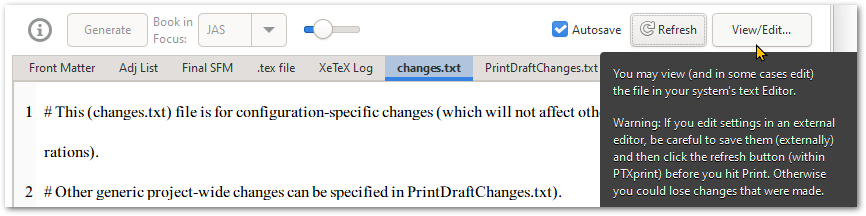
2. Klik tombol View/Edit... di pojok kanan atas, untuk mengedit file changes.txt di editor teks default Anda (Notepad++ sangat direkomendasikan), tetapi setelah melakukannya, berpindahlah ke tab lain (misalnya ke tab XeTeX Log) agar ketika Autosave berjalan, perubahan yang Anda buat secara eksternal tidak terus-menerus terhapus. [Opsi lain yang lebih merepotkan adalah tetap di changes.txt tetapi klik tombol "Refresh" setelah Anda memperbarui file di luar PTXprint.]
Presumably the Noto Nastaliq Urdu font doesn't contain any of the basic latin glyphs - hence the tofu boxes. There are two possible solutions:
1. Switch to a Nastaliq font which *does* have Basic latin, for example: software.sil.org/awami/
2. Click on the View/Edit... button at the top right, to edit the changes.txt file in your default text editor (Notepad++ is highly recommended), but after doing so, navigate to a different tab (for example to the XeTeX Log tab) so that when Autosave kicks in, it doesn't keep wiping out the changes you made externally. [The other more painful option is to leave it on changes.txt but click the "Refresh" button after you have updated the file outside of PTXprint.]
Diterjemahkan secara otomatis dari English








