沒有截圖或檔案,很難「看出」可能發生了什麼;但讓我帶您檢查幾項基本事項:
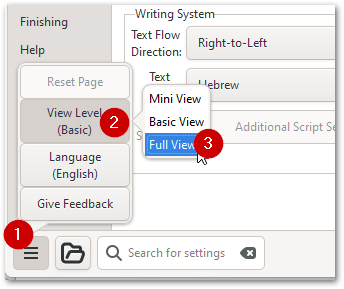
1. 確保您已啟用「完整檢視」(Full View)
2. 然後,在第一個(基本)分頁/頁面的底部,您應該會看到這些選項:
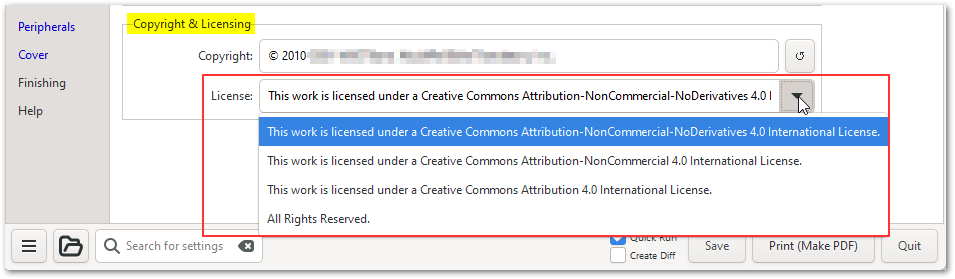 3. 請注意,如果您想使用其他授權條款,您可以在該欄位中輸入您偏好的授權條款。
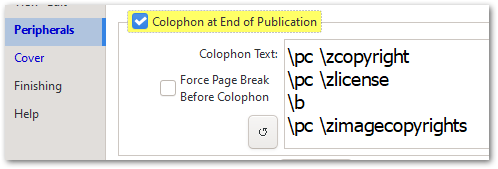
如果這無法解決您的問題,請再次檢查「週邊」(Peripherals)分頁中的設定(通常會採用在「基本」分頁中輸入的內容):
希望這對您解決問題有所幫助。
It is hard to "see" what might be happening without a screenshot or an archive; but let me walk you through a few basic things to check:
1. Ensure you have "Full View" enabled
2. Then at the bottom of the first (Basic) tab/page, you should see these option:
3. Note that if you want to use some other license, you can overtype your own preferred license in that box.
If that doesn't solve your issue, then please double check what is set on the Peripherals tab (which usually picks up whatever was entered on the Basic tab):
I hope that helps you solve the issue.
機器翻譯自 English








