在没有截图或存档的情况下,很难“看到”可能发生了什么;但让我带您检查几个基本事项:
1. 确保已启用“完整视图”(Full View)
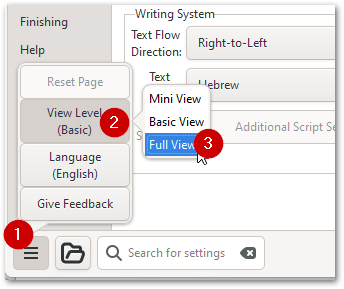
2. 然后,在第一个(基本)选项卡/页面的底部,您应该能看到这些选项:
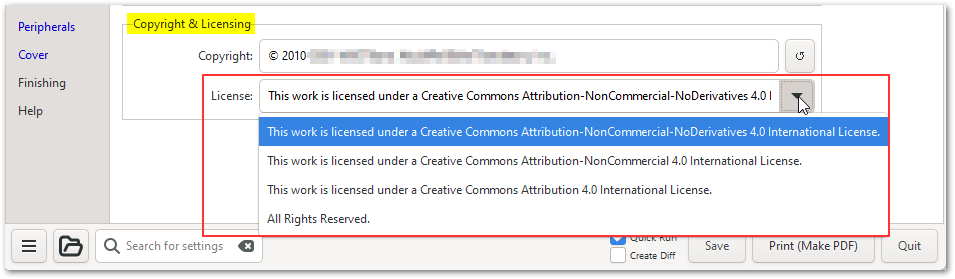 3. 请注意,如果您想使用其他许可证,可以在该框中覆盖输入您首选的许可证。
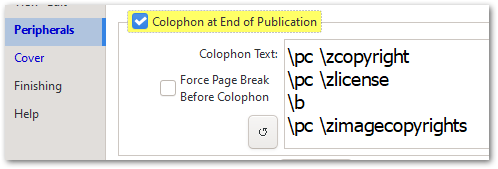
如果这不能解决您的问题,请再次检查“外设”(Peripherals)选项卡上的设置(通常会获取在“基本”选项卡中输入的内容):
希望这能帮助您解决问题。
It is hard to "see" what might be happening without a screenshot or an archive; but let me walk you through a few basic things to check:
1. Ensure you have "Full View" enabled
2. Then at the bottom of the first (Basic) tab/page, you should see these option:
3. Note that if you want to use some other license, you can overtype your own preferred license in that box.
If that doesn't solve your issue, then please double check what is set on the Peripherals tab (which usually picks up whatever was entered on the Basic tab):
I hope that helps you solve the issue.
机器翻译自 English








