嗨,Connor,
看起來其中一本書的資料中有些內容導致了問題。我注意到你正在處理 GEN-REV。你能找出是哪本書出了問題嗎?試著搜尋錯誤訊息中的那段希伯來文文字,如果找不到,請查看 View+Edit 頁面的 XeTeX Log 標籤,看看日誌結尾是否提供了線索,指出哪些書卷已完成,從而判斷是哪一本導致了問題。
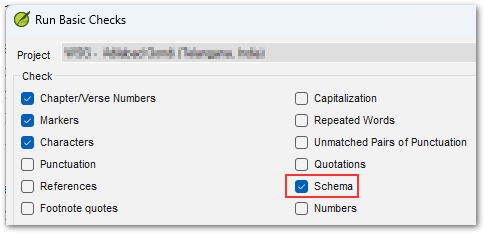
很可能是在該文字之前或之後的資料有些「不同」。可能只是節號後少了一個空格,或缺少標記等簡單問題。請注意,你也可以在 Paratext 中執行 Schema 檢查以確保資料完整性。要存取此特殊檢查,你需要在點擊選單選項「Run Basic Checks...」時按住 Shift 鍵,然後你會看到一個名為 Schema 的額外選項,它會提供關於任何資料結構完整性問題的詳細資訊。
如果你仍然無法解決這個謎團,請使用 Help 頁面/標籤上的「Create Archive...」按鈕建立一個 ZIP 檔案壓縮包,並透過電子郵件發送至 ptxprint_support (at) sil.org,我會查看一下(我比較希望收到只包含導致問題的那一本書的壓縮包,而不是全部 66 本書)。
Hi Connor,
It appears that there is something in the data of one of the books that is tripping it up. I see that you're doing GEN-REV. Are you able to work out which book is the culprit? Try searching for the string of Hebrew text (from the error message) and if that fails, look at the XeTeX Log tab of the View+Edit page to see if the end of the log gives you a hint about which books were complete, and therefore which one tripped it up.
It is likely that something in the data just before, or just after that text is "different". It could be something as simple as a space missing after a verse number, or a missing marker etc. Note that you can also run the Schema checks in Paratext to ensure data-integrity. To access this special check, you need to hold Shift when you click on the menu option, "Run Basic Checks...", then you'll see an additional option called Schema which will provide very detailed information about any data structure integrity issues.
If you still can solve the mystery, then please use the "Create Archive..." button on the Help page/tab to make a ZIP file archive and send it by email to ptxprint_support (at) sil.org and I'll take a look (I would prefer an archive with just the single book causing the issue, rather than all 66 books).
機器翻譯自 English








