Olá, Connor,
Parece que há algo nos dados de um dos livros que está causando o problema. Vejo que você está trabalhando com GEN-REV. Consegue descobrir qual livro é o culpado? Tente pesquisar pela sequência de texto em hebraico (da mensagem de erro) e, se isso não funcionar, veja a aba XeTeX Log da página View+Edit para ver se o final do log dá uma dica sobre quais livros foram concluídos e, portanto, qual deles causou o problema.
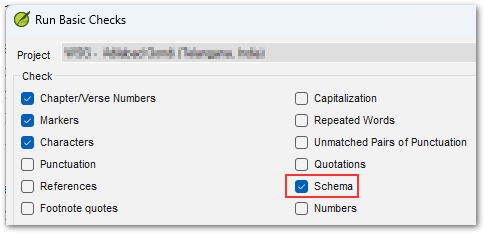
É provável que algo nos dados logo antes ou logo depois desse texto esteja "diferente". Pode ser algo simples, como um espaço faltando após um número de versículo, ou um marcador ausente, etc. Observe que você também pode executar as verificações de esquema (Schema checks) no Paratext para garantir a integridade dos dados. Para acessar essa verificação especial, você precisa segurar a tecla Shift ao clicar na opção de menu "Run Basic Checks...", e então verá uma opção adicional chamada Schema, que fornecerá informações muito detalhadas sobre quaisquer problemas de integridade da estrutura de dados.
Se você ainda não conseguir resolver o mistério, use o botão "Create Archive..." na página/aba Help para criar um arquivo ZIP e envie-o por e-mail para ptxprint_support (at) sil.org, e eu darei uma olhada (eu prefiro um arquivo com apenas o livro único que está causando o problema, em vez de todos os 66 livros).
Hi Connor,
It appears that there is something in the data of one of the books that is tripping it up. I see that you're doing GEN-REV. Are you able to work out which book is the culprit? Try searching for the string of Hebrew text (from the error message) and if that fails, look at the XeTeX Log tab of the View+Edit page to see if the end of the log gives you a hint about which books were complete, and therefore which one tripped it up.
It is likely that something in the data just before, or just after that text is "different". It could be something as simple as a space missing after a verse number, or a missing marker etc. Note that you can also run the Schema checks in Paratext to ensure data-integrity. To access this special check, you need to hold Shift when you click on the menu option, "Run Basic Checks...", then you'll see an additional option called Schema which will provide very detailed information about any data structure integrity issues.
If you still can solve the mystery, then please use the "Create Archive..." button on the Help page/tab to make a ZIP file archive and send it by email to ptxprint_support (at) sil.org and I'll take a look (I would prefer an archive with just the single book causing the issue, rather than all 66 books).
Tradução automática de English








