Bonjour Connor,
Il semble qu'il y ait quelque chose dans les données de l'un des livres qui provoque le problème. Je vois que vous travaillez sur GEN-REV. Pouvez-vous déterminer quel livre est le coupable ? Essayez de rechercher la chaîne de texte hébreu (provenant du message d'erreur) et, si cela échoue, consultez l'onglet XeTeX Log de la page View+Edit pour voir si la fin du journal vous donne un indice sur les livres qui étaient complets, et donc sur celui qui a provoqué le problème.
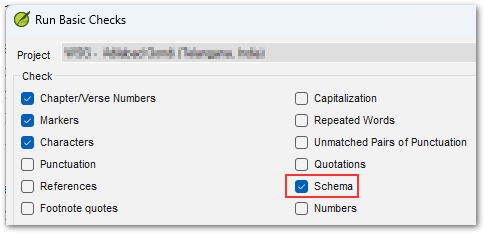
Il est probable que quelque chose dans les données juste avant ou juste après ce texte soit « différent ». Cela pourrait être aussi simple qu'une espace manquante après un numéro de verset, ou un marqueur manquant, etc. Notez que vous pouvez également exécuter les vérifications de schéma dans Paratext pour assurer l'intégrité des données. Pour accéder à cette vérification spéciale, vous devez maintenir la touche Maj en cliquant sur l'option du menu « Run Basic Checks... », puis vous verrez une option supplémentaire appelée Schema qui fournira des informations très détaillées sur les problèmes d'intégrité de la structure des données.
Si vous parvenez toujours à résoudre le mystère, veuillez utiliser le bouton « Create Archive... » sur la page/onglet Aide pour créer une archive au format ZIP et l'envoyer par e-mail à ptxprint_support (at) sil.org, et je jetterai un coup d'œil (je préférerai une archive contenant uniquement le livre unique qui cause le problème, plutôt que les 66 livres).
Hi Connor,
It appears that there is something in the data of one of the books that is tripping it up. I see that you're doing GEN-REV. Are you able to work out which book is the culprit? Try searching for the string of Hebrew text (from the error message) and if that fails, look at the XeTeX Log tab of the View+Edit page to see if the end of the log gives you a hint about which books were complete, and therefore which one tripped it up.
It is likely that something in the data just before, or just after that text is "different". It could be something as simple as a space missing after a verse number, or a missing marker etc. Note that you can also run the Schema checks in Paratext to ensure data-integrity. To access this special check, you need to hold Shift when you click on the menu option, "Run Basic Checks...", then you'll see an additional option called Schema which will provide very detailed information about any data structure integrity issues.
If you still can solve the mystery, then please use the "Create Archive..." button on the Help page/tab to make a ZIP file archive and send it by email to ptxprint_support (at) sil.org and I'll take a look (I would prefer an archive with just the single book causing the issue, rather than all 66 books).
Traduit automatiquement depuis English








