0 votes
282 views

Hi, I just started getting in depth with Paratext and now PTXprint and I can’t seem to make PTXprint output each verse on a new line like traditional Bibles. I’ve played with all the settings but can’t seem to find the trick.

I was able to make Paratext play nice with its PDF output by modifying a stylesheet, but that doesn’t seem to be an option (or I haven’t found that option just yet) in PTXprint.

Thank you in advance for your assistance.

PTXprint by (108 points) | 282 views

1 Answer

0 votes

I am assuming that your starting point is that verses appear within paragraphs like this:
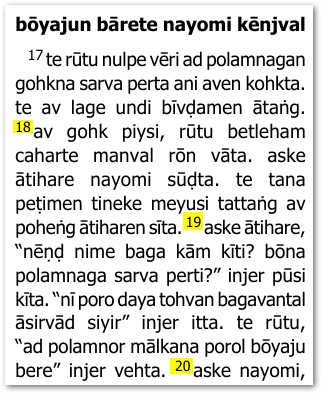
image

The simplest way to do what you are asking for is to use the Advanced tab and apply some changes. So, ensure that you are using “Full View” and then enable the Apply Changes.txt option as shown below:

When you click on Edit… the View+Edit tab should show you your changes.txt file.

Add these lines to it (as shown below):

"\\v " > "\\p\n\\v "
"\\p[\s\r\n]*\\p" > "\\p"
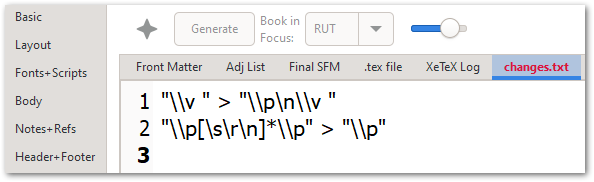
image

These rules will place a \p marker before EVERY verse and remove any duplicate/redundant \p markers. So the end result should then appear like this:
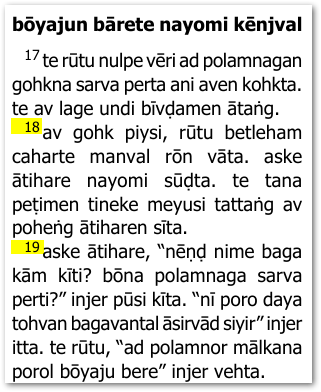
image

Note that you could use \m for margin paragraphs (not-indented) by tweaking the change rules slightly:

"\\v " > "\\m\n\\v "
"\\p[\s\r\n]*\\m" > "\\p"

That would give you this kind of layout (slight change):
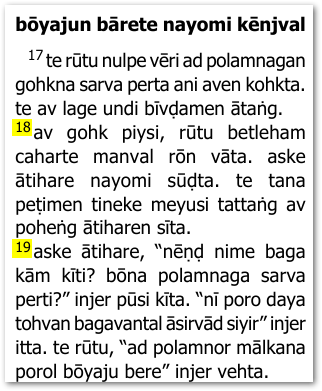
image

Just to be complete, it is worth noting that “Marginal Verses” is another possibility in case that is useful:

Which would result in this layout (you may need to adjust the formatting of the \v marker in the Styles tab):
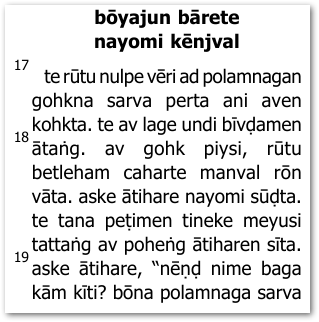
image

I trust this gives you enough options to move forward.

by (3.2k points)

Hi Mark, thank you for your extremely detailed and helpful response. Unfortunately I seem to have run into a lot more issues since moving from a Windows 10 PC to a Windows 11 VM on my Mac and now I can’t get Paratext to output a PDF draft without using PTXprint, and now PTXprint is throwing up all sorts of weird errors that it wasn’t giving previously on Windows 10. I’ll have to start a new thread about this issue if I can figure out what exactly to ask for help with.

Thank you!

Can we add something to the change code above to take into account the verse within \q quotations, please?

For anyone looking, this seems to work, complements of Claude AI... using grep lookahead function.

"\\v(?<!\\q )" > "\\p\n\\v " "\\p[\s\r\n]*\\p" > "\\p"

Related questions

0 votes
1 answer 78 views
https://community.scripture.software.sil.org/t/verse-per-line-in-ptxprint/4185 On the above link I found it very helpful ... code to add to PTX print to get this desired format?
Jordan K 110 asked Apr 2, 2025
0 votes
2 answers 716 views
I have a user who wants to format the translation so that it will be printed one verse per line- that is, each ... this is handled in the best way possible. Thanks, anon609523 Hall
anon609523 108 asked Aug 8, 2017
0 votes
2 answers 205 views
I help operate ScriptureEarth.org. We are dreaming about the possibility of setting up an option for people to request ... . Does this sound at all reasonable? --Loren Hawthorne
LorenHawthorne 173 asked Aug 5, 2024
+1 vote
0 answers 25 views
When citing chapters and verses, use only a comma (,) to separate the chapter number from the verse number on header of the page. Example: Mc 1,39 (Mark chapter 1 verse 39)
Petrus Khoa 103 asked Jul 26, 2025
0 votes
1 answer 48 views
I have lines like this in a custom.vrs file: *REV 21:6,a,b I have USFM marking like this in Paratext: \v 6a ... 'm missing? I'd rather not print more than required. Thanks, Paul
Paul 642 asked Oct 21, 2024
Welcome to Support Bible, where you can ask questions and receive answers from other members of the community.
Just as a body, though one, has many parts, but all its many parts form one body, so it is with Christ.
1 Corinthians 12:12
3,037 questions
5,995 answers
5,662 comments
2,022 users






