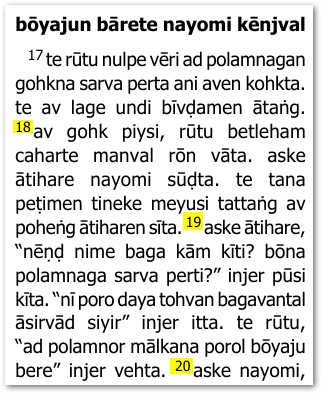
我假设你的起始状态是节经文出现在段落中,如下所示:
实现你所要求的最简单方法是使用 Advanced(高级)选项卡并应用一些更改。因此,请确保你正在使用“Full View”(完整视图),然后启用 Apply Changes.txt 选项,如下所示:
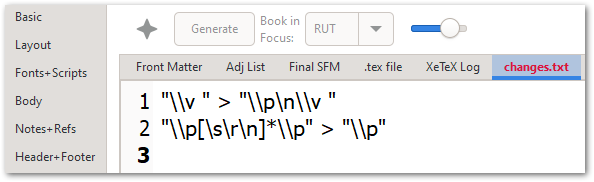
当你点击 Edit…(编辑…)时,View+Edit(查看+编辑)选项卡应该会显示你的 changes.txt 文件。
将以下行添加到该文件中(如下所示):
"\\v " > "\\p\n\\v "
"\\p[\s\r\n]*\\p" > "\\p"
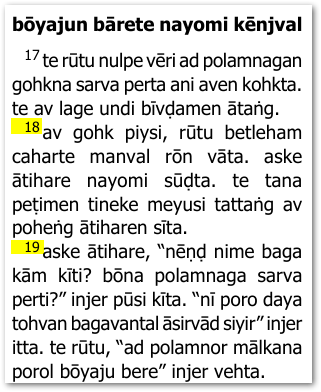
这些规则会在每一节经文之前放置一个 \p 标记,并删除任何重复/冗余的 \p 标记。因此,最终结果应该如下所示:
请注意,你可以通过稍微调整更改规则,使用 \m 来实现边栏段落(不缩进):
"\\v " > "\\m\n\\v "
"\\p[\s\r\n]*\\m" > "\\p"
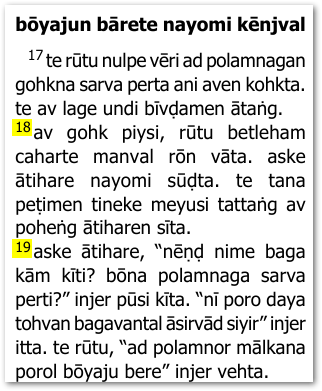
这将产生这种布局(略有变化):
为了完整性,值得一提的是,“Marginal Verses”(边栏经文)是另一种可能性,如果这有用的话:
这将产生这种布局(你可能需要在 Styles 选项卡中调整 \v 标记的格式):
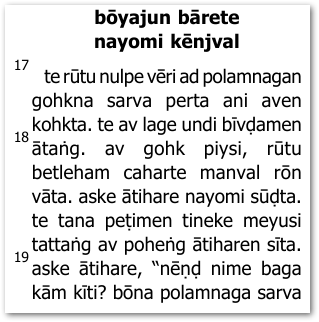
我相信这给了你足够的选项来继续前进。
I am assuming that your starting point is that verses appear within paragraphs like this:
The simplest way to do what you are asking for is to use the Advanced tab and apply some changes. So, ensure that you are using “Full View” and then enable the Apply Changes.txt option as shown below:
When you click on Edit… the View+Edit tab should show you your changes.txt file.
Add these lines to it (as shown below):
"\\v " > "\\p\n\\v "
"\\p[\s\r\n]*\\p" > "\\p"
These rules will place a \p marker before EVERY verse and remove any duplicate/redundant \p markers. So the end result should then appear like this:
Note that you could use \m for margin paragraphs (not-indented) by tweaking the change rules slightly:
"\\v " > "\\m\n\\v "
"\\p[\s\r\n]*\\m" > "\\p"
That would give you this kind of layout (slight change):
Just to be complete, it is worth noting that “Marginal Verses” is another possibility in case that is useful:
Which would result in this layout (you may need to adjust the formatting of the \v marker in the Styles tab):
I trust this gives you enough options to move forward.
机器翻译自 English








