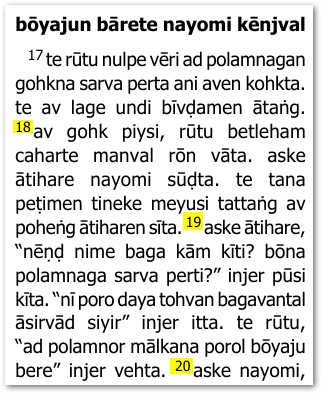
Supongo que tu punto de partida es que los versos aparecen dentro de párrafos, como esto:
La forma más sencilla de hacer lo que pides es usar la pestaña Advanced y aplicar algunos cambios. Así que, asegúrate de estar usando “Full View” y luego habilita la opción Apply Changes.txt como se muestra a continuación:
Cuando hagas clic en Edit…, la pestaña View+Edit debería mostrarte tu archivo changes.txt.
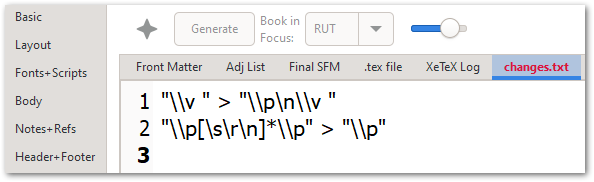
Agrega estas líneas (como se muestra a continuación):
"\\v " > "\\p\n\\v "
"\\p[\s\r\n]*\\p" > "\\p"
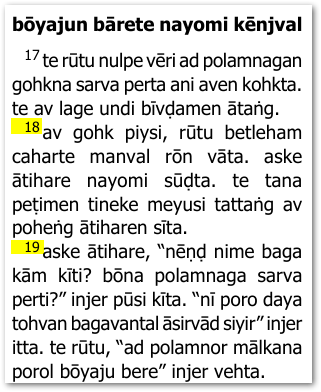
Estas reglas colocarán una marca \p antes de CADA verso y eliminarán cualquier marca \p duplicada o redundante. Así que el resultado final debería verse así:
Ten en cuenta que podrías usar \m para párrafos de margen (sin sangría) ajustando ligeramente las reglas de cambio:
"\\v " > "\\m\n\\v "
"\\p[\s\r\n]*\\m" > "\\p"
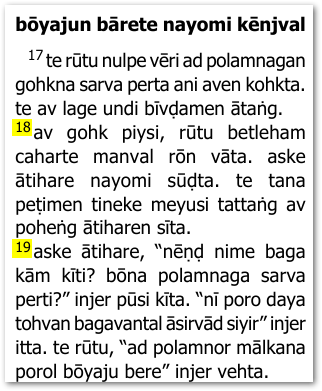
Eso te daría este tipo de diseño (cambio ligero):
Solo para ser completo, vale la pena señalar que “Marginal Verses” es otra posibilidad, por si resulta útil:
Lo que resultaría en este diseño (puede que necesites ajustar el formato de la marca \v en la pestaña Styles):
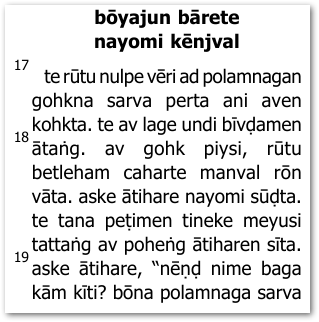
Espero que esto te dé suficientes opciones para avanzar.
I am assuming that your starting point is that verses appear within paragraphs like this:
The simplest way to do what you are asking for is to use the Advanced tab and apply some changes. So, ensure that you are using “Full View” and then enable the Apply Changes.txt option as shown below:
When you click on Edit… the View+Edit tab should show you your changes.txt file.
Add these lines to it (as shown below):
"\\v " > "\\p\n\\v "
"\\p[\s\r\n]*\\p" > "\\p"
These rules will place a \p marker before EVERY verse and remove any duplicate/redundant \p markers. So the end result should then appear like this:
Note that you could use \m for margin paragraphs (not-indented) by tweaking the change rules slightly:
"\\v " > "\\m\n\\v "
"\\p[\s\r\n]*\\m" > "\\p"
That would give you this kind of layout (slight change):
Just to be complete, it is worth noting that “Marginal Verses” is another possibility in case that is useful:
Which would result in this layout (you may need to adjust the formatting of the \v marker in the Styles tab):
I trust this gives you enough options to move forward.
Traducción automática desde English








