@mlucas53 這是一個非常常見的問題,但我認為我們過去並沒有特別好地回答過它。
這裡的問題在於 \s - Heading 樣式要求在文字之前保留 0.67 行,在文字之後保留 0.33 行。
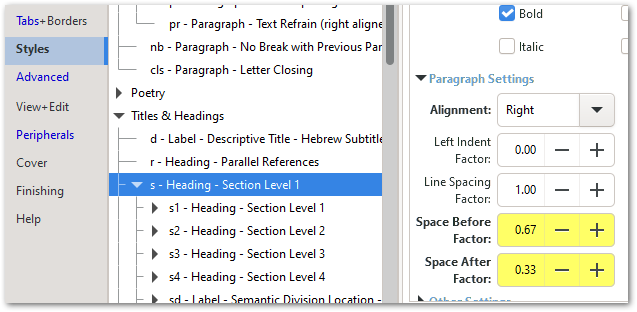
文字本身佔一行,因此它總是會佔用 2 行。
不過,如果你調整這些數值(有時需要一點試錯),應該就能讓它在頁面頂部壓縮,同時在文字欄中間保留足夠的空間。這裡我嘗試了上方 0.33 和下方 0.11,這似乎奏效了:
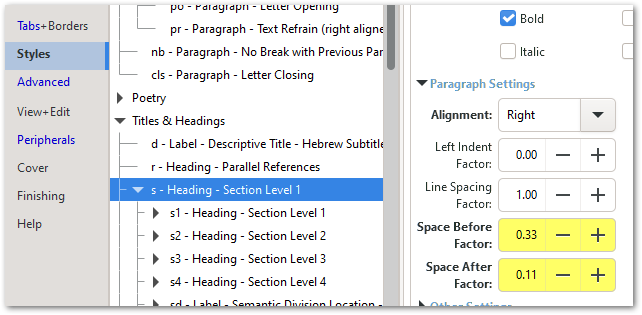
但請務必查看其他地方的標題,以確保沒有造成太大的混亂。
你也可以調整字體大小係數(Font Size Factor)和/或行距係數(Line Spacing Factor)來讓它擠進去,但通常調整前後間距(Space Before/After)的效果最快。
對於任何想要進行更多實驗的人(特別是如果你在 \s 標題之後有 \r 參考),請注意前後間距(Space Before/After)的值也可以是負數!
@mlucas53 This is a very common question, but I don’t think we’ve answered it particularly well in the distant past.
The issue here is that the \s - Heading style is requesting 0.67 of a line BEFORE the text and another 0.33 of a line AFTER the text.
The text itself takes one line, so it will always swallow 2 lines.
However, if you tweak those values (sometimes with a bit of trial and error) you should be able to convince it to scrunch up at the top of the page while still keeping sufficient space when the space comes half way through a column of text. Here I tried 0.33 above and 0.11 below and that seems to have done the trick:
But make sure you look at headers elsewhere to ensure it hasn’t messed them up too much.
You can also tweak the Font Size Factor and/or the Line Spacing Factor to make it squeeze in, but generally the tweaking of the Space Before/After has the quickest impact.
And for anyone who wants to have even more fun experimenting (especially if you have \r references after the \s heading) note that the Space Before/After values can also be negative!
機器翻譯自 English








