@mlucas53 Ini adalah pertanyaan yang sangat umum, tetapi saya tidak berpikir kita telah menjawabnya dengan cukup baik di masa lalu.
Isu di sini adalah bahwa gaya \s - Heading meminta 0,67 baris SEBELUM teks dan 0,33 baris SETELAH teks.
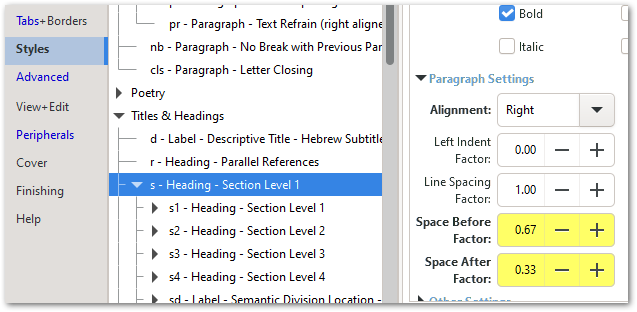
Teks itu sendiri mengambil satu baris, jadi itu akan selalu menelan 2 baris.
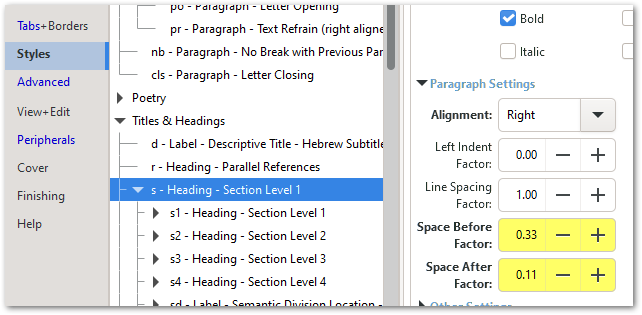
Namun, jika Anda menyesuaikan nilai-nilai tersebut (terkadang dengan sedikit coba-coba), Anda seharusnya bisa meyakinkannya untuk menyusut di bagian atas halaman sambil tetap mempertahankan ruang yang cukup ketika ruang tersebut berada di tengah kolom teks. Di sini saya mencoba 0,33 di atas dan 0,11 di bawah, dan tampaknya itu berhasil:
Tetapi pastikan Anda melihat header di tempat lain untuk memastikan itu tidak terlalu mengacaukannya.
Anda juga dapat menyesuaikan Font Size Factor dan/atau Line Spacing Factor untuk membuatnya muat, tetapi umumnya penyesuaian Space Before/After memiliki dampak tercepat.
Dan bagi siapa pun yang ingin bersenang-senang bereksperimen lebih banyak (terutama jika Anda memiliki referensi \r setelah judul \s) perhatikan bahwa nilai Space Before/After juga bisa negatif!
@mlucas53 This is a very common question, but I don’t think we’ve answered it particularly well in the distant past.
The issue here is that the \s - Heading style is requesting 0.67 of a line BEFORE the text and another 0.33 of a line AFTER the text.
The text itself takes one line, so it will always swallow 2 lines.
However, if you tweak those values (sometimes with a bit of trial and error) you should be able to convince it to scrunch up at the top of the page while still keeping sufficient space when the space comes half way through a column of text. Here I tried 0.33 above and 0.11 below and that seems to have done the trick:
But make sure you look at headers elsewhere to ensure it hasn’t messed them up too much.
You can also tweak the Font Size Factor and/or the Line Spacing Factor to make it squeeze in, but generally the tweaking of the Space Before/After has the quickest impact.
And for anyone who wants to have even more fun experimenting (especially if you have \r references after the \s heading) note that the Space Before/After values can also be negative!








