@mlucas53 Esta es una pregunta muy común, pero no creo que la hayamos respondido particularmente bien en el pasado.
El problema aquí es que el estilo \s - Heading está solicitando 0,67 de una línea ANTES del texto y otra 0,33 de una línea DESPUÉS del texto.
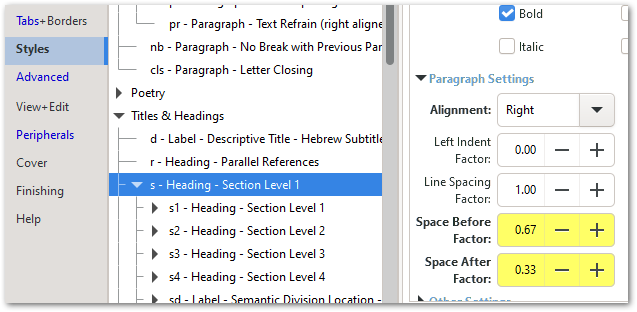
El texto en sí ocupa una línea, por lo que siempre consumirá 2 líneas.
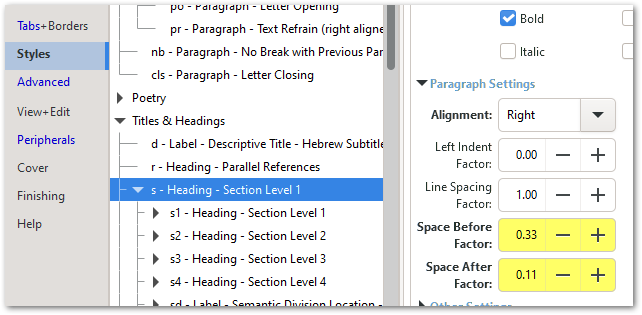
Sin embargo, si ajusta esos valores (a veces con un poco de prueba y error), debería poder convencerlo de que se comprima en la parte superior de la página, al tiempo que mantiene un espacio suficiente cuando el espacio llega a la mitad de una columna de texto. Aquí probé 0,33 arriba y 0,11 abajo, y eso parece haber hecho el truco:
Pero asegúrese de mirar los encabezados en otros lugares para asegurarse de que no los haya desordenado demasiado.
También puede ajustar el Factor de tamaño de fuente y/o el Factor de interlineado para hacer que se ajuste, pero generalmente el ajuste del Espacio Antes/Después tiene el impacto más rápido.
Y para cualquiera que quiera divertirse aún más experimentando (especialmente si tiene referencias \r después del encabezado \s), tenga en cuenta que ¡los valores de Espacio Antes/Después también pueden ser negativos!
@mlucas53 This is a very common question, but I don’t think we’ve answered it particularly well in the distant past.
The issue here is that the \s - Heading style is requesting 0.67 of a line BEFORE the text and another 0.33 of a line AFTER the text.
The text itself takes one line, so it will always swallow 2 lines.
However, if you tweak those values (sometimes with a bit of trial and error) you should be able to convince it to scrunch up at the top of the page while still keeping sufficient space when the space comes half way through a column of text. Here I tried 0.33 above and 0.11 below and that seems to have done the trick:
But make sure you look at headers elsewhere to ensure it hasn’t messed them up too much.
You can also tweak the Font Size Factor and/or the Line Spacing Factor to make it squeeze in, but generally the tweaking of the Space Before/After has the quickest impact.
And for anyone who wants to have even more fun experimenting (especially if you have \r references after the \s heading) note that the Space Before/After values can also be negative!








