嗯。我假设书卷引言在 01GENproject.SFM 文件中?如果它在 INT 书中,您可以尝试提前将其引入。
\zgetperiph|INTGEN\*
我认为这会起作用,但不能保证。
否则……您需要手动跟踪页码,因为 Python 生成的控制文件在读取 sfm 文件之前已经将页码重置为 1。
但如果您接受这一局限性,您可以使用钩子(hooks)手动重置它,例如:
\setbookhook{start}{GEN}{\pageno=-5}
\setcvhook{GEN1.1}{\pageno=1}
现在您只需要解决以下问题:
- 如果您的标题、引言等最终占据奇数页,您将需要强制插入一个空白页。
\zNeedOddPage 可能是您在这里的朋友。
- 您需要抑制经文前的自动空白页(外围事项选项卡)。
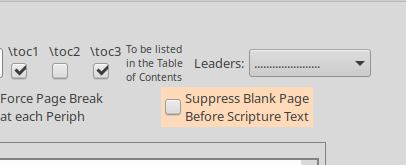
- 您可能需要开启“在同一页开始新书卷”或类似名称的选项。
如果您真的热衷于研究通用解决方案,我刚刚推送了一个半成品的变通方法,用于在 \oldpageno 中保留引言的页码
Hmm. I assume the book introduction is in the 01GENproject.SFM file? If it were in the INT book, then you could try to pull it in beforehand.
\zgetperiph|INTGEN\*
I think that would work, but it’s not guaranteed.
Otherwise… you’ll need to manually keep track of page numbers, because the control file that python generates has already reset the page number to 1, just before the sfm file gets read.
But if you accept that shortcoming, you could then use hooks to manually reset it, something like:
\setbookhook{start}{GEN}{\pageno=-5}
\setcvhook{GEN1.1}{\pageno=1}
Now you just have the following problems:
- If your title, introduction, the. ends up with an odd number of pages, you will need to force a blank page.
\zNeedOddPage is probably your friend here.
- you’d need to suppress the automatic blank page before scripture (peripherals tab).
- you probably need to turn on ‘start new book on the same page’ or whatever it’s called.
If you’re really keen on working on a general solution, I’ve just pushed a half-baked work-around for preserving the introduction’s page number in \oldpageno
机器翻译自 English








