Hmm. Saya asumsikan pengantar buku ada di file 01GENproject.SFM? Jika ada di buku INT, maka Anda bisa mencoba menariknya terlebih dahulu.
\zgetperiph|INTGEN\*
Saya berpikir itu akan berhasil, tetapi tidak dijamin.
Jika tidak… Anda perlu melacak nomor halaman secara manual, karena file kontrol yang dihasilkan python telah mengatur ulang nomor halaman menjadi 1, tepat sebelum file sfm dibaca.
Tetapi jika Anda menerima keterbatasan tersebut, Anda kemudian dapat menggunakan hook untuk mengatur ulang secara manual, seperti:
\setbookhook{start}{GEN}{\pageno=-5}
\setcvhook{GEN1.1}{\pageno=1}
Sekarang Anda hanya memiliki masalah-masalah berikut:
- Jika judul, pengantar, dll. berakhir dengan jumlah halaman ganjil, Anda akan perlu memaksa halaman kosong.
\zNeedOddPage mungkin adalah teman Anda di sini.
- Anda perlu menekan (suppress) halaman kosong otomatis sebelum kitab suci (tab peripherals).
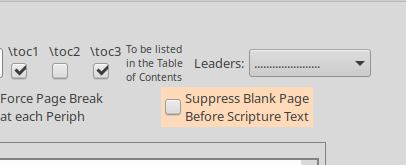
- Anda mungkin perlu mengaktifkan 'mulai buku baru di halaman yang sama' atau apa pun namanya.
Jika Anda benar-benar bersemangat untuk mengerjakan solusi umum, saya baru saja mendorong (push) solusi sementara (work-around) setengah jadi untuk mempertahankan nomor halaman pengantar di \oldpageno
Hmm. I assume the book introduction is in the 01GENproject.SFM file? If it were in the INT book, then you could try to pull it in beforehand.
\zgetperiph|INTGEN\*
I think that would work, but it’s not guaranteed.
Otherwise… you’ll need to manually keep track of page numbers, because the control file that python generates has already reset the page number to 1, just before the sfm file gets read.
But if you accept that shortcoming, you could then use hooks to manually reset it, something like:
\setbookhook{start}{GEN}{\pageno=-5}
\setcvhook{GEN1.1}{\pageno=1}
Now you just have the following problems:
- If your title, introduction, the. ends up with an odd number of pages, you will need to force a blank page.
\zNeedOddPage is probably your friend here.
- you’d need to suppress the automatic blank page before scripture (peripherals tab).
- you probably need to turn on ‘start new book on the same page’ or whatever it’s called.
If you’re really keen on working on a general solution, I’ve just pushed a half-baked work-around for preserving the introduction’s page number in \oldpageno
Diterjemahkan secara otomatis dari English








