Hmm. Suponho que a introdução do livro esteja no arquivo 01GENproject.SFM? Se estivesse no livro INT, você poderia tentar trazê-lo antes.
\zgetperiph|INTGEN\*
Eu acho que isso funcionaria, mas não é garantido.
Caso contrário… você precisará rastrear manualmente os números de página, porque o arquivo de controle gerado pelo python já reiniciou o número de página para 1, logo antes de o arquivo sfm ser lido.
Mas, se você aceitar essa limitação, poderá usar ganchos (hooks) para reiniciá-lo manualmente, algo como:
\setbookhook{start}{GEN}{\pageno=-5}
\setcvhook{GEN1.1}{\pageno=1}
Agora você tem apenas os seguintes problemas:
- Se o seu título, introdução, etc. terminar com um número ímpar de páginas, você precisará forçar uma página em branco.
\zNeedOddPage provavelmente será seu amigo aqui.
- você precisará suprimir a página em branco automática antes das Escrituras (aba Periféricos).
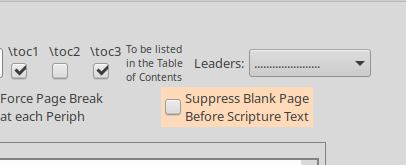
- provavelmente você precisa ativar 'iniciar novo livro na mesma página' ou como quer que se chame.
Se você estiver realmente interessado em trabalhar em uma solução geral, acabei de enviar um meio-termo mal resolvido para preservar o número de página da introdução em \oldpageno
Hmm. I assume the book introduction is in the 01GENproject.SFM file? If it were in the INT book, then you could try to pull it in beforehand.
\zgetperiph|INTGEN\*
I think that would work, but it’s not guaranteed.
Otherwise… you’ll need to manually keep track of page numbers, because the control file that python generates has already reset the page number to 1, just before the sfm file gets read.
But if you accept that shortcoming, you could then use hooks to manually reset it, something like:
\setbookhook{start}{GEN}{\pageno=-5}
\setcvhook{GEN1.1}{\pageno=1}
Now you just have the following problems:
- If your title, introduction, the. ends up with an odd number of pages, you will need to force a blank page.
\zNeedOddPage is probably your friend here.
- you’d need to suppress the automatic blank page before scripture (peripherals tab).
- you probably need to turn on ‘start new book on the same page’ or whatever it’s called.
If you’re really keen on working on a general solution, I’ve just pushed a half-baked work-around for preserving the introduction’s page number in \oldpageno
Tradução automática de English








