0
360 次瀏覽

我有一個專案,其 custom.sty 樣式表似乎包含許多舊內容,其中包括以下部分:

...
\Marker pc
\OccursUnder mt3

\Marker b
\OccursUnder mt3

# Custom style file created by the upgrade to Paratext 8.0. It is based upon
# the original style files used by your project.
# These files have been removed, but a backup of the files has been saved to
# usfm.sty.bak and custom.sty.bak.
...

在這個專案中,他們在詩篇中使用 \b 標記來標示段落分隔,但這些標記全都顯示為紅色,表示錯誤:
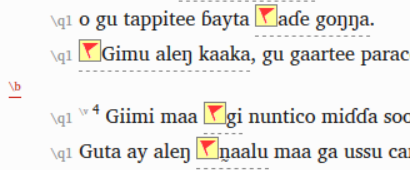
image

我推測這是因為這個自訂樣式表規定 \b 只能出現在 \mt3 之下。我想如果我從 custom.sty 中移除 \b 標記的定義,應該就能解決這個問題。

但我想知道這個樣式表中還有其他哪些來自早期版本(提到了升級到 Paratext 8.0……)的內容。如果這個團隊實際上沒有任何自訂樣式需求,我是否可以直接刪除該 custom.sty 檔案,讓它恢復為標準 USFM 樣式?這樣可能對他們更有幫助。有什麼要求或注意事項是我應該知道的嗎?需要管理員權限才能發送該變更嗎?

機器翻譯自 English
Paratext (1.4k 點) 提出 | 360 次瀏覽

2 個回答

0
最佳回答

有趣……我實際上將 \Marker b 行從 custom.sty 中移除,現在 \b 標記不再顯示為紅色,即不再給出錯誤。這讓我認為 \OccursUnder取代了標準定義中的內容。我假設標準定義是位於主要 My Paratext X Projects 資料夾中的 USFM.sty 檔案?該檔案中的 \b 標記只有一個簡單的 \OccursUnder c。那麼為什麼現在 \b 在 \q1 之下也是被接受的?看來我們需要更努力地理解這是如何運作的。

但就我的具體情況而言,我假設如果這個專案沒有任何特殊樣式需求,我應該可以只刪除 custom.sty 檔案,這樣就能恢復預設樣式?

機器翻譯自 English
(1.4k 點) 提出

If someone would write up a formal description of “OccursUnder”, I would rise up and call them blessed (and that’s something I typically only do for my mother).

As you’ve discovered, the line in a custom.sty sheet replaces what is in the usfm.sty sheet. It doesn’t merely supplement or add to it.

Where the supplement idea comes into play is that in your custom.sty sheet, you don’t have to rewrite every line defined in usfm.sty; if you edit it, it overrides usfm.sty. But if you don’t mention it, then usfm.sty still is in effect.

Where I’m still fuzzy is exactly the scope of OccursUnder. I think what it means is “does this marker fall somewhere in the heirarchy under that other marker?”. So \b falls under something (probably \v), which falls under something else \c–the important one, which falls under something else–maybe \id, etc. It would be nice to see a flow chart or some sort of organization to see what (according to usfm.sty) is considered a subset of what.

嗯,看來 Nathan 必須獲得你的祝福了……

機器翻譯自 English
0

嗨 jeffh。我經常建立 custom.sty 樣式表(事實上,上面的可能就是我建立的其中之一)。那裡給出的定義是對 usfm.sty 中已有內容的補充。usfm.sty 檔案已經包含 \b 的定義,包括它出現在哪些標記之下,因此 custom.sty 中的內容是附加在那之上的(而不是將其限制為「僅」)。在這種情況下,該專案顯然在某個階段希望能在 \mt3 之後有一個額外的空行,當然,更好的做法可能是直接增加 \mt3 樣式定義中的「後間距」。正如你所說,檢查 custom.sty 在專案中是否真的需要的一个好方法是將其從專案資料夾中移除,看看會發生什麼情況(即執行 Run basic checks 後報告的內容)。不過,為了讓 \b 不再顯示為紅色,你應該實際在 custom.sty 中新增:
\Marker b
\OccursUnder q1

機器翻譯自 English
(192 點) 提出

相關問題

0
0 個回答 155 次瀏覽
I've been working with a user who believed he needed to use a non-standard style sheet because he ... paragraph publishable vernacular \StyleType Paragraph \FontSize 12 \Italic
[Expert]
sewhite
3.3k 提出
已提問 3月 23, 2018
0
1 個回答 88 次瀏覽
我該如何為註解圖示新增顏色或變更現有顏色? 目前的顏色有紅色、紫色和天藍色。例如,我該如何新增一組綠色圖示?我是否必須修改自訂的 custom.sty 樣式表?
edwinsmith 114 提出 已提問 10月 31, 2024
0
1 個回答 206 次瀏覽
In custom.sty, is there a way to remove borders from tables (i.e., under \tr or tc#)? I don't see an ... show tables without borders, but usfm.sty seems to default to borders.
drwww 448 提出 已提問 4月 2, 2020
0
1 個回答 316 次瀏覽
(mnjames 寫道) usfm.sty 樣式表中將 \Italic 列為 \Marker qt 的屬性之一 我希望在 Paratext 中讓引文顯示為無格式文字 我已經從 usfm.sty 中移除了 \Italic,但當樣式 ... usfm.sty 中的 \Italic 我找到了 \Italic 和 \Bold 格式,但找不到移除它們的方法
匿名 提出 已提問 4月 10, 2015
0
1 個回答 57 次瀏覽
我想變更 HEB/GRK 資源的字型。當我在「專案設定 > 語言設定」中進行此操作時,系統允許我變更字型,但儲存並關閉檔案後,選擇似乎又恢復為預設值(在此案例中為 Ezra SIL)。是否有辦法在自訂設定或自訂樣式表中覆寫此字型?
edwinsmith 114 提出 已提問 10月 31, 2024
Welcome to Support Bible, where you can ask questions and receive answers from other members of the community.
But if we walk in the light, as he is in the light, we have fellowship with one another, and the blood of Jesus, his Son, purifies us from all sin.
1 John 1:7
3,045 個問題
6,005 個回答
5,671 則評論
2,026 位使用者







