0 votes
337 views

I’d like to have Paratext open as though it were a new installation. I tried holding Shift and resetting Paratext, but it didn’t erase my Registration Information (which is good for most users).

I’m just trying to see what windows appear when Paratext is first installed.

Like this one. Does this type of window appear for a brand new installation? (This screenshot may need to be updated to include the sensitive locations option).
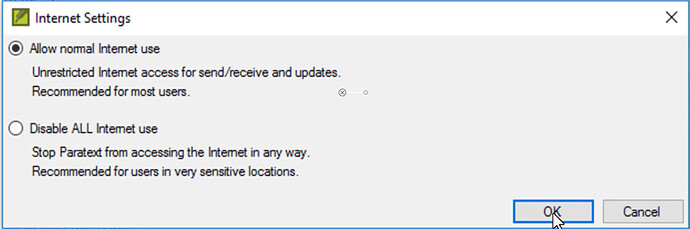
Paratext by [Moderator]
(2.1k points)

reshown | 337 views

1 Answer

+1 vote
Best answer

To mimic a new installation, you would have to uninstall Paratext and then delete all of the
C:\Users\{UserName}\AppData\Local\ParatextXX directories and the
C:\Users\{UserName}\AppData\Local\United_Bible_Societies directory. Then, reinstalling should recreate those directories with the default values. That should mostly mimic a completely new installation (You could also delete the My Paratext Projects directory and choose to remove all settings when uninstalling to be even more thorough).

by [Expert]
(16.7k points)

reshown

Thank you for these tips.

I never saw an option to disable Internet. Does that happen by default anymore on a fresh install of Paratext?

I also didn’t get the chance to enter my registration information. I believe there’s a registry setting or something somewhere that I may need to delete?

When a Paratext major release (like 9.3.102.1) is being run for the first time, it will copy settings from previous versions if any are in the C:\Users{UserName}\AppData\Local\ folder.

So, I suspect there was some Paratext80 … Paratext92 folder there and the registration and internet settings were copied from it.

Related questions

0 votes
1 answer 125 views
The error message is: Paratext could not save changes to project history. This may indicate that your local copy of the ... Send/Receive server other than by doing a send/receive?
Glenn Kerr 102 asked Apr 22
0 votes
1 answer 281 views
Navigate to: http://scripts.sil.org/cms/scripts/page.php?site_id=nrsi&id=enccnvtrs Under the Downloads heading, in the SIL ... . See also: How do I add an encoding converter?
[Expert]
anon421222
735
asked Feb 23, 2017
0 votes
2 answers 292 views
I want to add new keyterms to the customized keyterm list of the translation project. But I can only find instructions how ... add more new keyterms to the list as such. Any help?
anon532188 175 asked Mar 24, 2021
0 votes
1 answer 420 views
If you get a message that says that your registration code is invalid or out-of-date, you need to get a new ... because your Paratext registration code is invalid or out-of-date.
[Expert]
anon421222
735
asked Feb 23, 2017
Welcome to Support Bible, where you can ask questions and receive answers from other members of the community.
And I tell you that you are Peter, and on this rock I will build my church, and the gates of Hades will not overcome it.
Matthew 16:18
3,054 questions
6,014 answers
5,677 comments
2,033 users






