某些翻譯專案不希望腳註末尾有句號。如果直接省略句號,腳註將無法通過標點檢查。不過,Paratext 中有一個選用的設定,可以告訴 Paratext 不要對腳註套用標點檢查。
如何變更「檢查腳註中的句末標點」(Check Final Punction in Footnotes)設定
-
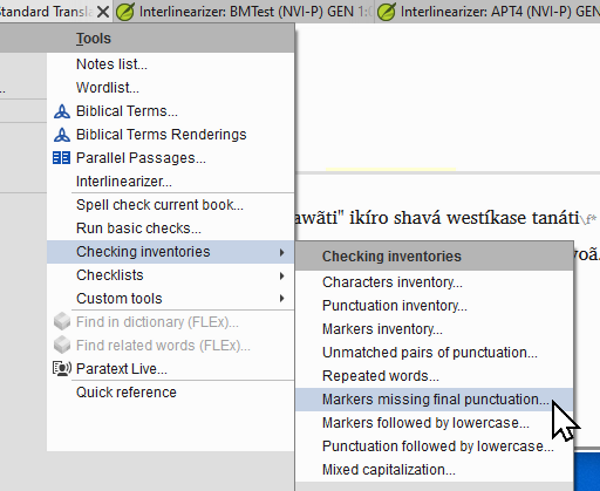
前往 專案(Project) 選單 > 工具(Tools) > 檢查清單(Checking Inventories) > 缺少句末標點的標記(Markers missing final punctuation)。
-
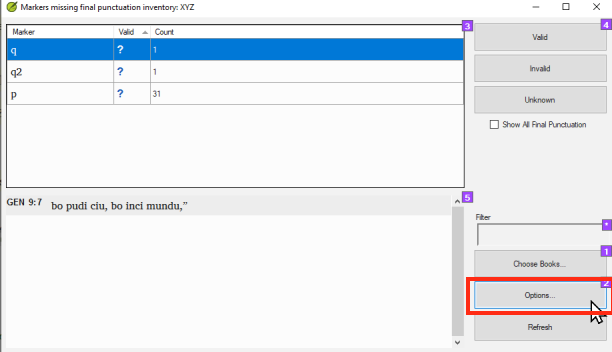
點擊 選項(Options) 按鈕。
-
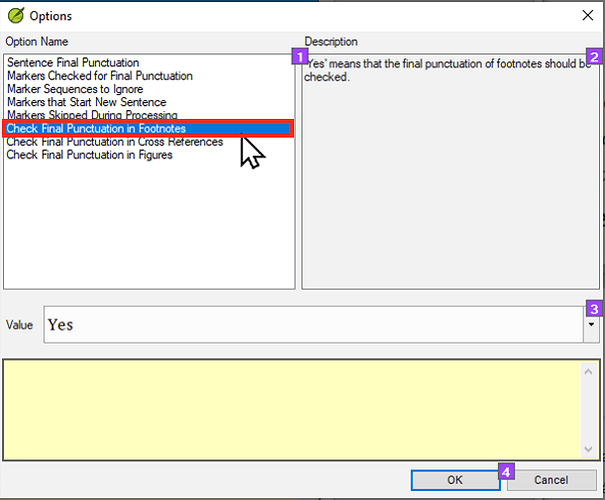
點擊「檢查腳註中的句末標點」(Check Final Punctuation in Footnotes)。
Check final punctuation in footnotes-1612×505 60.9 KB
-
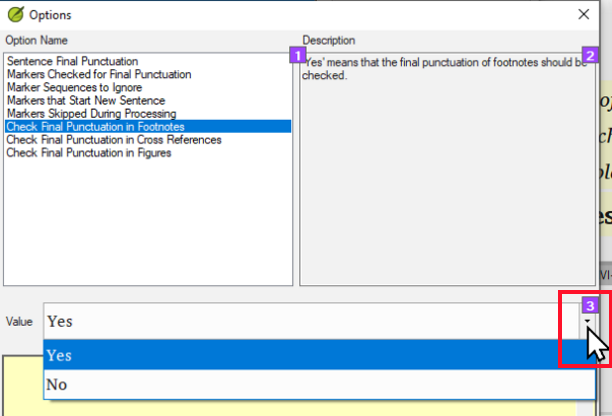
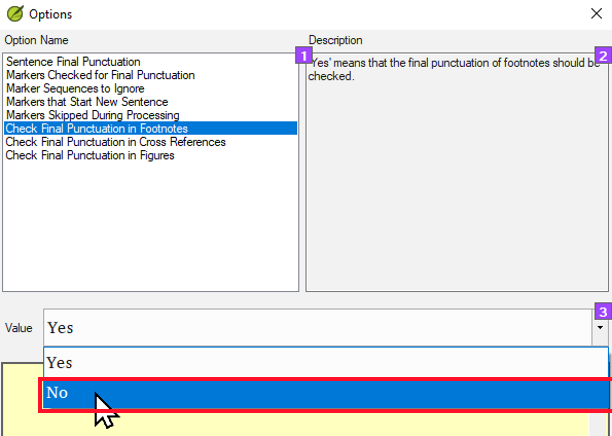
點擊「值」(Value)下拉選單。
-
點擊「否」(No)。
-
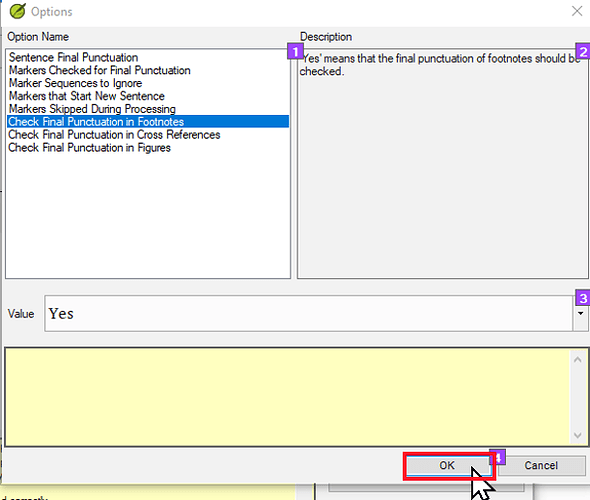
點擊「確定」(OK)。
Click on OK-1612×518 55.1 KB
-
再次點擊「確定」(OK)。
結論
此設定將導致 Paratext 不對腳註執行句末標點檢查。這意味著沒有句末標點(通常是句號)的腳註將通過標點基本檢查。
注意: 此設定不會在您的一些腳註確實有句末標點時發出警告。如果您擔心腳註不一致,即有些有句末標點而有些沒有,則必須透過其他方式檢查一致性。一個很好的方法是使用腳註檢查清單。您可以透過前往 專案(Project)選單 > 工具(Tools) > 檢查清單(Checklists) > 腳註(Footnotes) 來找到它。如需更全面的解決方案,請參閱主題:如何查找並刪除腳註末尾的句號 - 幫助 - Paratext 支援者網站
Some translation projects do not want to have periods at the end of their footnotes. Simply leaving them off will cause the footnotes to fail the punctuation check. However, there is an optional setting in Paratext that allows you to tell Paratext that it should not apply the punctuation check to footnotes.
How to change the “Check Final Punction in Footnotes” setting
-
Go to the Project menu > Tools > Checking Inventories > Markers missing final punctuation.
-
Click on the Options button.
-
Click on Check Final Punctuation in Footnotes.
Check final punctuation in footnotes-1612×505 60.9 KB
-
Click on the Value dropdown.
-
Click on No.
-
Click OK.
Click on OK-1612×518 55.1 KB
-
Click OK again.
Conclusion
This setting will cause Paratext NOT to run the sentence final punctuation check on footnotes. This means that footnotes without sentence final punctuation (typically a period) will pass the punctuation basic check.
Note: This setting will NOT alert you if some footnotes DO have sentence final punctuation. If you are concerned that your footnotes are inconsistent and that some have sentence final punctuation and others do not, then you will have to check for consistency another way. One good way to do this is to use the footnote checklist. This can be found by going to the Project menu > Tools > Checklists > Footnotes. For a more comprehensive solution see the topic: How to find and delete periods at the end of footnotes - Helps - Paratext Supporter Site
機器翻譯自 English








