Некоторые проекты перевода не хотят ставить точку в конце своих сносок. Просто опуская её, вы заставите сноски не пройти проверку пунктуации. Однако в Paratext есть необязательный параметр, который позволяет указать программе, что она не должна применять проверку пунктуации к сноскам.
Как изменить настройку «Проверка конечной пунктуации в сносках» (Check Final Punction in Footnotes)
-
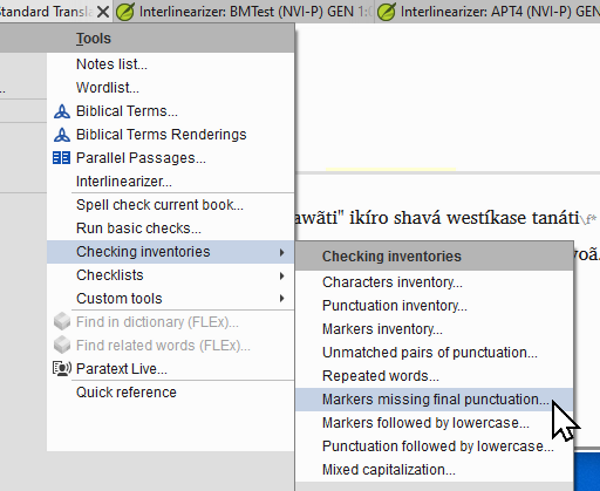
Перейдите в меню Project > Tools > Checking Inventories > Markers missing final punctuation.
-
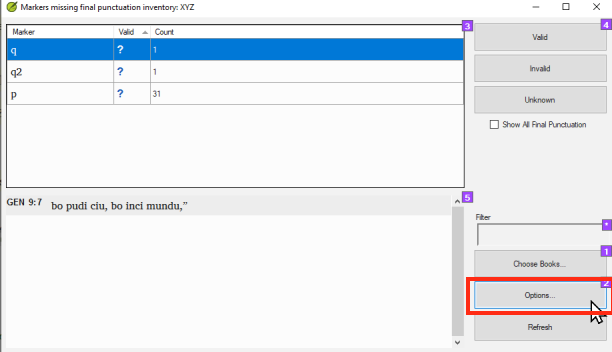
Нажмите на кнопку Options.
-
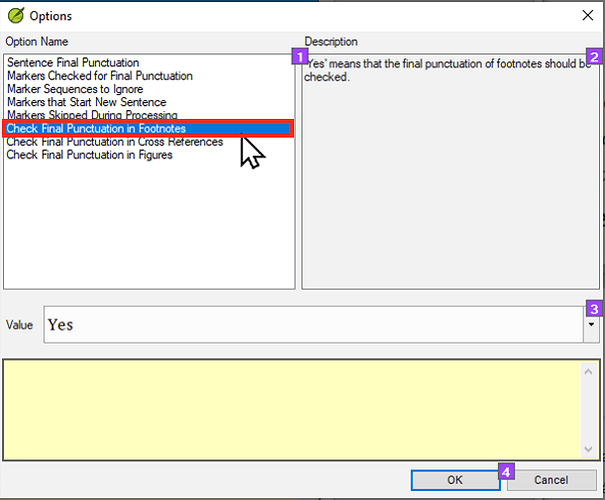
Нажмите на Check Final Punctuation in Footnotes.
Check final punctuation in footnotes-1612×505 60.9 KB
-
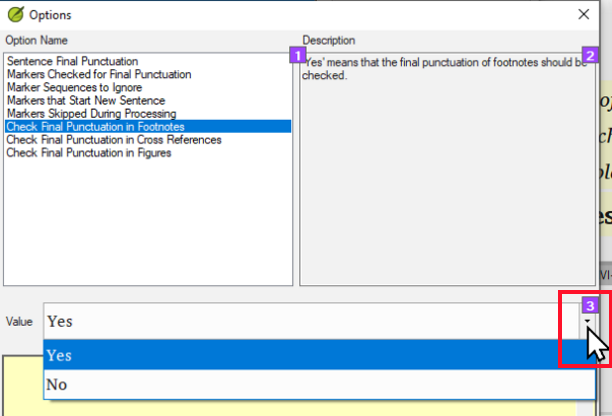
Нажмите на выпадающий список Value.
-
Нажмите на No.
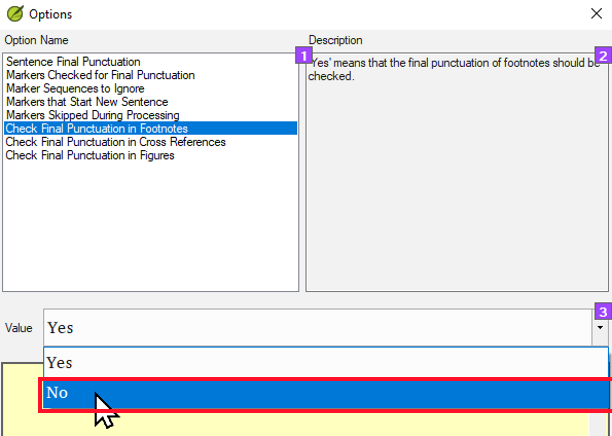
-
Нажмите OK.
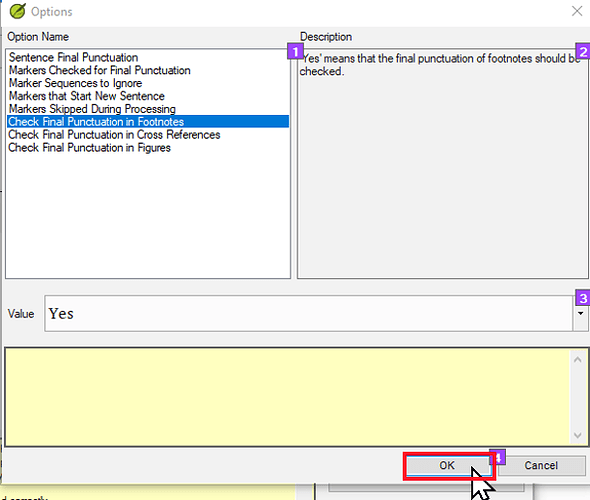
Click on OK-1612×518 55.1 KB
-
Нажмите OK ещё раз.
Заключение
Эта настройка заставит Paratext НЕ выполнять проверку конечной пунктуации предложений в сносках. Это означает, что сноски без конечной пунктуации предложения (обычно точки) пройдут базовую проверку пунктуации.
Примечание: Эта настройка НЕ предупредит вас, если в некоторых сносках ЕСТЬ конечная пунктуация предложения. Если вас беспокоит, что ваши сноски непоследовательны и в некоторых есть конечная пунктуация предложения, а в других нет, вам придётся проверять последовательность другим способом. Один хороший способ сделать это — использовать чек-лист сносок. Его можно найти, перейдя в меню Project > Tools > Checklists > Footnotes. Для более комплексного решения см. тему: Как найти и удалить точки в конце сносок - Helps - Paratext Supporter Site
Some translation projects do not want to have periods at the end of their footnotes. Simply leaving them off will cause the footnotes to fail the punctuation check. However, there is an optional setting in Paratext that allows you to tell Paratext that it should not apply the punctuation check to footnotes.
How to change the “Check Final Punction in Footnotes” setting
-
Go to the Project menu > Tools > Checking Inventories > Markers missing final punctuation.
-
Click on the Options button.
-
Click on Check Final Punctuation in Footnotes.
Check final punctuation in footnotes-1612×505 60.9 KB
-
Click on the Value dropdown.
-
Click on No.
-
Click OK.
Click on OK-1612×518 55.1 KB
-
Click OK again.
Conclusion
This setting will cause Paratext NOT to run the sentence final punctuation check on footnotes. This means that footnotes without sentence final punctuation (typically a period) will pass the punctuation basic check.
Note: This setting will NOT alert you if some footnotes DO have sentence final punctuation. If you are concerned that your footnotes are inconsistent and that some have sentence final punctuation and others do not, then you will have to check for consistency another way. One good way to do this is to use the footnote checklist. This can be found by going to the Project menu > Tools > Checklists > Footnotes. For a more comprehensive solution see the topic: How to find and delete periods at the end of footnotes - Helps - Paratext Supporter Site








