Beberapa proyek terjemahan tidak ingin menggunakan titik di akhir catatan kaki mereka. Sederhana saja, jika titik tidak ditambahkan, catatan kaki tersebut akan gagal dalam pemeriksaan tanda baca. Namun, ada pengaturan opsional di Paratext yang memungkinkan Anda memberi tahu Paratext agar tidak menerapkan pemeriksaan tanda baca pada catatan kaki.
Cara mengubah pengaturan “Check Final Punction in Footnotes”
-
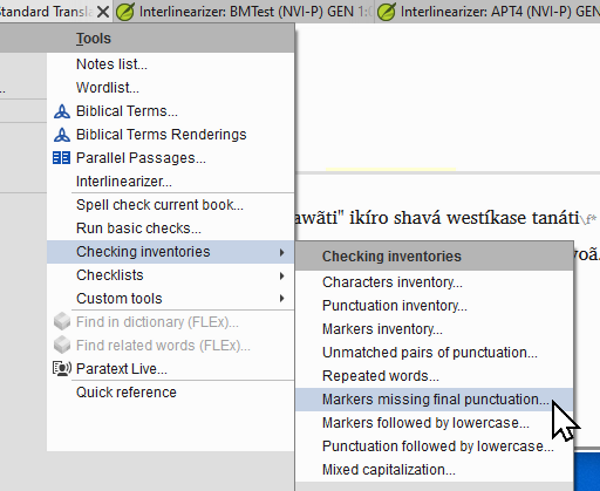
Buka menu Project > Tools > Checking Inventories > Markers missing final punctuation.
-
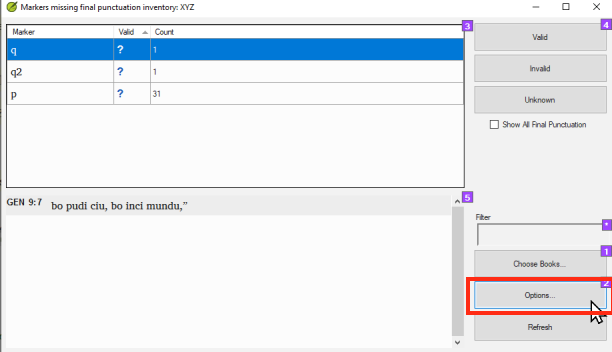
Klik tombol Options.
-
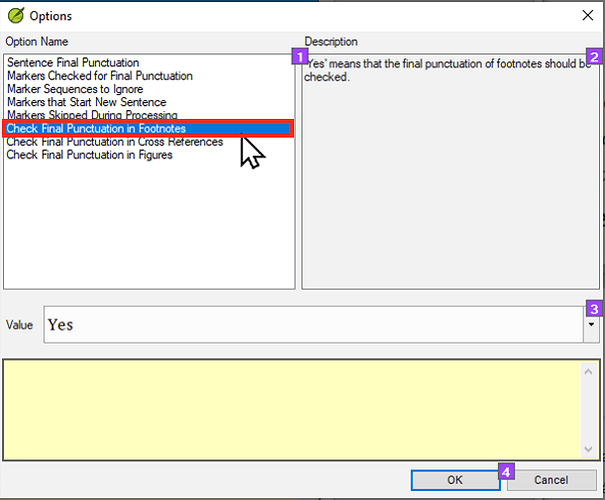
Klik pada Check Final Punctuation in Footnotes.
Check final punctuation in footnotes-1612×505 60.9 KB
-
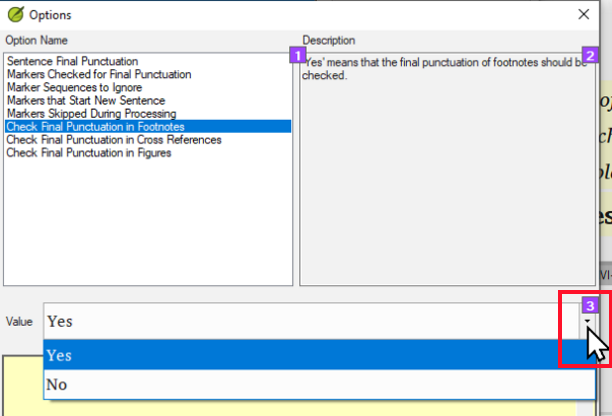
Klik pada dropdown Value.
-
Klik pada No.
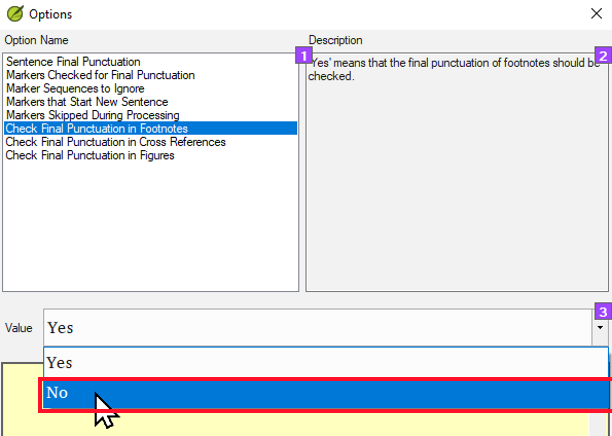
-
Klik OK.
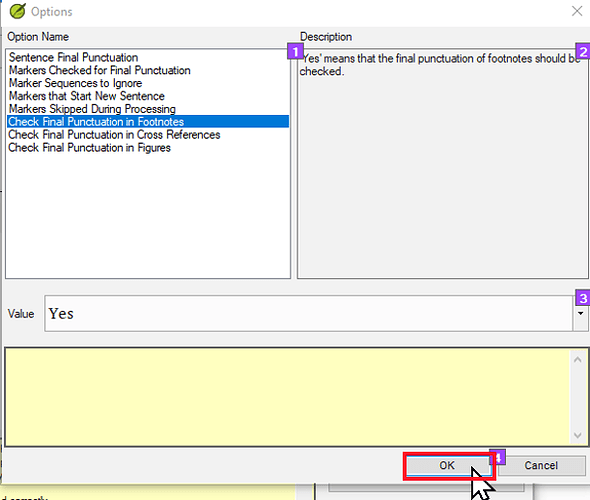
Click on OK-1612×518 55.1 KB
-
Klik OK sekali lagi.
Kesimpulan
Pengaturan ini akan menyebabkan Paratext TIDAK menjalankan pemeriksaan tanda baca akhir kalimat pada catatan kaki. Ini berarti bahwa catatan kaki tanpa tanda baca akhir kalimat (biasanya titik) akan lolos pemeriksaan tanda baca dasar.
Catatan: Pengaturan ini TIDAK akan memberi tahu Anda jika beberapa catatan kaki MEMANG memiliki tanda baca akhir kalimat. Jika Anda khawatir bahwa catatan kaki Anda tidak konsisten dan beberapa memiliki tanda baca akhir kalimat sementara yang lain tidak, maka Anda harus memeriksa konsistensinya dengan cara lain. Salah satu cara yang baik untuk melakukan ini adalah dengan menggunakan daftar periksa catatan kaki. Ini dapat ditemukan dengan membuka menu Project > Tools > Checklists > Footnotes. Untuk solusi yang lebih komprehensif, lihat topik: How to find and delete periods at the end of footnotes - Helps - Paratext Supporter Site
Some translation projects do not want to have periods at the end of their footnotes. Simply leaving them off will cause the footnotes to fail the punctuation check. However, there is an optional setting in Paratext that allows you to tell Paratext that it should not apply the punctuation check to footnotes.
How to change the “Check Final Punction in Footnotes” setting
-
Go to the Project menu > Tools > Checking Inventories > Markers missing final punctuation.
-
Click on the Options button.
-
Click on Check Final Punctuation in Footnotes.
Check final punctuation in footnotes-1612×505 60.9 KB
-
Click on the Value dropdown.
-
Click on No.
-
Click OK.
Click on OK-1612×518 55.1 KB
-
Click OK again.
Conclusion
This setting will cause Paratext NOT to run the sentence final punctuation check on footnotes. This means that footnotes without sentence final punctuation (typically a period) will pass the punctuation basic check.
Note: This setting will NOT alert you if some footnotes DO have sentence final punctuation. If you are concerned that your footnotes are inconsistent and that some have sentence final punctuation and others do not, then you will have to check for consistency another way. One good way to do this is to use the footnote checklist. This can be found by going to the Project menu > Tools > Checklists > Footnotes. For a more comprehensive solution see the topic: How to find and delete periods at the end of footnotes - Helps - Paratext Supporter Site
Diterjemahkan secara otomatis dari English








