Algunos proyectos de traducción no desean tener puntos al final de sus notas al pie. Simplemente omitirlos hará que las notas al pie no pasen la comprobación de puntuación. Sin embargo, hay una configuración opcional en Paratext que le permite indicarle a Paratext que no debe aplicar la comprobación de puntuación a las notas al pie.
Cómo cambiar la configuración “Check Final Punction in Footnotes”
-
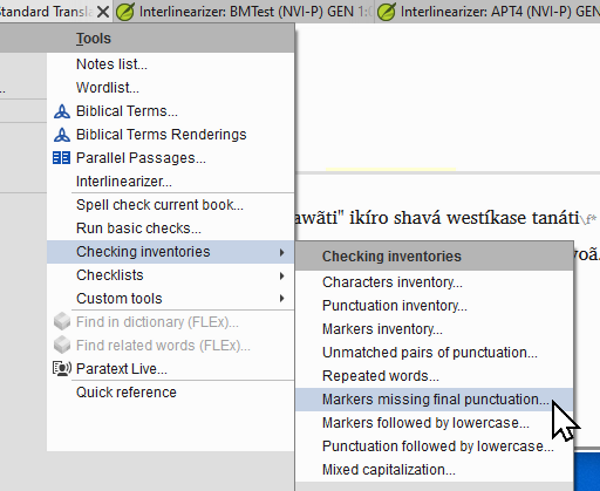
Vaya al menú Project > Tools > Checking Inventories > Markers missing final punctuation.
-
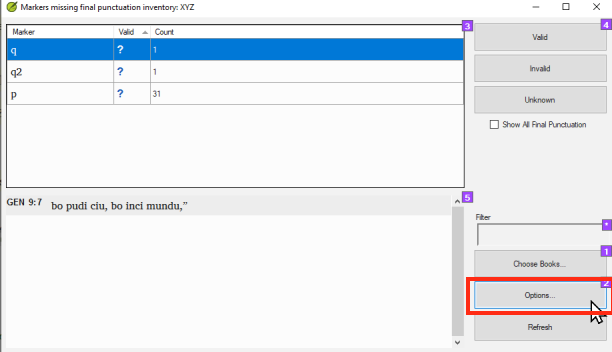
Haga clic en el botón Options.
-
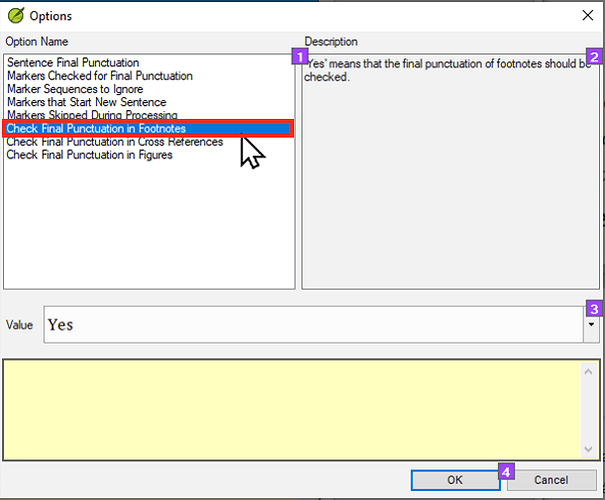
Haga clic en Check Final Punctuation in Footnotes.
Check final punctuation in footnotes-1612×505 60.9 KB
-
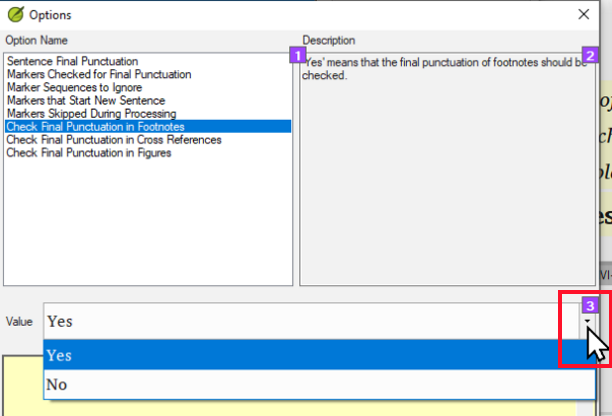
Haga clic en el menú desplegable Value.
-
Haga clic en No.
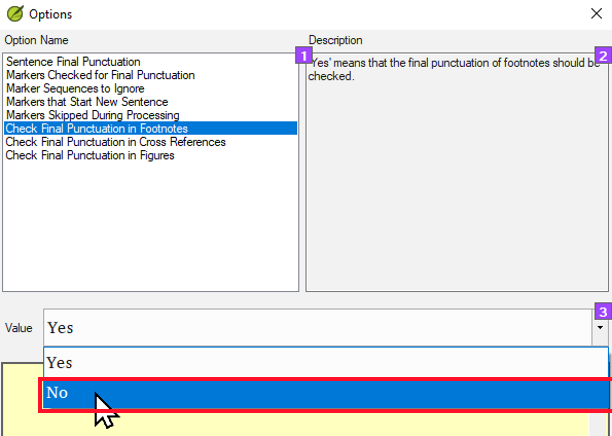
-
Haga clic en OK.
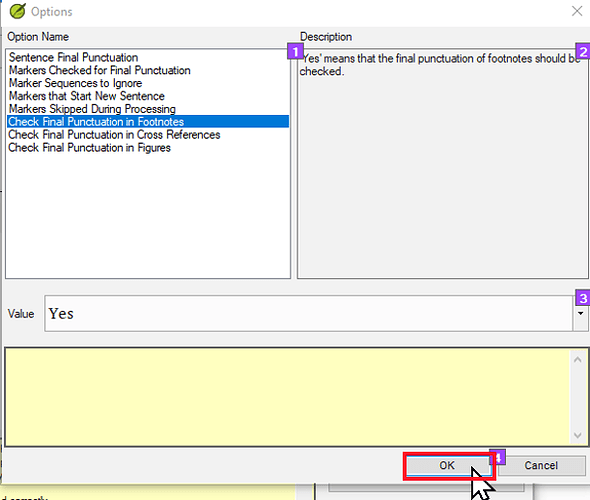
Click on OK-1612×518 55.1 KB
-
Haga clic en OK nuevamente.
Conclusión
Esta configuración hará que Paratext NO ejecute la comprobación de puntuación final de oración en las notas al pie. Esto significa que las notas al pie sin puntuación final de oración (típicamente un punto) pasarán la comprobación básica de puntuación.
Nota: Esta configuración NO le alertará si algunas notas al pie SÍ tienen puntuación final de oración. Si le preocupa que sus notas al pie sean inconsistentes y que algunas tengan puntuación final de oración y otras no, entonces tendrá que comprobar la consistencia de otra manera. Una buena forma de hacerlo es usar la lista de verificación de notas al pie. Esto se puede encontrar yendo al menú Project > Tools > Checklists > Footnotes. Para una solución más completa, vea el tema: How to find and delete periods at the end of footnotes - Helps - Paratext Supporter Site
Some translation projects do not want to have periods at the end of their footnotes. Simply leaving them off will cause the footnotes to fail the punctuation check. However, there is an optional setting in Paratext that allows you to tell Paratext that it should not apply the punctuation check to footnotes.
How to change the “Check Final Punction in Footnotes” setting
-
Go to the Project menu > Tools > Checking Inventories > Markers missing final punctuation.
-
Click on the Options button.
-
Click on Check Final Punctuation in Footnotes.
Check final punctuation in footnotes-1612×505 60.9 KB
-
Click on the Value dropdown.
-
Click on No.
-
Click OK.
Click on OK-1612×518 55.1 KB
-
Click OK again.
Conclusion
This setting will cause Paratext NOT to run the sentence final punctuation check on footnotes. This means that footnotes without sentence final punctuation (typically a period) will pass the punctuation basic check.
Note: This setting will NOT alert you if some footnotes DO have sentence final punctuation. If you are concerned that your footnotes are inconsistent and that some have sentence final punctuation and others do not, then you will have to check for consistency another way. One good way to do this is to use the footnote checklist. This can be found by going to the Project menu > Tools > Checklists > Footnotes. For a more comprehensive solution see the topic: How to find and delete periods at the end of footnotes - Helps - Paratext Supporter Site
Traducción automática desde English








