在設定關聯時,文字系統必須完全相同。這是我的 Paratext 專案範例。
它出現了關聯錯誤
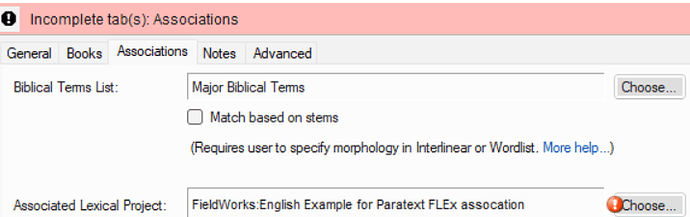
image716×226 46.3 KB
根據我的經驗(好吧,是我故意造成這個錯誤的),問題在於文字系統的具體程度不匹配。
Paratext 登錄檔中的語言設定是
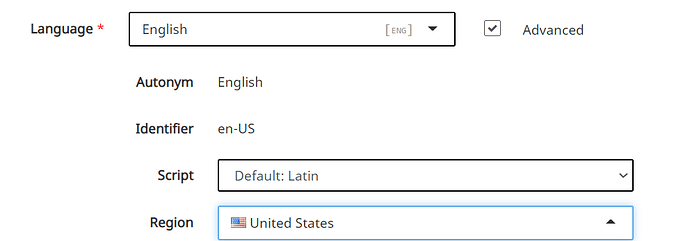
image992×347 17.5 KB
FLEx 9 中的本土語言文字系統是

如果我確實需要在 Paratext 中保留書寫系統和地區,那麼我需要將 FLEx 本土語言文字系統中的 Special: 改為 Script/Region/Variant 並相應設定。
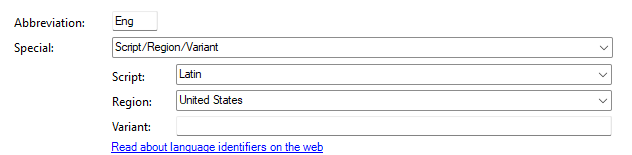
在範例中,我選擇讓 FLEx 與 Paratext 保持一致。一旦我這樣做了……然後關閉這兩個應用程式,並重新開啟 Paratext,關聯問題就消失了
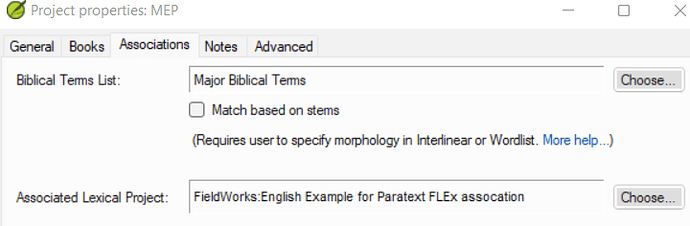
image720×236 41.5 KB
您還需要使用相容版本的 FLEx 和 Paratext。您需要使用 FLEx 9.0 和最新版本的 Paratext。
When setting up the association, the writing systems have to be exactly the same. This is my example Paratex project.
It’s getting an Association error
image716×226 46.3 KB
I know from experience (well, and I caused the error on purpose) that the problem is a mismatch in the specificity of the writing system.
The language settings in the Paratext registry are
image992×347 17.5 KB
The vernacular writing system in FLEx 9 is
If I really need to keep script and region in Paratext, then I need to change Special: in the FLEx Vernacular Writing system to Script/Region/Variant and set it accordingly.
In example, I opted to make FLEx match Paratext. Once I did that…and then closed both apps, and opened Paratext, the association issue goes away
image720×236 41.5 KB
You do also need to be on compatible versions of FLEx and Paratext. You need to be using FLEx 9.0 and the latest version of Paratext.
機器翻譯自 English








