Saat mengatur asosiasi, sistem penulisan harus sama persis. Ini adalah proyek Paratext saya sebagai contoh.
Saya mendapatkan error Asosiasi
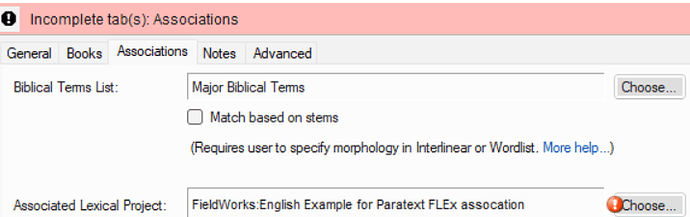
image716×226 46.3 KB
Dari pengalaman saya (dan saya sengaja menyebabkan error ini), masalahnya adalah ketidakcocokan dalam spesifisitas sistem penulisan.
Pengaturan bahasa di registry Paratext adalah
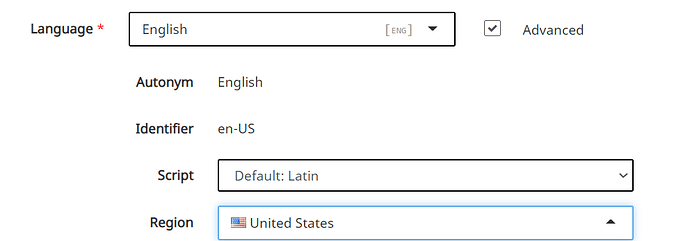
image992×347 17.5 KB
Sistem penulisan vernakular di FLEx 9 adalah

Jika saya benar-benar perlu mempertahankan skrip dan wilayah di Paratext, maka saya perlu mengubah Special: di sistem penulisan Vernakular FLEx menjadi Script/Region/Variant dan menyesuaikannya.
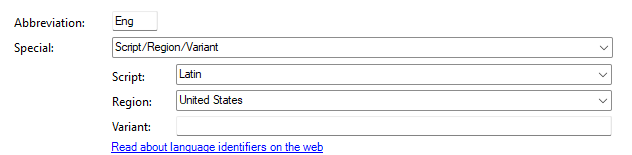
Sebagai contoh, saya memilih untuk membuat FLEx sesuai dengan Paratext. Setelah saya melakukan itu… lalu menutup kedua aplikasi, dan membuka Paratext, masalah asosiasi tersebut hilang
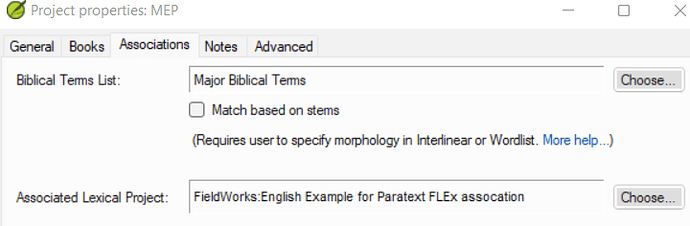
image720×236 41.5 KB
Anda juga harus menggunakan versi FLEx dan Paratext yang kompatibel. Anda perlu menggunakan FLEx 9.0 dan versi Paratext terbaru.
When setting up the association, the writing systems have to be exactly the same. This is my example Paratex project.
It’s getting an Association error
image716×226 46.3 KB
I know from experience (well, and I caused the error on purpose) that the problem is a mismatch in the specificity of the writing system.
The language settings in the Paratext registry are
image992×347 17.5 KB
The vernacular writing system in FLEx 9 is
If I really need to keep script and region in Paratext, then I need to change Special: in the FLEx Vernacular Writing system to Script/Region/Variant and set it accordingly.
In example, I opted to make FLEx match Paratext. Once I did that…and then closed both apps, and opened Paratext, the association issue goes away
image720×236 41.5 KB
You do also need to be on compatible versions of FLEx and Paratext. You need to be using FLEx 9.0 and the latest version of Paratext.
Diterjemahkan secara otomatis dari English








