संबंध (association) सेटअप करते समय, लेखन प्रणालियों (writing systems) का बिल्कुल एक जैसा होना आवश्यक है। यह मेरा उदाहरण Paratext प्रोजेक्ट है।
एक Association error आ रहा है
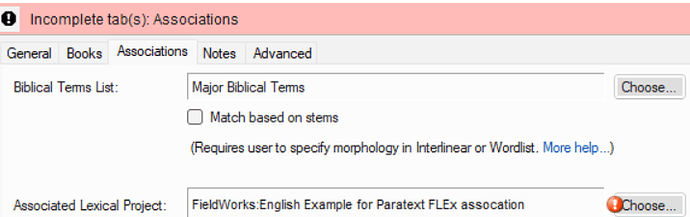
image716×226 46.3 KB
मेरे अनुभव से (और मैंने जानबूझकर यह त्रुटि उत्पन्न की थी) मुझे पता है कि समस्या लेखन प्रणाली की विशिष्टता (specificity) में असंगति है।
Paratext रजिस्ट्री में भाषा सेटिंग्स हैं
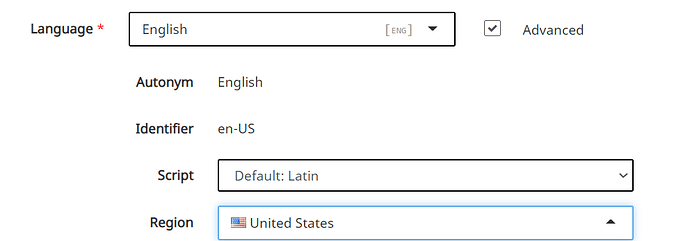
image992×347 17.5 KB
FLEx 9 में स्थानीय (vernacular) लेखन प्रणाली है

अगर मुझे Paratext में स्क्रिप्ट और क्षेत्र (region) को बनाए रखना ही है, तो मुझे FLEx Vernacular Writing system में Special: को Script/Region/Variant में बदलना होगा और इसे अनुरूप रूप से सेट करना होगा।
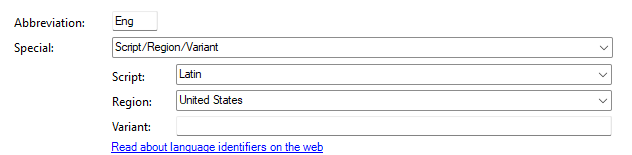
उदाहरण के लिए, मैंने FLEx को Paratext से मेल खाने के लिए चुना। एक बार जब मैंने ऐसा किया… और फिर दोनों ऐप्स बंद कर दिए, और Paratext खोला, तो संबंध (association) की समस्या समाप्त हो गई
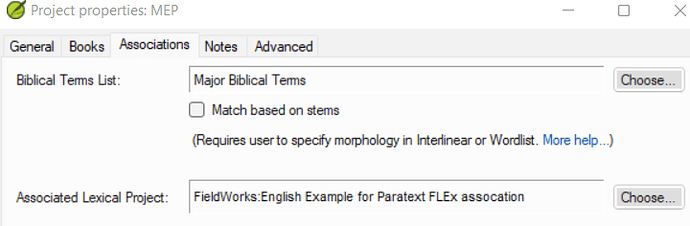
image720×236 41.5 KB
आपको FLEx और Paratext की संगत संस्करणों (compatible versions) पर भी होना चाहिए। आपको FLEx 9.0 और Paratext के नवीनतम संस्करण का उपयोग करना चाहिए।
When setting up the association, the writing systems have to be exactly the same. This is my example Paratex project.
It’s getting an Association error
image716×226 46.3 KB
I know from experience (well, and I caused the error on purpose) that the problem is a mismatch in the specificity of the writing system.
The language settings in the Paratext registry are
image992×347 17.5 KB
The vernacular writing system in FLEx 9 is
If I really need to keep script and region in Paratext, then I need to change Special: in the FLEx Vernacular Writing system to Script/Region/Variant and set it accordingly.
In example, I opted to make FLEx match Paratext. Once I did that…and then closed both apps, and opened Paratext, the association issue goes away
image720×236 41.5 KB
You do also need to be on compatible versions of FLEx and Paratext. You need to be using FLEx 9.0 and the latest version of Paratext.
English से मशीन-अनुवादित








