+1 vote
568 views

In all projects I’m working, all parallel passages show up.

In one project I only see NT parallel passages plus one single parallel passages from the OT (PSA 118:26).

Why can’t I see all parallel passages?

“All parallels” is active.
All books are active in “Project Properties”

Paratext by (155 points)
reshown | 568 views

6 Answers

0 votes
Best answer

I realise I am late to this conversation, but missing books shouldn’t cause parallel passages not to show up in the tool. If that happens, please report a bug. I can believe that funky \id lines would cause things not to work.

The dialog which defines which books are to be checked for parallelism is in the PP tool menu. It can be a different list of books to the project progress scope:
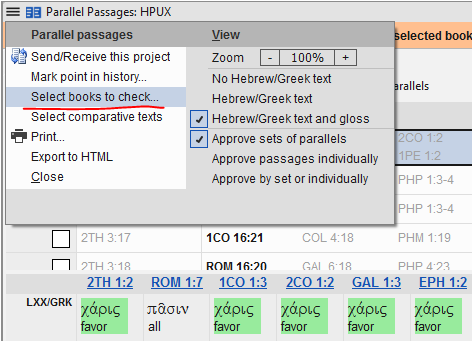
image

In Paratext 9.2 opening the Parallel Passages tool to (or navigating to) a book which is not currently included in parallel passage checking scope, should show a banner which looks like this:

image
Clicking the bold text in the orange banner adds this book to the list of books to be checked for parallel passages.

If the book is neither in project scope, nor selected for PP checking, I see this:

image
Clicking the bold text in the orange banner adds this book to the list of books to be checked for parallel passages and adds it to the overall project scope in Project Properties.

I am unable to prevent books which are part of a set of parallels from appearing in the PP tool. If a book is not created, not in project scope and/or not selected to be checked for parallelism, it still shows in the tool for me. The only difference is that verse references in books which aren’t in scope are shown in grey in the upper pane:

by [Moderator]
(1.2k points)

If all the verses are in books that are not in your project, I’m fairly certain the entire line will not show up. I don’t think that filter can not be turned off. So if the project only has a few books, a large number of passages will not show up. Currently this is by-design (in the sense that is was purposefully coded that way).

0 votes

Which books are present in the project? Are there any other OT books besides PSA?
I’m fairly certain that books that are not in the project are filtered out implicitly to keep newer projects from being overwhelmed. This also happens for the Biblical Terms tool.

by [Expert]
(16.6k points)
0 votes

I would run the Chapter/Verse and Marker checks for those books if you haven’t already done so.

Another thing to check is whether the \id lines are correct and all the same and only one for each book at the top of the file only. This line is what some tools of Paratext use to grab the books and they are supposed to match the full project name in the Project settings as in:

\id MAT – Long Project Name

Of course, the MAT must be the short book name that Paratext uses in the drop down book.

I have creative users who change the book name to their \toc3 abbreviation.

This has been known to impact what is seen in the BT Tool and quite possibly could block the Parallel Passages tool from finding some books.

Do report back to us when you find the answer.

Blessings,

by (1.3k points)
reshown
0 votes

Thanks!

All books were chosen (in Project Properties) but not created (content-wise). So \id was indeed missing. So we created all the books and now see all parallel passages.

The strange thing was that we could see parallel passages for all NT books, although they were not started (just greyed out). But this is maybe a language/sourse question (HE - GR resp. LXX - GNT).

by (155 points)
0 votes

Hi Andre, Once you get this figured out, please let me know also. I am very interested in doing this also. anon441204

by (250 points)
0 votes

Hi anon441204,
When all books were created (at least \id) it worked. Only choosing all books in Project Properties was not enough.

by (155 points)

When you are in the Project Properties > Book tab you are simply identifying the scope of books that are going to be included in the assignments and progress, but this doesn’t indicate which books are actually included in the project. It is possible to create books that are not listed in the Books tab. If you navigate to a new book and open the Assignments and Progress you should get a message asking if you want to include it in the scope.

Related questions

0 votes
4 answers 900 views
We started a Synoptic check and ran into a problem in Luke 3:4. When we select All parallels, it gives us one ... work needs to be done on the Parallel Passages tool. Iver+Larsen
Iver Larsen 869 asked Jun 14, 2017
0 votes
0 answers 163 views
A user has a project (ApalVB) that uses a legacy font. She reports that in the Parallel Passages and ... . Her internet bandwidth is extremely small, supporting only email.
anon895417 129 asked Oct 25, 2018
0 votes
1 answer 304 views
Another user just asked me how to increase the font size in Parallel Passages. For the project in question, the font ... shown in Times 12 in the Parallel Passages? Paulus+Kieviet
Paulus Kieviet 517 asked Oct 3, 2022
0 votes
1 answer 212 views
I'm helping a team who finished the NT back in PT7 and checked all the parallel passages at the time, but they are not ... macro to do, say, 20 at a time. Any better ideas?
CraigF 237 asked Apr 15, 2021
0 votes
2 answers 268 views
I would love to be able to customize/modify/create my own references in the parallel passages tool. Is this possible?
drwww 448 asked Sep 27, 2019
Welcome to Support Bible, where you can ask questions and receive answers from other members of the community.
And I tell you that you are Peter, and on this rock I will build my church, and the gates of Hades will not overcome it.
Matthew 16:18
3,038 questions
5,994 answers
5,661 comments
2,022 users







