Saya sadar saya terlambat dalam percakapan ini, tetapi kitab yang hilang seharusnya tidak menyebabkan ayat paralel tidak muncul di alat. Jika itu terjadi, silakan laporkan bug. Saya bisa percaya bahwa baris \id yang aneh dapat menyebabkan hal-hal tidak berfungsi.
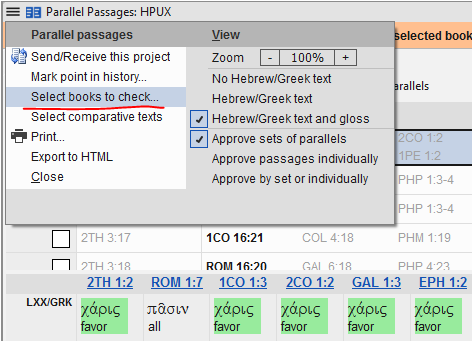
Dialog yang mendefinisikan kitab mana yang akan diperiksa untuk paralelisme ada di menu alat PP. Ini bisa menjadi daftar kitab yang berbeda dari cakupan kemajuan proyek:
Di Paratext 9.2, membuka alat Ayat Paralel (Parallel Passages) ke (atau menavigasi ke) kitab yang saat ini tidak disertakan dalam cakupan pemeriksaan ayat paralel, seharusnya menampilkan banner yang terlihat seperti ini:

Mengklik teks tebal di banner oranye menambahkan kitab ini ke daftar kitab yang akan diperiksa untuk ayat paralel.
Jika kitab tersebut tidak ada dalam cakupan proyek, dan tidak dipilih untuk pemeriksaan PP, saya melihat ini:

Mengklik teks tebal di banner oranye menambahkan kitab ini ke daftar kitab yang akan diperiksa untuk ayat paralel dan menambahkannya ke cakupan proyek keseluruhan di Properti Proyek.
Saya tidak dapat mencegah kitab yang merupakan bagian dari set paralel untuk muncul di alat PP. Jika sebuah kitab tidak dibuat, tidak ada dalam cakupan proyek dan/atau tidak dipilih untuk diperiksa paralelismenya, itu masih muncul di alat bagi saya. Satu-satunya perbedaan adalah bahwa referensi ayat di kitab yang tidak ada dalam cakupan ditampilkan dalam warna abu-abu di panel atas:

image1232×181 7.37 KB
I realise I am late to this conversation, but missing books shouldn’t cause parallel passages not to show up in the tool. If that happens, please report a bug. I can believe that funky \id lines would cause things not to work.
The dialog which defines which books are to be checked for parallelism is in the PP tool menu. It can be a different list of books to the project progress scope:
In Paratext 9.2 opening the Parallel Passages tool to (or navigating to) a book which is not currently included in parallel passage checking scope, should show a banner which looks like this:
Clicking the bold text in the orange banner adds this book to the list of books to be checked for parallel passages.
If the book is neither in project scope, nor selected for PP checking, I see this:
Clicking the bold text in the orange banner adds this book to the list of books to be checked for parallel passages and adds it to the overall project scope in Project Properties.
I am unable to prevent books which are part of a set of parallels from appearing in the PP tool. If a book is not created, not in project scope and/or not selected to be checked for parallelism, it still shows in the tool for me. The only difference is that verse references in books which aren’t in scope are shown in grey in the upper pane:
image1232×181 7.37 KB
Diterjemahkan secara otomatis dari English








