Olá, TSNgaihte,
Você reportou o problema? Definitivamente é um bug que precisa ser corrigido para todos. É melhor que você o faça, para que o desenvolvedor possa rastreá-lo adequadamente. O problema é que o Publishing Assistant está aplicando um atributo de espaçamento (tracking) a estes estilos de caractere do InDesign: v v1 vsp e v1sp. Não ficaria surpreso se também estivesse aplicando espaçamento aos estilos de caractere cnum e cnumEndSpace, mas não posso dizer pelo seu print de tela. Claro que, em um dígloto, você terá dois conjuntos de estilos de caractere, a fim de diferenciar entre os estilos de texto primário e secundário. Portanto, deve ser algo como diglot_v, ou v_diglot. Você poderá identificar colocando o cursor da ferramenta de texto no texto naquele ponto e olhando para o painel de estilos de caractere, que o destacará.
O espaçamento (tracking) é controlado manualmente no painel de controle aqui:
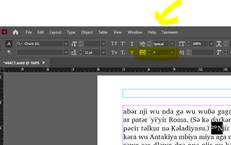
Isso é informativo, mas você não quer corrigir manualmente estes, você quer forçar o InDesign a remover a substituição de espaçamento (tracking override) que o PA aplicou a todo o texto com os estilos de caractere que listei (sem prejudicar o espaçamento no restante do texto, que é benéfico. Tive uma maneira mais difícil de te dizer para fazer isso, mas apenas pesquisei NOVAMENTE sobre como corrigir esse problema e encontrei uma melhor solução. Aqui está o link: https://www.nobledesktop.com/learn/indesign/fix-style-override . Você precisará fazer isso com cada estilo que listei acima, mas vou guiá-lo através disso com o estilo de caractere v (o seu pode ser o estilo v_diglot).

Greetings, TSNgaihte,
Did you report the problem? It definitely is a bug that needs fixing for everyone. It is best if you do so, so that the developer and track it down properly. The problem is that Publishing Assistant is applying a tracking attribute to these InDesign character styles: v v1 vsp and v1sp. I wouldn’t be surprised if it were also applying tracking to the cnum and cnumEndSpace character styles as well, but I can’t tell from your screenshot. Of course, in a diglot, you will have two sets of character styles, in order to differentiate between the primary and secondary text styles. So, it should be something like diglot_v, or v_diglot. You will be able to tell by putting your text tool cursor in the text at that point and looking at the character style panel, which will highlight it.
Tracking is controlled manually with the control panel here:
This is informative, but you don’t want to manually fix these, you want to force InDesign to remove the tracking override that PA applied from all of the text with the character styles I listed (without hurting the tracking on the rest of the text which is beneficial. I had a more difficult way to tell you to do this but just searched AGAIN on how to fix this problem and found a better solution. Here is the link: https://www.nobledesktop.com/learn/indesign/fix-style-override . You will need to do this with every style I listed above, but I’ll walk you through it with the v characters style (yours may be the v_diglot style).
Tradução automática de English








