Saludos, TSNgaihte,
¿Reportaste el problema? Definitivamente es un error que necesita ser corregido para todos. Es mejor que lo hagas, para que el desarrollador pueda rastrearlo adecuadamente. El problema es que Publishing Assistant está aplicando un atributo de espaciado (tracking) a estos estilos de carácter de InDesign: v, v1, vsp y v1sp. No me sorprendería si también estuviera aplicando espaciado a los estilos de carácter cnum y cnumEndSpace, pero no puedo determinarlo desde tu captura de pantalla. Por supuesto, en un dígloto, tendrás dos conjuntos de estilos de carácter, para diferenciar entre los estilos de texto primario y secundario. Por lo tanto, debería ser algo como diglot_v o v_diglot. Podrás identificarlo colocando el cursor de la herramienta de texto en el texto en ese punto y mirando el panel de estilos de carácter, que lo resaltará.
El espaciado se controla manualmente con el panel de control aquí:
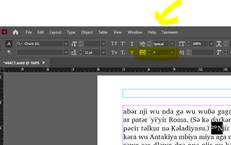
Esto es informativo, pero no quieres corregirlos manualmente; quieres forzar a InDesign a eliminar la sobrescritura de espaciado que PA aplicó a todo el texto con los estilos de carácter que enumeré (sin dañar el espaciado del resto del texto, que es beneficioso). Tenía una forma más difícil de explicarte cómo hacer esto, pero volví a buscar cómo solucionar este problema y encontré una mejor solución. Aquí está el enlace: https://www.nobledesktop.com/learn/indesign/fix-style-override . Necesitarás hacer esto con cada estilo que enumeré arriba, pero te guiaré a través del proceso con el estilo de carácter v (el tuyo podría ser el estilo v_diglot).

Greetings, TSNgaihte,
Did you report the problem? It definitely is a bug that needs fixing for everyone. It is best if you do so, so that the developer and track it down properly. The problem is that Publishing Assistant is applying a tracking attribute to these InDesign character styles: v v1 vsp and v1sp. I wouldn’t be surprised if it were also applying tracking to the cnum and cnumEndSpace character styles as well, but I can’t tell from your screenshot. Of course, in a diglot, you will have two sets of character styles, in order to differentiate between the primary and secondary text styles. So, it should be something like diglot_v, or v_diglot. You will be able to tell by putting your text tool cursor in the text at that point and looking at the character style panel, which will highlight it.
Tracking is controlled manually with the control panel here:
This is informative, but you don’t want to manually fix these, you want to force InDesign to remove the tracking override that PA applied from all of the text with the character styles I listed (without hurting the tracking on the rest of the text which is beneficial. I had a more difficult way to tell you to do this but just searched AGAIN on how to fix this problem and found a better solution. Here is the link: https://www.nobledesktop.com/learn/indesign/fix-style-override . You will need to do this with every style I listed above, but I’ll walk you through it with the v characters style (yours may be the v_diglot style).
Traducción automática desde English








