0 votes
295 views

I am working on an LTR transliteration of an RTL project. For some reason, the directionality of punctuation around numerals in a PDF export is sometimes reversed.

Everything looks fine in Paratext, e.g.:
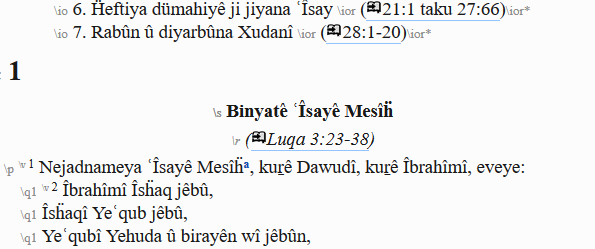
image

But in the PDF export it looks like this:
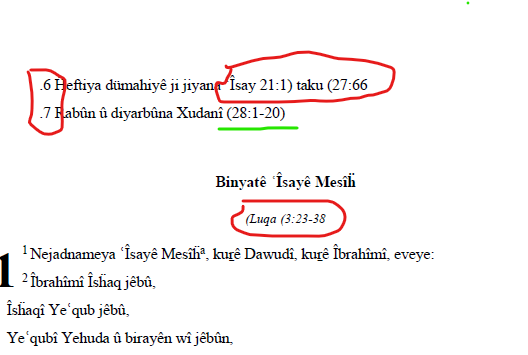
image

Sometimes it is okay, but it is often very messy.

I thought there might be some invisible direction markers from the RTL source text still hanging around, but I have searched for U+200E and U+200F; they are not there. The numerals and punctuation seem to be standard encodings.

I do not observe this behavior in “plain” LTR projects, just transliterated ones. Is there some setting that might be left over from the source project that I need to change?


Paratext by (175 points) | 295 views

2 Answers

0 votes
Best answer

As you may already know, if you hold down the Ctrl key when clicking OK in the “Export Draft to PDF” dialog, then Paratext will preserve (in the PrintDraft folder) the intermediate files created during the process of making the PDF output file. In some cases this can provide information on where the problem lies.

Alternatively, you could try PTXprint .

by (296 points)

I did not know that; thanks!

Thanks even more for the PTXprint tip. It works great, and all the punctuation comes out right.

So it seems that the issue is in the Export Draft PDF protocol…I will send a problem report.

0 votes

It looks like there are some RTL markers in the project when you do a print draft. Try adding a PrintDraftChanges.txt file in your project folder that has the following line in it:

'\u200F' > ''

This should remove any RTL markers from the text that is processed by the drafting engine.

by (1.8k points)

There was already a PrintDraftChanges.txt in the folder. I tried adding ‘\u200F’ > ‘’ to it, then replacing the file with one containing only that line.

In each case the output was not visibly changed.

Related questions

+1 vote
5 answers 385 views
I am trying to produce nice looking PDFs of the translated books. I have custom.sty in our project folder. Changes I make to ... PDF. What am I missing? Using Paratext 9.0.103.41
Iska 164 asked Nov 11, 2020
0 votes
2 answers 568 views
I'm using PTXprint to export my Paratext project text to PDF files. If I choose Multiple Books under the Basic , Project ... be tedious. Is there a way to do it in one step?
bit 495 asked Jul 4, 2022
0 votes
3 answers 485 views
Hi Friends, I have a list of Scripture references tagged as follows (this is justified right in Ptxt, mind you, which ... identified and set. Where might that be? anon303076 (SAB)
anon303076 118 asked Mar 25, 2021
0 votes
3 answers 347 views
Now and then I've encountered an issue where I can't use Export to PDF for a particular project, where the ... not installed for all users will also effect users of PTXPrint.
[Expert]
sewhite
3.3k
asked Feb 27, 2020
+1 vote
1 answer 242 views
I want to export a Japanese project that has ruby text to RTF (Print Draft will be okay if necessary). So far, I have ... the project is set to USFM 3. Thank you for your help.
anon180868 195 asked Dec 28, 2020
Welcome to Support Bible, where you can ask questions and receive answers from other members of the community.
Just as a body, though one, has many parts, but all its many parts form one body, so it is with Christ.
1 Corinthians 12:12
3,037 questions
5,994 answers
5,661 comments
2,022 users





