Apakah yang Anda maksud di halaman Registry? https://registry.paratext.org/
Saya telah mengirim email di luar daftar dengan informasi nama pengguna Anda untuk masuk.
Setelah masuk, ikuti langkah-langkah berikut:
- Klik nama pengguna Anda di sudut kanan atas (1)
- Klik My Profile (2)
- Klik tab Projects (3)
- Klik Project yang ingin Anda edit (4)
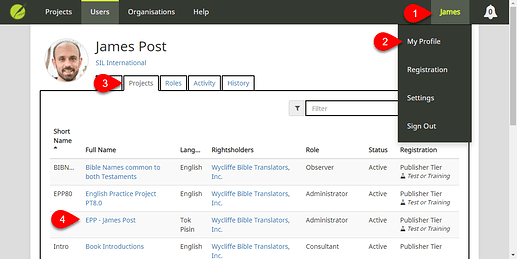
image1119×562 69.7 KB
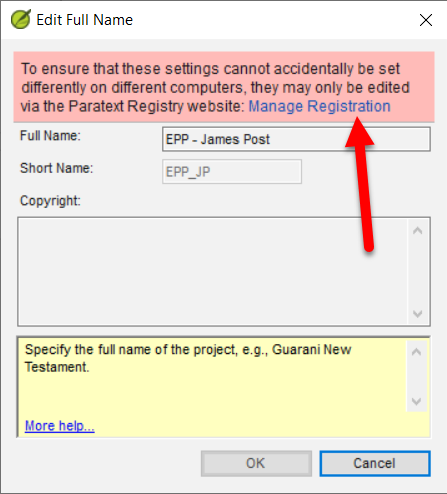
Anda juga dapat mengakses halaman Project dari Paratext:
- Klik menu Project > Project settings > Project properties
- Klik Edit di sebelah Copyright info
- Klik Manage Registration
Setelah berada di halaman Project:
- Klik tab Publishing (1)
- Edit Copyright info (2)
- Klik tombol Save Changes
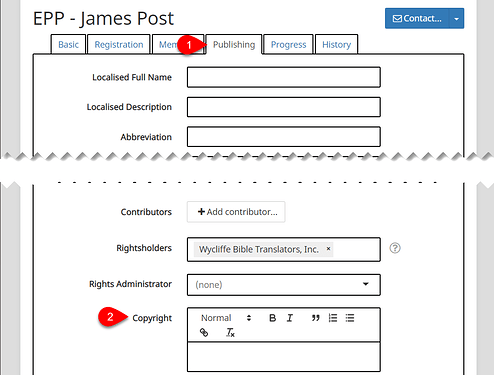
image1017×771 44.6 KB
Do you mean on the Registry page? https://registry.paratext.org/
I emailed you offlist with your username info to login.
Once logged in, follow these steps:
- Click your username in the upper-right corner (1)
- Click My Profile (2)
- Click the Projects tab (3)
- Click the Project you wish to edit (4)
image1119×562 69.7 KB
You can also access the Project page from Paratext:
- Click on the Project menu > Project settings > Project properties
- Click Edit next to the Copyright info
- Click Manage Registration
Once on the Project page:
- Click the Publishing tab (1)
- Edit the Copyright info (2)
- Click the Save Changes button
image1017×771 44.6 KB
Diterjemahkan secara otomatis dari English








