0 votes
424 views

I have a user trying to set up Wasta on a newly purchased Mac Air. (I have never set up Wasta.)

He said he has two partitions, and the second Wasta partition is 35 GB.

Paratext opens but when he tries to to S/R he gets a low disk space warning.

Error message:
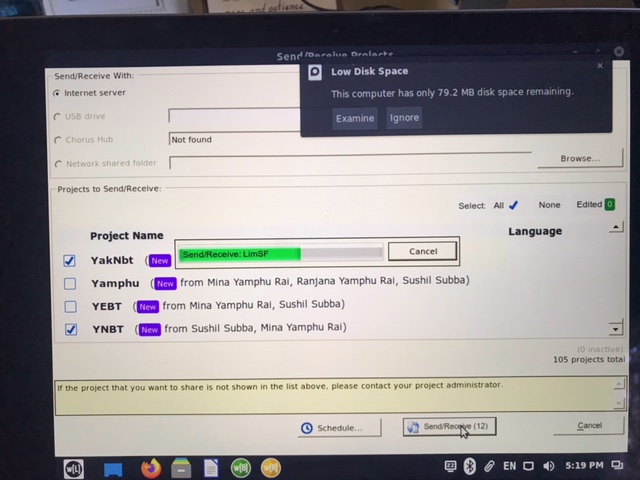
error
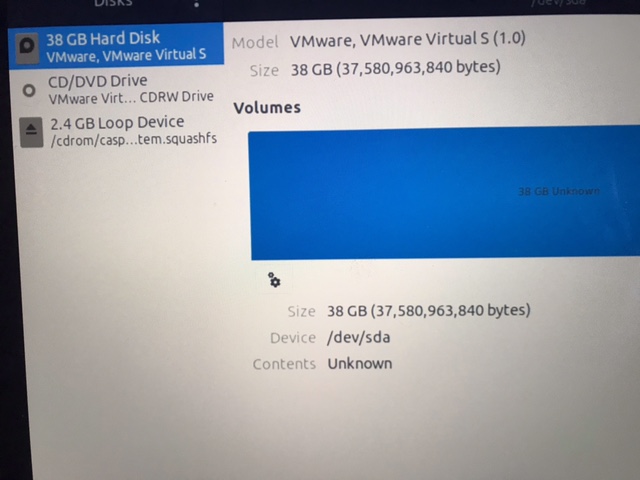
Disk List:
disks

Paratext by (1.2k points) | 424 views

3 Answers

0 votes
Best answer

It sounds like the VM virtual disk space needs to be increased. Which VM software is he using?

Also, how large is the other partition and how much space does the hard drive have in total? Is he using the other partition for anything?

james_post

by [Moderator]
(2.1k points)

He told me the partition was originally 20GB, so he increased it to 35GB, but still gets the error.
Which doesn’t make sense to me. I have a hard time imagining the wasta linux OS needing more than 35GB.

He is remote from my location. He said he is using VMware, and disk size is 250GB total. I’ll ask about other items on VM partition.

I wonder if the /home directory is on a small partition.

The user’s Paratext folder is normally under their home folder.

You can use: df -h /home
to determine which drive the /home folder is on and how much space it has.

John+Wickberg

Hi John+Wickberg, I was wondering if he might be in an unexpected volume as well, but didn’t know how to check.
I have asked him to run that command. Thanks!

Yes, it showed Wasta is using the small removeable 2.4GB volume instead of the 35GB.

Is the 2.4GB drive in the previous photo the USB drive? If yes, how does he move it to the volume on the internal SSD?

Thanks,

I did some searching and found that there is a usermod command that should allow you to move the home directory for a user from one drive to another (https://linux.die.net/man/8/usermod)

I think you need to do the following:

  1. Find out where the large partition is mounted by using the “df -h” command
  2. Create a home folder on that drive using “mkdir /newdrive/home”
  3. Use “usermod -d /newdrive/home -m username” to move the home directory - I think you’ll need to be logged in as root to do this, maybe sudo is sufficient, but you’ll want to logout after moving the home directory of the user you are logged in as.

If you don’t find the drive in step 1, it probably isn’t mounted and that will take other steps to fix.

John+Wickberg

0 votes

Hi John+Wickberg,
That will move his Home Dir for the Paratext install, but won’t Wasta still be installed on the other small drive? Wouldn’t it be better to install Wasta on the intended drive?
Thanks

by (1.2k points)

Yes, if the user is willing to re-install Wasta, that would probably be the best option to fix the way the drive is partitioned.

Maybe the Wasta Linux forum can help with the best way to go forward: https://groups.google.com/g/wasta-linux-users

John+Wickberg

+1 vote

Remotely connected to user laptop, and learned they were booting off install Wasta ISO which supports live boot, but they were not actually installing Wasta, so the small drive was the mounted ISO. I was able to help them perform the install remotely.

Thanks!

by (1.2k points)

Related questions

0 votes
2 answers 402 views
After a project is migrated to PT8, will there be a warning to users who still have edit rights to it in PT7, ... a best practice written up somewhere that helps avoid this issue?
wdavidhj 1.4k asked Feb 9, 2018
0 votes
2 answers 449 views
I can't find a topic on the message: Warning: Another copy of Paratext 7 is . Continue anyway? , so I'm starting a ... , it's for a user new to computers easy not to realise.
wdavidhj 1.4k asked Sep 15, 2016
0 votes
4 answers 419 views
I have a Paratext user who is using Paratext 8 on Wasta 18.04. When you select the Paratext8 menu item, nothing ... I can get Paratext working again. Thanks if you can help.
anon469049 120 asked May 4, 2021
0 votes
2 answers 280 views
Short version: Does PT8 run on Wasta 20? I assume that, since it is in the focal main repository, in theory ... returns me to the command prompt. Any help appreciated! anon770990
Bradmcx 146 asked Nov 20, 2020
0 votes
4 answers 379 views
I have a project that is on the latest versions of Paratext on Windows and on Wasta. The original project was ... all computers hasn't changed anything. Am I missing something?
anon349755 120 asked Feb 5, 2019
Welcome to Support Bible, where you can ask questions and receive answers from other members of the community.
If anyone destroys God’s temple, God will destroy that person; for God’s temple is sacred, and you together are that temple.
1 Corinthians 3:17
3,037 questions
5,994 answers
5,661 comments
2,022 users