我認為差異在於清單的建構方式。在大多數情況下,「所有」(All)清單是單獨的詞根(lemmas)。「主要」(Major)清單則是經過精心構建的。例如,具有多重意義的詞根被拆分為單獨的條目(例如,1-צדק「成為公義」,2-צדק「稱義」,以及 3-צדק「宣告為義」),並且該詞根出現的所有參考經文清單都經過仔細排序,以將其與這些不同的意義關聯起來。[旁註:這通常很有幫助,但有時你會對意義或上下文有不同的分析。]
更針對你的實際問題,製作「主要」清單時投入的額外工作包括加入多字詞組。這些非常實用,你在過程中可能也會想加入一些自己的詞組。例如,我加入了「這些是……的世系」(these are the generations)(創世記中一個關鍵的結構元素,在路得記中巧妙地重複出現)、「耶和華的話臨到/來到」(the word of the Lord was/came)(一個引入神諭的關鍵詞組,其意義超過「神說」),以及「大聲呼喊反對」(call out against)。
因為「所有」清單實際上只是聖經中(幾乎)所有單獨詞根的清單,所以你在其中找不到詞組。因此,「主要」清單不僅僅是一個項目較少的清單——它是一個項目較少(省略了大多數單詞)且項目更多(按意義劃分單詞,並增加了詞組)的清單。我希望開發團隊的某人能糾正我,如果我這裡說錯了的話。
我使用的是「聖經術語…」(Biblical Terms…)工具,而不是「聖經術語譯法」(Biblical Terms Renderings)工具。總體而言,「譯法」(Renderings)工具似乎設計來讓你只做幾件事:(1) 在聖經術語清單之間切換(一旦你構建了你的專案清單,你就停留在該清單上——除非你切換到,例如,「所有」清單,以便在你想要加入專案清單的術語旁邊加上一個星號)。(2) 編輯你清單中術語的譯法(雙擊該條目,然後在條目的譯法部分中,在單獨的行上輸入你將該術語翻譯成專案語言的所有方式)——你也可以編輯相關的詞彙表條目。(3) 編輯譯法討論筆記(雙擊星號左側的小圖標)。
「聖經術語…」工具除了做上述三件事外,還可以做以下事情:(4) 對於源語言中出現目標術語的經文,它會顯示你輸入的該術語譯法是否出現在翻譯專案中。(5) 允許你通過搜索英文釋義、專案語言譯法、源語言等來過濾清單。(6) 查看其他翻譯中相關參考經文的內容,並與專案翻譯進行比較。(7) 在清單下方顯示輸入的譯法,而無需雙擊條目。(8) 選擇不同的翻譯 [我對這個選項感到困惑,因為它不會改變術語清單!——我會建議始終將該選擇設定為你的專案]。(9) 執行許多其他酷炫的事情,例如在你的專案文本中標記詞彙表術語的所有出現,以便你的印刷/數位輸出(以你選擇的任何方式)表明已出版文本中的詞 X 有一個可以查找(或在應用程式中點擊)的詞彙表條目。
在我看來,「聖經術語譯法」(Biblical Terms Rendering)工具僅適用於輸入你的翻譯將如何翻譯術語清單中的特定術語(以及添加討論筆記,和添加/編輯詞彙表條目)。但為什麼不在功能完整的「聖經術語…」(Biblical Terms…)工具中做這些呢——該工具會即時反饋你添加的譯法是否實際出現在所有相關參考經文中?至少這是我的看法。
是的,這很耗時。[給開發人員的旁註:積極維護其聖經術語清單的翻譯者/顧問將不斷在清單之間切換,以將新項目添加到專案清單中。要做到這一點需要 4 次點擊(選單標籤 … 選擇聖經術語清單 … [點擊清單] … 確定)。然後你必須重複該過程才能回到你的專案清單。雖然只需兩次點擊就可以切換翻譯,但我不明白為什麼任何人會這樣做。如果工具中直接可見的「更改翻譯」選擇清單可以被隱藏,而「選擇清單」可以被賦予那個高度可訪問且顯眼的空間,那就太好了!]
你必須找出最適合你自己的工作流程。我討厭做兩遍:第一遍添加譯法,然後做第二遍尋找要添加的其他相關術語——然後我還必須添加那些譯法。並且逐節進行(而不是逐章進行),因為如果我查看整章,我更有可能忽略一個重要的術語。另一方面,這大大減慢了速度,我可能無法長期維持這種方式。如果你在檢查一本書之前先進行研經,你也可以注意關鍵術語/概念,並在進行任何檢查之前添加這些術語!僅供參考,這是我在這個階段的螢幕截圖:
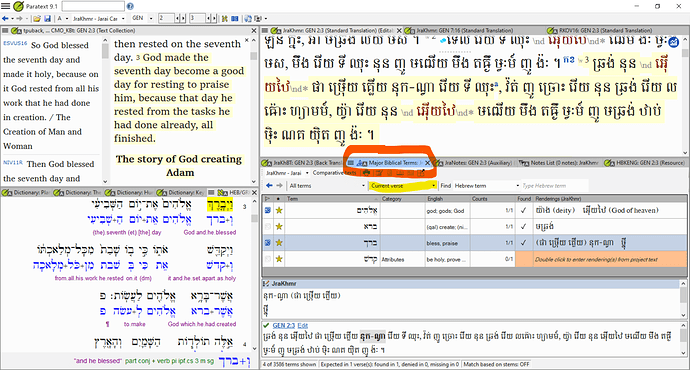
image1917×1028 597 KB
除了你在創 2:7 中看到的我們專案清單中的術語外,我可能會從「所有」清單中添加「安息」(rest)這個術語——不是因為我們總是在所有地方都以完全相同的方式翻譯該詞,而是因為我想追蹤我們的做法,並確保當我們偏離「正常」翻譯時是有正當理由的(而不是在特定經文中不考慮更大的正典,只是憑感覺「自然」地翻譯)。
希望這對你有幫助。
I think the difference is in how the lists are constructed. For the most part, the “All” list is individual lemmas. The “Major” list was carefully constructed. For example, lemmas with multiple senses were broken into separate entries (say, 1-צדק “be righteous”, 2-צדק “justify”, and 3-צדק “declare righteous”), and the full list of references where the lemma occurs is carefully sorted to associate them with the separate senses. [sidenote: this is often helpful, but sometimes you’ll analyze the senses or contexts differently.]
More to your actual question, the extra work that went into making the “Major” list included adding in multi-word phrases. These are VERY handy, and you’ll probably want to add some of your own as you go, too. For example, I’ve added the phrases “these are the generations” (a key structuring element in Genesis, artfully repeated in Ruth), “the word of the Lord was/came” (a key phrase introducing oracles that means more than “God said”), and “call out against”.
Because the “All” list is really just a list of (nearly) all the individual stems in the Bible, you won’t find phrases. So the “Major” list isn’t just a list with LESS – it’s a list with LESS (most words omitted) and MORE (words divided by senses, addition of phrases). I hope that someone from the development team corrects me if I’ve misstated things here.
I use the “Biblical Terms…” tool rather than the “Biblical Terms Renderings” tool. On the whole, the “Renderings” tool appears designed to let you do only a few things: (1) switch between Biblical Terms Lists (once you construct your project list, you stay on that – except when you switch to, say, the “All” list so you can put a star next to a term that you want added to your project list). (2) Edit the rendering of a term in your list (double-click on the entry, then add in, on separate lines in the Renderings section of an entry, all the ways you translate that term into the project’s language) – you can also edit the associated glossary entry. (3) Edit rendering discussion notes (double click on the little icon off to the left of the star).
The “Biblical Terms…” tool does those three things plus the following: (4) For verses where the target term appears in the source language, it shows whether or not your keyed-in rendering for the term occurs in the translation project. (5) Allows you to filter the list by searching the English gloss, the project language rendering, the source language, etc. (6) Look at other translations of the relevant references in comparison to the project translation. (7) Display the keyed in renderings below the list without having to double-click the entry. (8) Select a different translation [I am mystified by this option, since it doesn’t change the terms list! – I’d leave that selection on your project at all times]. (9) Do lots of other cool things like marking up all occurrences of a glossary term in your project text, so your print/digital output indicates (in whatever way you choose) that word X in the published text has a glossary entry that can be looked up (or clicked on in the app!).
As I see it, the “Biblical Terms Rendering” tool is ONLY good for keying in how your translation will translate a particular term in the terms list (and adding discussion notes, and adding/editing glossary entries). But why not do that in the full-featured “Biblical Terms…” tool – which shows instant feedback about whether the rendering you added actually appears in all the relevant references? That’s my 2c, anyway.
Yeah, it’s time-consuming. [Side-note to Developers: translators/advisors who actively maintain their Biblical Terms lists will be constantly switching between lists to add new items to the project list. To do this requires 4 clicks (Menu Tab … Select Biblical Terms list … [click on the list] … OK). Then you have to repeat the process to get back to your project list. In just two clicks you can switch translations, though it’s not obvious to me why anyone would ever do that. It would be nice if the “change translation” selection list that’s right in the tool could be buried, and the “select list” could be given that highly accessible and visible real estate!]
You’ll have to figure out your own best work flow. I hate to make two passes: a first pass adding renderings, then make a second pass looking for additional relevant terms to add – and then I have to add those renderings too. And do it verse-by-verse (rather than chapter-by-chapter), since I’m more likely to overlook an important term if I’m looking at a whole chapter. On the other hand, it slows me down considerably, and I may not be able to sustain this long-term. If you do a book study before checking a book, you can also pay attention to key terms/concepts and add those terms before doing any checking! For what it’s worth, here’s what my screen looks like at this stage:
image1917×1028 597 KB
In addition to the terms you see for Gen. 2:7 that are in our project list, I’ll probably add the term “rest” from the “All” list – not because we’ll always and everywhere translate that word exactly the same, but because I want to keep track of what we do and make sure we’re justified when we diverge from the “normal” translation (instead of translating however feels “natural” in a particular verse without thinking about the larger canon).
I hope this helps.








