0
804 次浏览

Hi,

We just updated to the latest 9.0.100.74 version of PT this morning. It worked on one computer ( on Mac via Fusion), but did not work on two computers (one on Mac and another native Windows). It started the process of updating (asking permission, etc.) and when it starts PT the loading of sub-windows never finishes and seems frozen. It will be helpful to get some direction on this issue.

Thanks,
Bayar

较早的帖子 - 以原始语言显示
Paratext (122 分) 发布
已重新显示 | 804 次浏览

10 个回答

0
最佳答案

OK, now we’ve got an issue with TXL not showing up in .87, so need to drop back to .74 temporarily. But HOW do we find a previous .msp file? I used to be able to guess the URL, but either the file has been taken down, or my guess is no longer right. Can someone point me to a version that will work with Transcelerator (TXL).


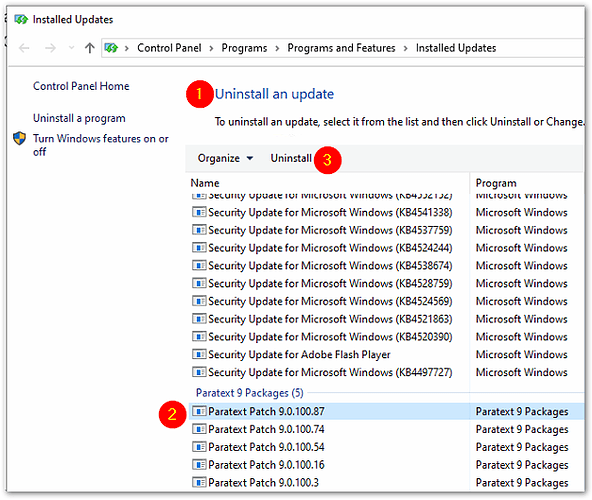
Edit2: FWIW: The “right” way to step backwards to a previous version is to pay a visit to “Installed updates” in the Control Panel, and scroll down to see “Paratext 9 Packages”, then select the Patch that you wish to uninstall, and hit the “Uninstall” button.
较早的帖子 - 以原始语言显示
(3.2k 分) 发布
已重新显示

Good to know. Note this ability to find installed patches and uninstall the latest one is only available in Control Panel. The newer app that starts from Settings in the start menu doesn’t show this list of patch files.

To start Control Panel, click Start and type “Control”. You should see Control Panel app.

较早的帖子 - 以原始语言显示
0

Hi again,

Update:
I downloaded the Paratext_9.0.100.1_InstallerOnline.exe and run the Repair option and it fixed the issue on one computer (Mac Windows via Fusion). But the same method did not work on native Windows computer. The loading of sub windows is still problematic.

Bayar

较早的帖子 - 以原始语言显示
(122 分) 发布

From your description, I’m not sure if the problem is occurring during the update or when starting Paratext after the update.

If the problem is occurring during the update, look for this file:

C:\Users{userName}\AppData\Local\Temp\PtPatch.log

Send the file and an explanation of the problem to: [Email Removed]

If the problem happens when Paratext is starting, try resetting Paratext by holding down the Shift key while it is starting.

John+Wickberg

Paratext Support

较早的帖子 - 以原始语言显示
0

Like Bayar, I updated my Paratext to version 9.0.100.74 this morning. After the update was finished Paratext would not start. I reset Paratext by holding the SHIFT key. Now I would get Paratext to start and display an empty window. But as soon as I tried to load one of my saved layouts, it got totally stuck/crashed. I started all over and tried to load a different layout with the same result. Finally after resetting Paratext once more, with the empty window, I recreated all my window layouts and deleted the old ones. Now everything is working again. My conclusion is that after the update, Paratext was no longer able to read a layout configuration file and crashed. Recreating all my layout configuration files helped in my case.

较早的帖子 - 以原始语言显示
(164 分) 发布

I spoke too quickly. Paratext is frozen again. I was able to close and open Paratext a few times, but then I had the Keyterms tool window open when I closed PT. Then trying to start again, it froze. At the moment I am trying to remember to close the Keyterms window before closing Paratext.

较早的帖子 - 以原始语言显示
0

The problem occurs when opening the PT after the update is finished. I think KapalaDikili is right that the problem is to do with layout configuration file.

I reset the PT, but PT still would not load my specific windows layout.

较早的帖子 - 以原始语言显示
(122 分) 发布
0

I had the same problem after updating to 9.0.100.74.
I also reset Paratext and recreated my layouts - but it would still freeze.
The only thing that worked for me was disabling hardware accelleration (in PT settings).

较早的帖子 - 以原始语言显示
(155 分) 发布

It seems not to be about the “hardware acceleration”. If one of the projects I access is active when I close PT, it will open without problems the next time. If I have another project active when closing PT, it will freeze when PT is restarted. As a workaround, I now always close PT with an empty layout and choose the resp. project layout after starting PT (for the time being).

较早的帖子 - 以原始语言显示
0

I have now been working a few hours trying to establish a sequence of event that enables me to start Paratext. At the moment this seems to work: When I want to close Paratext, I close all projects and resources and any other windows that Paratext may have opened. With nothing but the empty main window open I exit Paratext. Then before I start Paratext again I restart Windows.

Anything else seems to result in Paratext freezing when loading a window layout. In this case I need to reset Paratext again. I am working on the latest version of Windows 10.

较早的帖子 - 以原始语言显示
(164 分) 发布
0

Please use Help > Give feedback shortly after encountering a problem so we can look into it. Layouts from previous versions of Paratext should not cause problems with the current version.

较早的帖子 - 以原始语言显示
[Expert]
(16.7k 分) 发布
+1

We’ve identified a problem with having the Biblical Terms or Wordlist open when closing Paratext. It will hang when it starts back up. If your problem doesn’t seem related to what I described, please send in a problem report. Otherwise, I think we have all the information we need.

We’re going to pull 9.0.100.74 from the automatic updates so more users don’t get this problem.
We apologize for causing this issue. :anguished:

较早的帖子 - 以原始语言显示
[Expert]
(16.7k 分) 发布

已重新显示

I have noticed that the website is still offering .74 - which
might not be helpful. Is there an estimate about when a newer
version will be (publicly) available that doesn’t have this issue?

Mark

较早的帖子 - 以原始语言显示
+1

9.0.100.87 should be available now and should include the fix.

较早的帖子 - 以原始语言显示
[Expert]
(16.7k 分) 发布
+1

For those who are more visual learners - here is a quick video on how to go back to an earlier installed update of Paratext: https://www.youtube.com/watch?v=puhu4YSbleQ

较早的帖子 - 以原始语言显示
(9.9k 分) 发布

相关问题

+1
1 个回答 263 次浏览
In PT9 when I select a book, wait for the drop down to go away and the book to appear in the box, highlight the chapter ... going to be faster, but it's just the same as PT8.)
anon953007 213 发布 提问于 四月 7, 2020
0
2 个回答 385 次浏览
我是几个项目的管理员,最近一位项目协调员让我代表另一位用户更改其编辑权限,因为该用户正在出差,无法自行操作 我虽然是该项目的管理员,但之前从未下载过该项目 当我尝试首次获取该项目时,使用 PT 9.0-0.100(最初)或 ... Paratext 却提示连接失败 其他人也遇到过这个问题吗?有人有建议的解决方案吗? 上传进度(最终达到 100%) 失败结论
n8_in_car 298 发布 提问于 三月 16, 2022
0
4 个回答 795 次浏览
我正在帮助一位用户解决 Paratext Flex 集成问题(与 Tone Sandhi 相关),在将 FLEx 和 Paratext 项目都安装到我的电脑后,我遇到了一个 Paratext 问题 当我尝试打开 Paratext 项目的 项目属性 ... FLEx 项目版本为 8.1.3,可以正常打开 Paratext 项目版本为 8 有什么建议吗?
MSEAIT_LT 478 发布 提问于 五月 28, 2020
0
1 个回答 197 次浏览
When I try to download Patch 9 0 100 3 from https://paratext.org/download/currentversion/, I get this message: Any suggestions?
anon716631 346 发布 提问于 十一月 7, 2019
0
2 个回答 429 次浏览
In PT 9 I tried to create Bible module(XXA extra book), it's taking too much time. Same module it's took less than ... 8. It will be helpful to get some direction on this issue.
Prabhu_beelagi 241 发布 提问于 六月 3, 2020
Welcome to Support Bible, where you can ask questions and receive answers from other members of the community.
Don’t you know that you yourselves are God’s temple and that God’s Spirit dwells in your midst?
1 Corinthians 3:16
3,048 个问题
6,007 个回答
5,672 条评论
2,028 位用户







