0 votos
365 vistas

In PT8 when I compare two project (of the same language) there were two arrows to go backwards or forwards to the previous or the next difference between the two projects. All I can find in the helpfile of PT9 is to use the arrows in the toolbar that (apparently) will do the same for two versions of the same project, but they do not work for difference between two different projects.

Publicación antigua - se muestra en su idioma original
Paratext por (105 puntos) | 365 vistas

2 Respuestas

0 votos
Mejor respuesta

I am able to use the compare tool and go to next difference in Paratext 9 for different projects without a problem. A frequent gotcha that has always been there is that if you change the project choice for the right hand window, the left hand window will change
projects also so that you are again viewing identical projects. Sometimes I don’t notice that that has happened and of course there are no differences to find. Do verify that you are viewing exactly the projects and versions you wish to view and that they
haven’t changed while you were looking elsewhere. I could be wrong about the left and right as I’m on my phone but you haven’t had an answer yet so I thought it was worth not making you wait longer for a possibly easy solution.

Blessings Shegnada

Publicación antigua - se muestra en su idioma original
por (1,3k puntos)
mostrada de nuevo

I tried to replicate anon784407’s problem. When I opened a new Compare window it works OK with different projects:
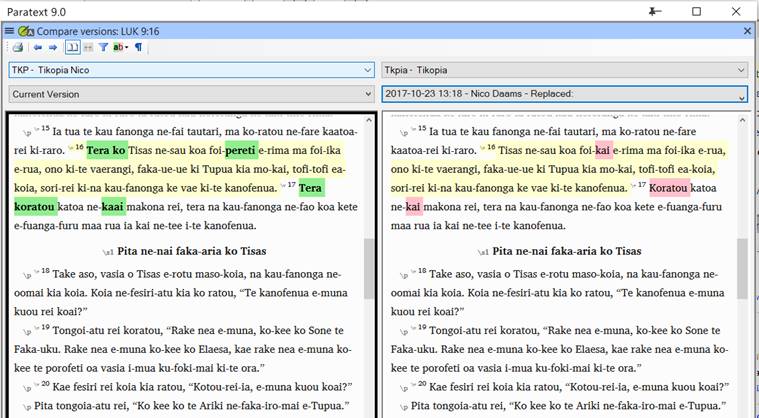
But when I change the project in an existing Compare window, PT doesn’t switch to that project. The example below should show Satawalese on the left and Tikopia on the right, but it’s showing Tikopia in both panes.
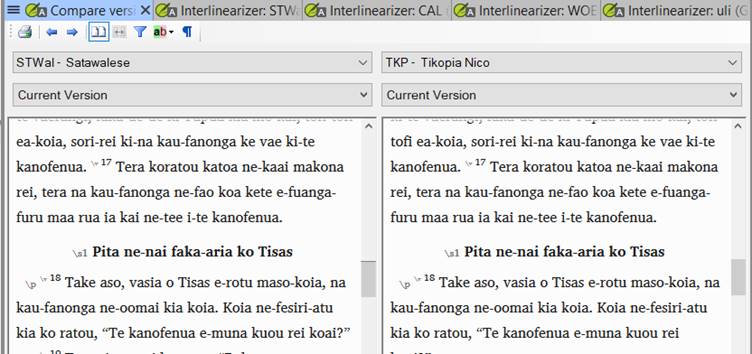
There are also other problems when a Compare window is kept open after shutting down and reopening Paratext, or when it’s part of a layout. Sometimes the top part of the window will disappear (with the buttons, the project selection box and the version selection box).

Paulus+Kieviet

Publicación antigua - se muestra en su idioma original

This is a known issue introduced with 9.0.100.6.

Publicación antigua - se muestra en su idioma original

I have tried the same Paulus+Kieviet, and the two arrows are indeed there when I set up a completely new compare texts window, but not when I go back to a saved one. I can get by now, but have found it essential to be able to go to the next difference when there are few differences left. So, I hope this can get fixed.

Thanks all for your comments,

anon784407

Publicación antigua - se muestra en su idioma original
0 votos

I reported this issue in Paratext 9 several weeks ago. Until this bug is fixed, I recommend using Paratext 8 to do compare texts.

Publicación antigua - se muestra en su idioma original
por (1,8k puntos)
mostrada de nuevo

Preguntas relacionadas

0 votos
0 respuestas 233 vistas
Does anybody have any training materials for Compare Texts that you could share with me? I have a user who needs to learn how to use it remotely. Thank you, SIL+LSS+PNG
SIL LSS PNG 411 preguntada abr 4, 2019
0 votos
1 respuesta 207 vistas
The Print window of the Compare Texts Tool contains a Save as HTML button. In Paratext 7.6 this button works. But ... at the specified location. Any idea why this is not working?
anon818964 147 preguntada feb 4, 2019
0 votos
1 respuesta 434 vistas
In PT 7 there is a Filter button in the Compare Texts window. In PT8 I don't see this button any more. It ... accidental changes). I wonder why this feature is no longer there.
Paulus Kieviet 517 preguntada sep 20, 2018
0 votos
4 respuestas 528 vistas
Estoy notando lo que parece ser una diferencia binaria entre algunos IDs de términos que aparecen en Major Biblical Terms ... Shem de un archivo de Renderings Shem de Major Terms
stevepence 127 preguntada may 19, 2022
0 votos
2 respuestas 201 vistas
When downloading Paratext 8, I'm told: The Online file is smaller and may be used if you are installing while connected to the ... to download that extra 85Mb, if I don't have to.
jeffh 1,4k preguntada mar 23, 2017
Welcome to Support Bible, where you can ask questions and receive answers from other members of the community.
For just as each of us has one body with many members, and these members do not all have the same function, so in Christ we, though many, form one body, and each member belongs to all the others.
Romans 12:4-5
3,049 preguntas
6,007 respuestas
5,672 comentarios
2,029 usuarios





